

Most employee performance reviews collect feedback from just one person – the manager. That single perspective misses how an employee actually communicates with peers, leads a team, or handles day-to-day pressure. The result is a review that feels incomplete, biased, and often unfair to the person being evaluated.
A 360 degree feedback form is essential for gathering input from various sources to evaluate performance comprehensively. It ensures that the feedback process is well-rounded.
Utilizing a 360 degree feedback form can help in identifying blind spots and improving workplace dynamics.
The 360 degree feedback form can be tailored for various organizational needs, enhancing its relevance and effectiveness.
When feedback comes from only one direction, talented employees get overlooked, workplace issues go unaddressed, and trust in the review process quietly erodes. People stop taking evaluations seriously because they know the system does not reflect the full picture. Over time, that disconnect costs businesses in turnover, disengagement, and poor leadership development.
A 360 degree feedback form changes that entirely. This form collects performance input from peers, managers, direct reports and the employee themselves, giving a far more balanced view than a single-manager review.
Implementing a 360 degree feedback form also fosters a culture of open communication and continuous improvement.
This guide walks you through building one on WordPress, complete with templates, essential form elements, and a clear step-by-step process to get it live fast.
What is a 360 Degree Feedback Form?
A 360 degree feedback form is a structured questionnaire used to collect performance evaluations from multiple people who interact with a specific employee. The term “360 degrees” refers to the all-around nature of the feedback process, gathering perspectives from every direction rather than just from above.
Feedback gathered through a 360 degree feedback form is crucial for personal development and effective leadership.
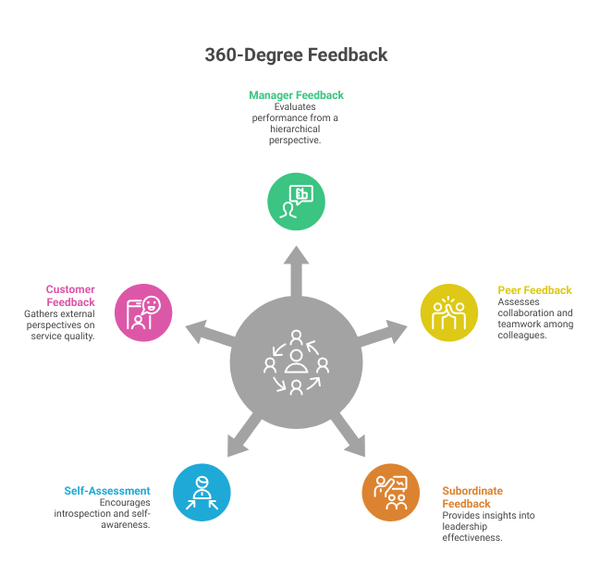
Traditional reviews rely on a direct manager’s perspective. In contrast, the 360-degree approach gathers input from multiple sources. This variety creates a balanced evaluation and effectively reduces personal bias.
The process collects insights from several key groups. The employee being reviewed completes the self-assessment responses. Direct supervisors or team leads submit the manager evaluations. Colleagues at the same level provide peer feedback, while direct reports offer subordinate input. In some cases, the review also gathers client or customer responses.
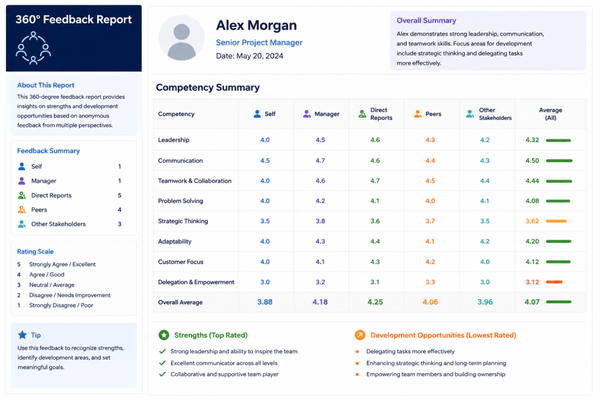
Organizations compile these responses into a 360-degree performance review template report. This document highlights strengths, identifies areas for improvement, and reveals patterns that the individual may not have recognized. Many organizations use these reports during annual reviews, leadership development programs, or onboarding evaluations.
Fairness is the greatest advantage of this method. A peer review form captures insights that a single manager simply cannot see. This process also helps employees feel more engaged because they know the organization hears their voices.
360 Degree Feedback Templates
Before you start building your form on WordPress, it helps to understand what a solid 360 degree feedback questionnaire actually looks like.
Having a clear template gives you a starting point and ensures you cover all the dimensions that matter in a multi-rater review.
Below is a general-purpose template structure you can adapt for your organization. We organize the questions by category and customize them to align with your company values, job roles, and review goals.
1. Communication Skills
- This employee communicates clearly in both written and verbal formats.
- This employee actively listens and considers other viewpoints before responding.
- This employee shares important updates with the team on time.
2. Teamwork and Collaboration
- This employee works cooperatively with colleagues across departments.
- This employee contributes to team goals without being prompted.
- This employee handles conflict professionally and constructively.
3. Leadership and Initiative
- This employee takes ownership of tasks and follows through to completion.
- This employee motivates others through example and encouragement.
- This employee identifies problems and proposes solutions proactively.
4. Technical Competency
- This employee demonstrates strong knowledge in their area of expertise.
- This employee keeps their skills current with relevant training and tools.
- This employee applies technical knowledge effectively to their daily responsibilities.
5. Professionalism and Reliability
- This employee meets deadlines consistently.
- This employee maintains a positive attitude even under pressure.
- This employee upholds the company values in their daily behavior.
For the rating scale, most organizations use a five-point Likert scale with options ranging from Strongly Disagree to Strongly Agree or from Never to Always. You can also include open-ended questions at the end of each section to capture qualitative insights that ratings alone cannot provide.
Adding a self-assessment section using the same questions allows you to compare how the employee perceives themselves with how others perceive them. This comparison is often the most valuable part of the entire 360-degree feedback process.
360 Degree Feedback Form Templates for WordPress
When you bring these templates into a WordPress environment, you need to think about more than just the questions. You also need to consider how multiple respondents will access the form, how anonymity will be protected, how results will be stored and how the data will be presented back to reviewers and employees.
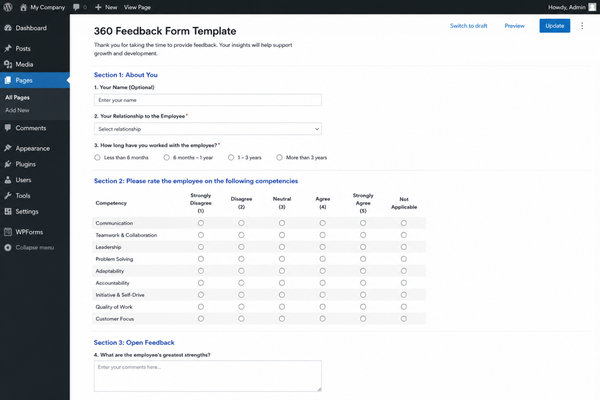
Here are four template types that work well within WordPress form builders and can be adapted for different organizational needs.
Basic Employee Peer Review Template
This is the simplest version, designed for small teams where everyone knows each other well. It includes around 10 to 15 rating questions across two or three competency areas, plus one or two open-ended text fields. The form is short enough to complete in under five minutes, which helps improve completion rates.
Full Multi-Rater Feedback Template
This template covers all five rater groups and includes up to 30 questions across five to six competency categories. It best suits mid-size organizations that run formal performance cycles. Because anonymity settings are vital, you can conduct a secure anonymous employee survey on WordPress by configuring the form properly.
Leadership Development Review Template
This version is focused on senior employees and emerging leaders. It includes deeper questions about strategic thinking, decision-making, coaching behaviors and cross-functional collaboration. Open-ended questions are weighted more heavily in this template because the insights needed are more nuanced.
Project-Based 360 Review Template
Instead of reviewing an employee’s overall behavior, this template focuses on their performance on a specific project. It is shorter and more focused, usually covering teamwork, communication and delivery of results. This is ideal for agencies, consulting firms and companies that work in project-based structures.
Feedback from a 360 degree feedback form can contribute to succession planning and talent management strategies.
All of these templates can be built using a flexible WordPress form builder. You can also check out how to create a WordPress contact form using pre-built templates to understand how template-based form creation works before diving into more complex structures.
Recommended Plugins and Tools
Choosing the right tool for your 360-degree feedback form is the most important decision you will make in this process. The tool needs to support conditional logic, multiple respondents, rating scales, anonymous submissions and ideally, some form of data export for reporting.
Employers should consider the structure of the 360 degree feedback form to ensure clarity and focus in responses.
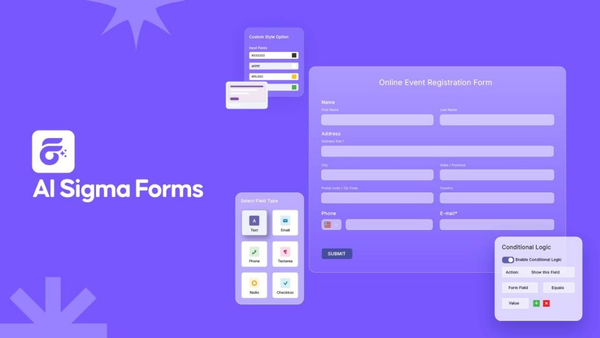
For WordPress users, Sigma Forms by BdThemes is a powerful, flexible option that meets all these requirements. It is purpose-built for WordPress and includes a wide range of field types, form templates and configuration options that make building complex feedback forms straightforward. You can learn more about it at the Sigma Forms by BdThemes page.
Sigma Forms supports rating fields, multi-step forms, conditional visibility and a clean drag-and-drop interface. This makes it possible to create a full multi-rater feedback system without writing a single line of code.
Some key features that make it well-suited for 360-degree feedback questionnaire examples include the following capabilities.
A comprehensive 360 degree feedback form can enhance employee engagement and satisfaction.
- Rating Scale Fields that support Likert-style responses from one to five or one to ten.
- Conditional Logic that shows or hides questions based on the respondent type selected.
- Multi-Step Forms that break long questionnaires into manageable sections.
- Submission Management that allows you to view, filter and export all responses from the WordPress admin.
- Email Notifications that alert managers and HR teams as soon as a form is submitted.
- Anonymous Submission Options to protect respondent identity and encourage honest feedback.
For teams looking to speed up their form-building process, Sigma Forms also integrates seamlessly with AI-assisted form creation. If you have not explored this yet, it is worth reading about how to create a contact form with AI for WordPress, which demonstrates just how fast modern form building can be.
Investing time in a well-structured 360 degree feedback form pays off in employee development and team dynamics.
Security is another consideration when collecting sensitive employee feedback. Adding a reCAPTCHA layer to your form prevents spam and unauthorized submissions. For guidance, see how to add reCAPTCHA to a WordPress contact form.
Effective implementation of a 360 degree feedback form can drive performance improvements across all levels.
Essential Form Elements
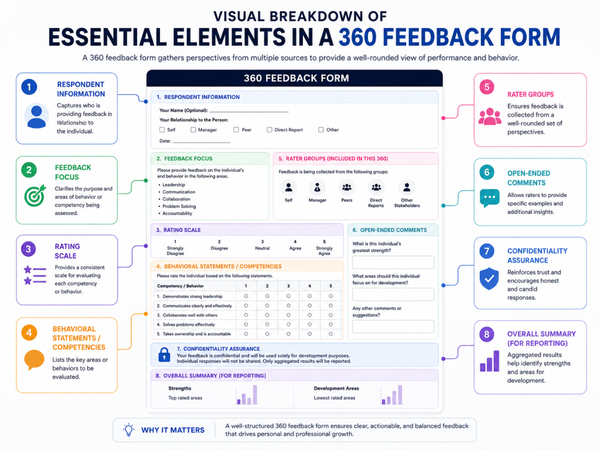
Regardless of which template you use or which tool you build with, every solid 360-degree feedback form should include a set of core elements. Missing any of these can undermine the quality and usefulness of your collected data.
Respondent Role Selection
At the very beginning of the form, each person should be asked to identify their relationship to the person being reviewed. This is what makes the 360 system work. Knowing whether feedback came from a peer, a manager or a direct report allows you to segment the data meaningfully.
Each 360 degree feedback form should be designed to elicit constructive insights that can lead to actionable outcomes.
Combining qualitative and quantitative data from the 360 degree feedback form enhances the feedback process.
Employee Identifier Field
By analyzing results from the 360 degree feedback form, organizations can identify trends and areas for improvement.
A dropdown or text field where the reviewer selects or types the name of the employee being evaluated. If multiple people are being reviewed in the same cycle, this field is essential for routing responses to the correct profile.
Rating Scale Questions
Consider iterative improvements to your 360 degree feedback form based on user feedback to keep it effective.
The core of the form consists of Likert-scale questions grouped by competency. Each question should be written as a clear behavioral statement, not a vague opinion. For example, use “This employee communicates deadlines clearly” rather than “Is this person a good communicator?”
Open-Ended Text Areas
Rating scales reveal patterns, but open text fields reveal context. Every section should end with at least one open-ended question such as “What is one thing this person could do differently?” or “Describe a situation where this person demonstrated strong leadership.”
Anonymity Settings
For peer and subordinate sections, especially, anonymous submission is critical. If respondents believe their answers can be traced back to them, they will give safer and less honest responses. A good anonymous employee survey for WordPress hides identifying information at the submission level while still capturing the respondent’s role.
Completion Indicator
Multi-step forms should include a progress bar or step indicator, so respondents know how far they are through the questionnaire. This small addition significantly reduces form abandonment, especially for longer templates.
Confirmation and Thank You Message
After submission, always show a clear confirmation message. This reassures the respondent that their feedback was received and allows you to acknowledge their time with a brief thank-you note.
If you want to understand the full range of what is possible with custom WordPress forms, you may find it helpful to read about how to create a custom form in WordPress and how to create a custom contact form in WordPress. Both guides complement the process outlined here.
General Implementation Steps
Now that you have a clear picture of what a 360-degree feedback form should include, here is the complete step-by-step process for building and deploying one on your WordPress website.
Step 1: Choose Your Tool
The first step is selecting the right form builder for your needs. For this guide, Sigma Forms is the recommended solution due to its flexibility, ease of use and full compatibility with WordPress.
Install the plugin from the WordPress admin panel: go to Plugins > Add New. Search for Sigma Forms, install it and activate it. Once activated, you will see the Sigma Forms menu item appear in your WordPress sidebar.
Incorporate various question types in the 360 degree feedback form to gain a well-rounded perspective.
Step 2: Select a Template
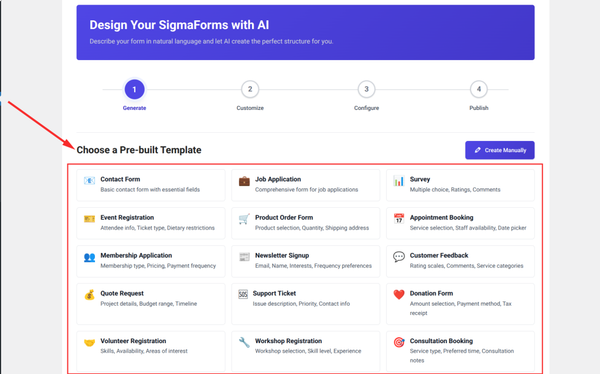
Sigma Forms includes a library of pre-designed form templates that you can import with a single click. Look for a survey or feedback-style template to use as your starting point. If you find a template that closely matches your needs, importing it will save you significant setup time.
A well-designed 360 degree feedback form can enhance organizational accountability and transparency.
Regularly reviewing the 360 degree feedback form ensures it remains aligned with company values and goals.
Adopting a 360 degree feedback form enhances decision-making by providing diverse perspectives on performance.
Alternatively, you can start from a blank form if you prefer to build everything from scratch. For first-time users, starting with a template is recommended because it gives you a working structure to customize rather than an empty canvas.
By analyzing responses from the 360 degree feedback form, organizations can develop targeted training programs.
Step 3: Customize Questions
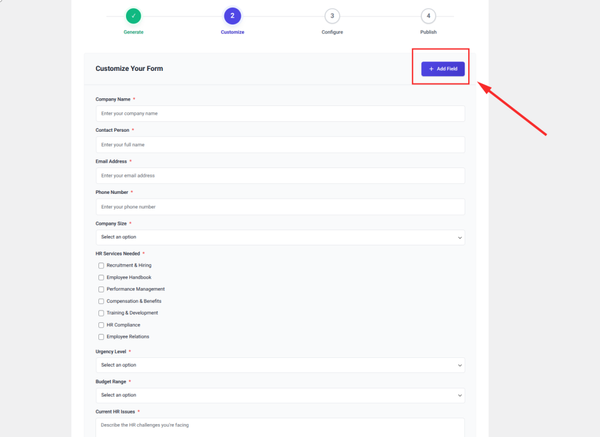
This is where the core of your 360-degree feedback form takes shape. Using the drag-and-drop form builder, add your competency sections and populate them with rating scale questions and open-ended text areas.
Start by creating a Dropdown field for selecting the respondent role. Set the options to include Manager, Peer, Direct Report and Self. Then add a second dropdown or text field for the employee name.
For each competency category, add a Section Label field as a visual divider, then add your rating scale questions. Most form builders offer a dedicated Rating or Likert field type. If yours does not, a radio button group with options labeled from one to five works just as well.
Use conditional logic to show or hide specific questions based on the respondent role selected in the first dropdown. For example, questions about managing others should only appear for peers and managers, not for self-assessments or subordinate reviews.
Step 4: Configure Notifications
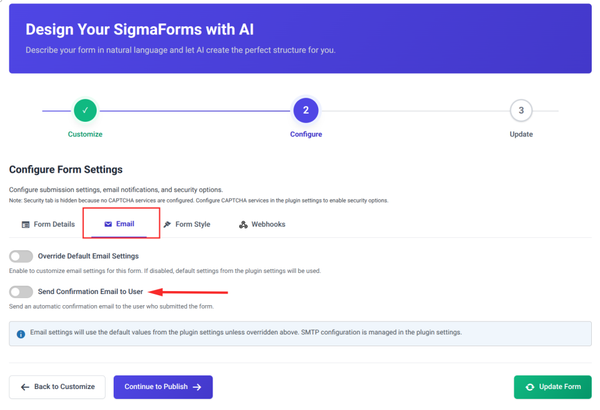
The next step is to configure email notifications, so your team is automatically alerted when a form is submitted. In Sigma Forms, go to the Notifications section of your form settings and create at least two notification rules.
The first notification should go to the HR administrator or whoever is managing the review cycle. This gives them a real-time view of incoming responses. The second notification can be a confirmation email sent to the respondent if an anonymous submission is not required.
If you are collecting anonymous responses, skip the respondent confirmation email and instead focus on the admin notification. Include in the notification the respondent role and employee name field values so the admin can quickly identify which review just came in.
You can also schedule a summary email that collects all submissions from a given period and sends a digest to management. This is useful for keeping leadership informed without flooding inboxes during active review cycles.
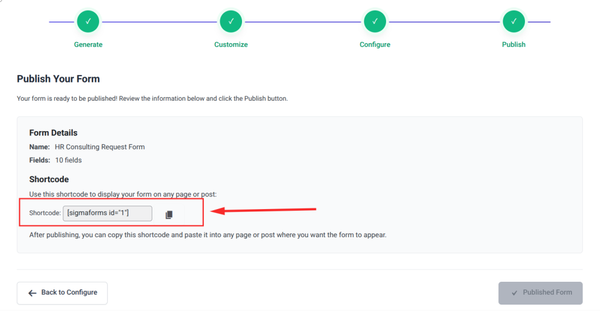
Step 5: Embed on WordPress
This template covers all five rater groups and includes up to 30 questions across five to six competency categories. It best suits mid-size organizations that run formal performance cycles. Because anonymity settings are vital, you can conduct a secure anonymous employee survey on WordPress by configuring the form properly.
Utilizing a 360 degree feedback form allows employees to receive diverse feedback, which is invaluable for growth.
Create a new page in WordPress and set it to private or password-protected if the form should be accessible only to specific employees or team members. Paste the shortcode into the page content area and publish. The form will render exactly as you designed it.
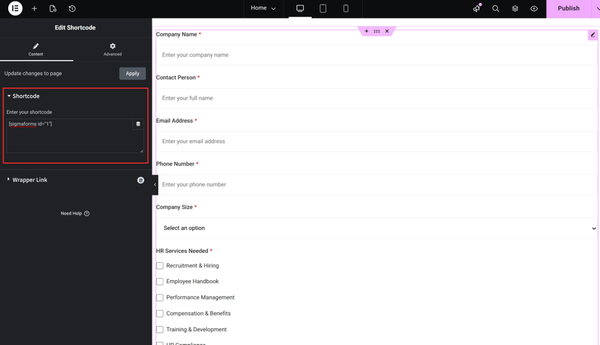
For HR teams managing multiple review cycles, you may want to create separate pages for each department or review period and embed the appropriate form on each page.
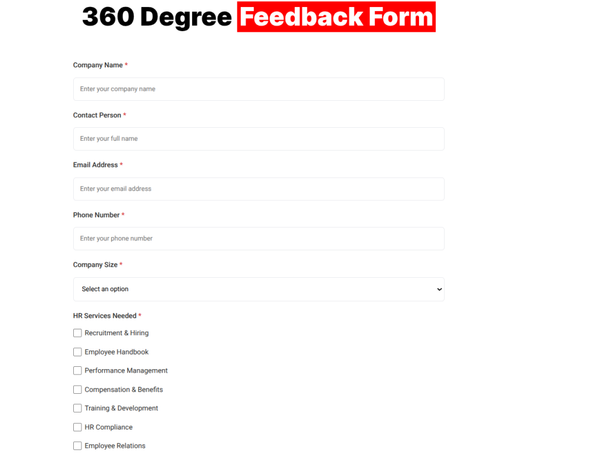
It’s the final appearance of the 360-degree feedback form.
FAQ
What is the difference between a 360-degree review and a standard performance review?
A standard performance review typically involves only a manager rating the employee. A 360-degree review collects input from the employee’s peers, direct reports and sometimes clients in addition to the manager. This provides a much broader, more balanced view of how the person actually performs in their role.
Can I build a 360-degree feedback form without any coding experience?
Yes, absolutely. Tools like Sigma Forms provide a fully visual drag-and-drop interface that requires no programming knowledge. You simply choose your fields, arrange them, configure your settings and embed the form on your WordPress page.
How do I keep responses anonymous on a WordPress feedback form?
Most modern form builders include an option to disable the collection of identifying information, such as IP addresses or user login data. In Sigma Forms, you can enable anonymous submission mode at the form level. For extra assurance, you can also avoid including any name or email fields in the form itself.
How many questions should a 360-degree feedback form include?
The ideal length depends on your review goals, but most effective forms include between 20 and 30 rating questions across four to six competency categories, plus three to five open-ended questions. For project-based reviews, you can reduce this to 10 to 15 questions total.
Can I use the same form for multiple employees?
Yes. By including an employee name or employee ID field at the top of the form, you can use a single form for an unlimited number of review subjects. The responses are stored separately in your submission database and can be filtered by employee name when you are ready to analyze results.
What rating scale works best for 360 feedback forms?
A five-point scale is the most widely used because it is simple for respondents to understand and provides enough variation to be meaningful. Some organizations prefer a seven-point scale for greater granularity, or a frequency-based scale that ranges from Never to Always. Choose the one that best fits the type of behavior you are evaluating.
How do I export and analyze the feedback data collected through WordPress?
Sigma Forms stores all submissions in your WordPress database and allows you to export responses as a CSV file, which you can open in any spreadsheet application for analysis. You can filter by employee, by respondent role or by submission date to isolate the data you need.
Conclusion
Building a 360-degree feedback form for a WordPress website is one of the most valuable ways to improve your team’s performance culture. When done right, the process gives employees a clear and balanced view of how they are perceived, identifies hidden development opportunities and strengthens trust across teams.
The key is to start with a solid template, choose the right tool and think carefully about the form elements that matter most for your specific context. From peer review forms to full multi-rater feedback systems, WordPress gives you the flexibility to build exactly what your organization needs.
Sigma Forms by BdThemes makes the technical side of this process smooth and accessible, even if you have no background in form building or web development. With its drag-and-drop interface, conditional logic, anonymous submission support and email notification system, you have everything you need to run a professional 360-degree performance review process entirely within your WordPress site.
Ultimately, the effectiveness of a 360 degree feedback form lies in its thoughtful implementation and follow-through.
Whether you are building your first employee feedback form for WordPress or upgrading an existing performance review system, this guide provides a clear path forward. Start with the template that fits your needs, customize it to reflect your organization’s values and embed it on a secure page your team can access with confidence.
For more WordPress form-building resources, explore how to create a custom form in WordPress, how to create a custom contact form and everything offered by Sigma Forms by BdThemes to take your WordPress forms to the next level.
A well-constructed 360 degree feedback form can lead to impactful changes within teams and organizations.
Leveraging insights gained from the 360 degree feedback form can significantly shape leadership development initiatives.
Incorporating a 360 degree feedback form in your performance management system is a strategic move for organizational growth.
To maximize its effectiveness, ensure that the 360 degree feedback form is easy to use and accessible to all employees.
Regularly updating and refining your 360 degree feedback form can keep it relevant to changing workplace dynamics.
Md Tariqul
The BdThemes team builds WordPress plugins trusted by 3M+ users worldwide. We write about web accessibility, WCAG compliance, and inclusive design.