

Running a bakery is a labor of love, but managing orders manually through phone calls, text messages, or printed sheets can quickly become chaotic. Customers want a smooth, professional experience when placing an order online and bakery owners need a system that keeps everything organized without requiring hours of manual data entry.
That is exactly where a WordPress solution for bakery order forms powered by AI comes in. With the right WordPress AI form builder, you can create a fully functional and beautiful online cake order form template in just minutes, without writing a single line of code.
In this guide, you will learn how to build a professional bakery order form in WordPress using AI, step by step. Whether you are a home baker looking for smart forms for home bakers or a bakery shop owner searching for an automated bakery ordering system, this tutorial has everything you need.
Why Your Bakery Needs an Online Order Form
Most bakery owners underestimate how much time they lose handling orders manually. A customer sends a message asking about a custom cake. You reply with questions about size, flavor and delivery date. They respond hours later. You write it down somewhere and then spend 20 minutes finding it again later.
This back-and-forth costs time, causes mistakes and frustrates both you and your customers. An online cake order form template solves all of this by collecting all the information you need upfront, in a structured and consistent way.
Here is what a proper bakery order form WordPress setup can do for your business
- Capture complete order details, including flavors, sizes, pickup or delivery date and special instructions
- Send automatic confirmation emails to customers so they feel confident their order was received
- Store all submissions in your WordPress dashboard so nothing gets lost
- Save hours of back-and-forth communication every week
- Look professional and build trust with first-time customers
If you are running a bakery website or planning to launch one, adding a bakery website order management form is one of the highest-impact improvements you can make.
Bakery Order Form Creation with AI
Creating forms used to be a slow and technical process. You would need to know how to use a page builder, drag and drop each field manually and then figure out how to connect email notifications. This is no longer the case.
Modern AI form generators for small businesses can create an entire form from a short text description. You type something like “Create a bakery order form with fields for customer name, phone number, cake flavor, size, number of tiers, delivery date and special message,” and the AI builds the entire form for you in seconds.
This is what makes the WordPress AI form builder approach so powerful. It removes the technical barrier and allows bakery owners to focus on what they do best, which is baking.
The plugin we will use throughout this tutorial is Sigma Forms by BdThemes. It is a smart, AI-powered form builder designed specifically for WordPress. It offers a clean interface, powerful customization options, conditional logic for advanced form behavior, spam protection and seamless email notification setup. You can learn more about it on the
The plugin we will use throughout this tutorial is Sigma Forms by BdThemes. It is a smart, AI-powered form builder designed specifically for WordPress. It offers a clean interface, powerful customization options, conditional logic for advanced form behavior, spam protection and seamless email notification setup.
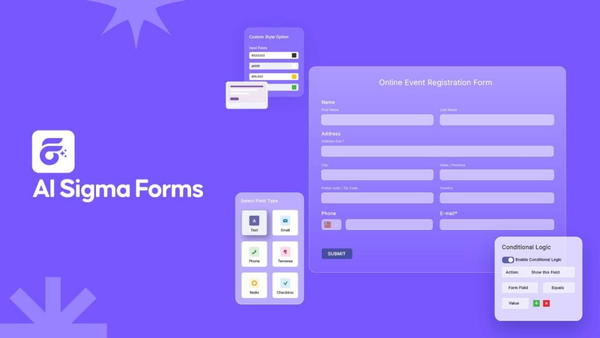
Unlike many other plugins, Sigma Forms keeps the entire form-building process inside your WordPress dashboard. There is no need to switch between multiple tools or deal with third-party platforms. Everything is in one place.
If you are new to creating forms in WordPress, you might also want to check out this guide on how to create a custom form in WordPress to understand the basics before diving into the AI-powered approach.
How to Create a Bakery Order Form with AI for WordPress
Here is a quick summary of the entire process before we go step by step
- Pick a form plugin you like
- Install the plugin on your WordPress site
- Start a new form using the AI generator
- Configure your form settings, including email and submissions
- Place the form on any page or post using a shortcode
Now, let us walk through each step in detail.
Step 1: Pick a Form Plugin You Like
The first step in building a bakery order form WordPress solution is choosing the right plugin. There are many form plugins available in the WordPress ecosystem, but not all of them are built with AI capabilities or modern bakery needs in mind.
When evaluating a custom cake order form builder, look for these features
- AI-powered form generation from a text prompt
- WordPress form with conditional logic so fields can show or hide based on customer selections
- Email notification setup for both the bakery owner and the customer
- Submission storage inside the WordPress dashboard
- Spam protection, such as reCAPTCHA integration
- Easy embedding with shortcodes or blocks
Sigma Forms by BdThemes checks all of these boxes. It is built specifically to make form creation fast and accessible for business owners who do not want to spend hours learning complicated software.
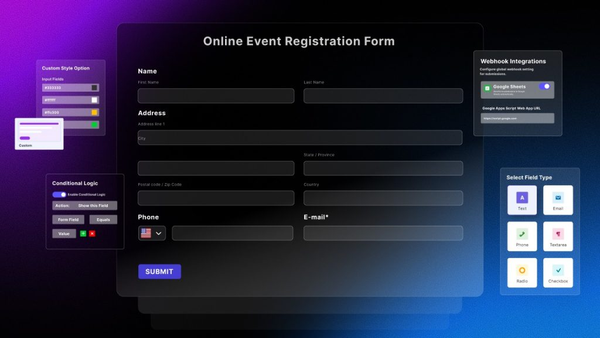
If you want to compare different form creation methods, this guide on how to create a custom contact form in WordPress gives you a broader picture of your options.
Step 2: Install the Plugin
Once you have decided on Sigma Forms, the next step is to get it installed on your WordPress website. The installation process is straightforward and takes only a couple of minutes.
Here is how to do it
- Log in to your WordPress dashboard
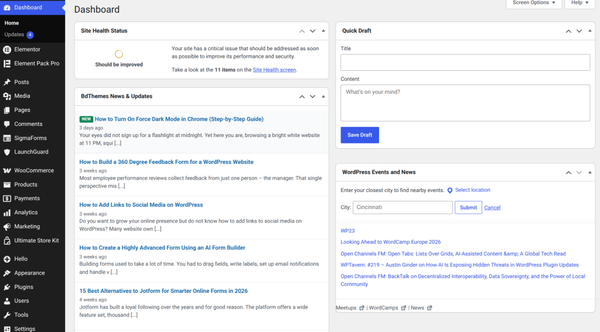
- Navigate to “Plugins” in the left-hand sidebar
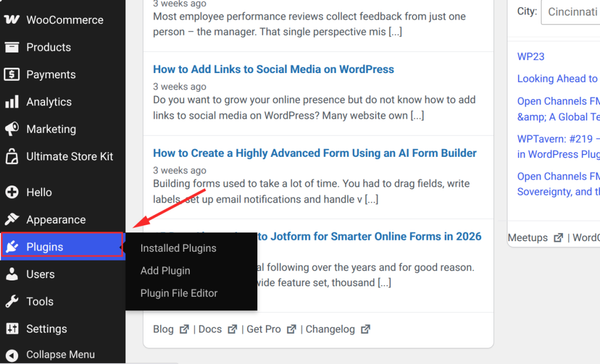
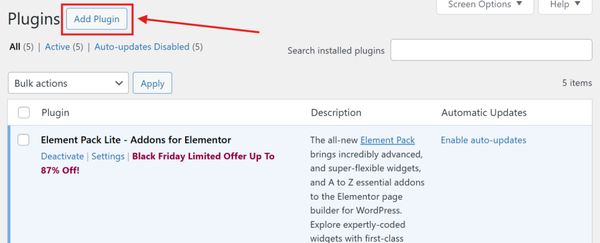
- Click “Add Plugin”
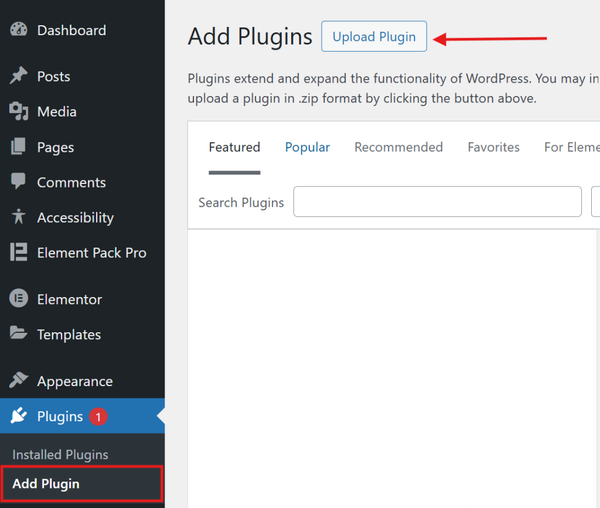
- Click “Upload Plugin” at the top of the page
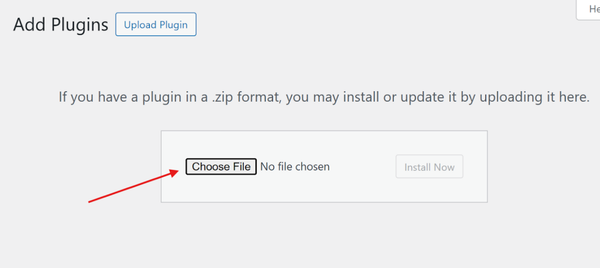
- Select the Sigma Forms zip file from your computer
- Click “Install Now” and
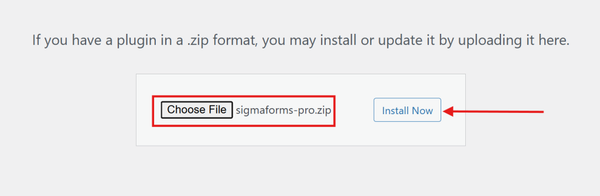
- Then “Activate Plugin.”
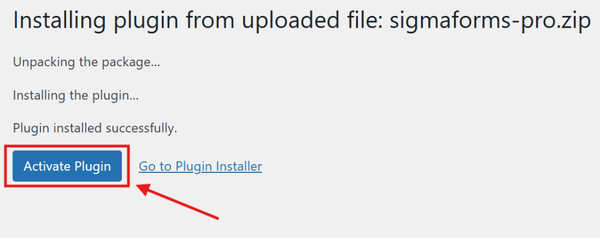
After activation, you will see “Sigma Forms” appear in the left sidebar of your WordPress dashboard. This means the plugin is installed and ready to use.
Make sure your WordPress site is running a recent version for the best experience. If you have not already set up a proper contact form on your site, this guide on
Make sure your WordPress site is running a recent version for the best experience. If you have not already set up a proper contact form on your site, this guide on creating a WordPress contact form with a pre-built template can give you additional context on how plugins like this work.
Step 3: Start a New Form
Now comes the exciting part. This is where the AI takes over and builds your bakery order form for you.
Follow these steps to start a new form
- In your WordPress dashboard, click on “Sigma Forms” in the left sidebar
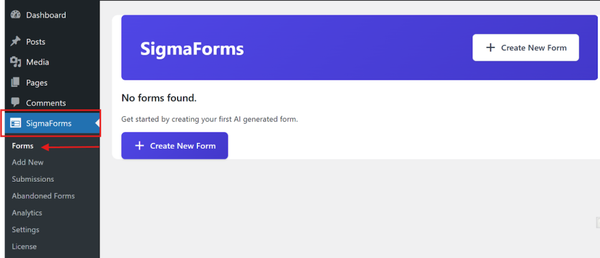
- Select “Forms” from the submenu
- At the top of the page, click the “Create New Form” button

You will now see an AI command prompt field. This is where you describe the form you want to create. Think about what information you need from your bakery customers and type it out in plain language.
For example, you could type something like this
“Create a bakery order form with fields for customer name, email address, phone number, cake type, cake flavor, number of tiers, cake size, delivery or pickup option, preferred date and any special instructions or allergy notes.”
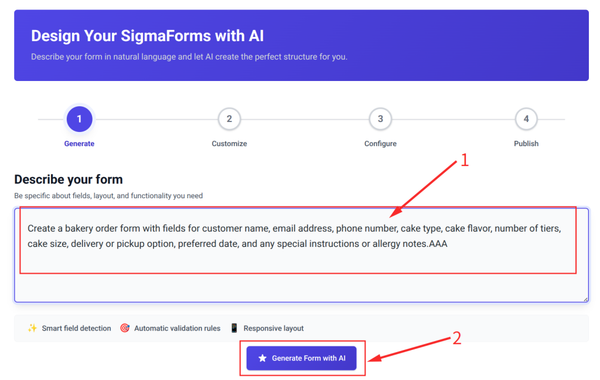
Once you have entered your prompt, click the “Generate Form with AI” button. The AI will analyze your description and instantly build a fully structured form with all the fields you described, complete with proper labels and field types.
After the form is generated, you can review the fields and make adjustments. You can add new fields, remove ones you do not need, reorder them or change field types. The form is fully editable even after AI generation.

When you are satisfied with the form structure, click the “Continue to Configure” button to move to the next step.
Step 4: Configure Your Form
This step is about configuring your form’s behavior after someone submits it. Good configuration is what turns a basic form into a fully automated bakery ordering system.
Form Name and Confirmation Message
Start by giving your form a clear, descriptive name, such as “Bakery Order Form” or “Custom Cake Order.” Then write the message that customers will see after they submit the form. Something like “Thank you for your order! We will be in touch within 24 hours to confirm the details” works well and builds customer confidence.
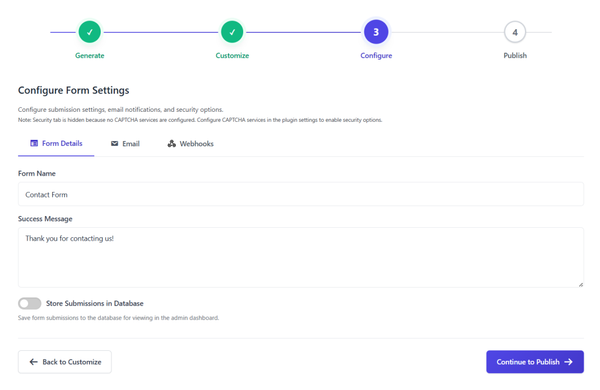
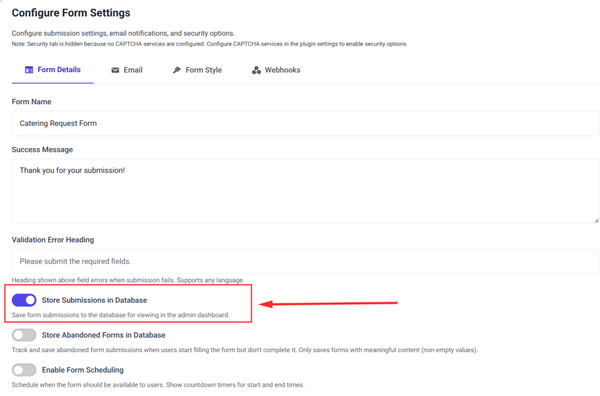
Store Submissions in Database
Turn on the “Store Submissions in Database” option. This is critical for a bakery because it means every single order that comes through the form will be saved inside your WordPress dashboard. You can view all submissions at any time, export them or search for a specific customer order.
Without this option enabled, you would only receive orders by email, which means if an email gets lost or filtered as spam, you could miss an order entirely.
Email Notifications
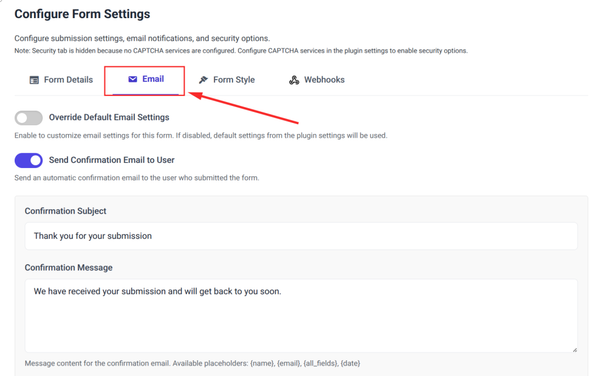
Click on the “Email” tab to configure how the form handles email notifications. You will want to set up at least two email rules
- One notification is sent to you (the bakery owner) whenever a new order is submitted
- One confirmation email was sent to the customer acknowledging their order
Set the “To” field in the first notification to your bakery email address. In the second step, use the email field from the form so it goes to the customer automatically. You can customize the subject line and body of both emails to reflect your bakery brand.
Webhooks
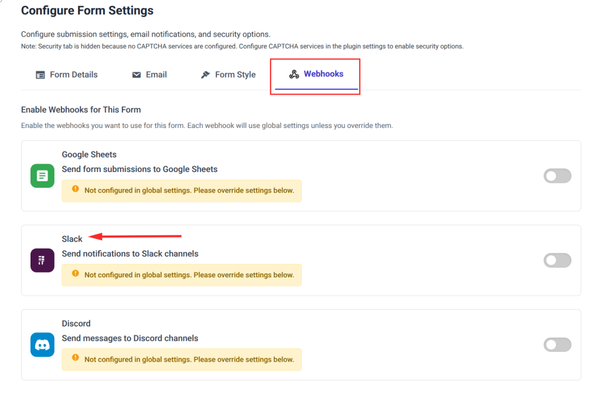
If you use any external tools for your bakery, such as a CRM, a Google Sheet for tracking orders or any automation service, open the “Webhooks” tab. Here you can connect your form to external services so that submissions are automatically sent wherever you need them. By default, each webhook follows the global settings, but you can customize behavior for this specific form.
Spam Protection with reCAPTCHA
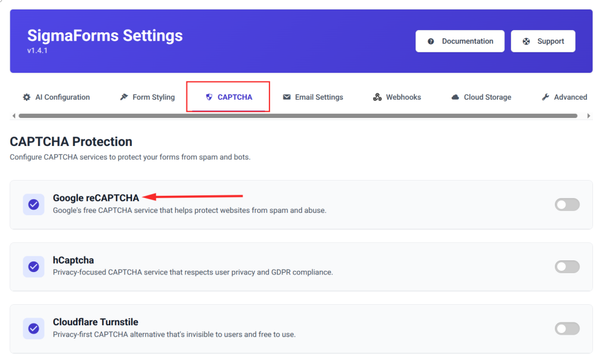
If you want to protect your bakery order form from spam bots, Sigma Forms supports reCAPTCHA integration. This adds a security layer that filters out automated submissions. You can follow this guide on how to add reCAPTCHA to a WordPress contact form for a detailed walkthrough of the setup process.
Publish Your Form
Once all your settings are configured, click the “Continue to Publish” button. Review everything one final time to make sure it looks correct. Then click the “Publish” button to make your form live.
Step 5: Place the Form Using Shortcodes on Any Page or Post
Your bakery order form is now published and ready to be embedded on your website. Sigma Forms makes this simple using a shortcode, which is a small snippet of text that tells WordPress to display the form wherever you paste it.
Here is how to embed your form
- After publishing your form, you will see a shortcode displayed on the screen
- Copy the shortcode by clicking the copy button next to it
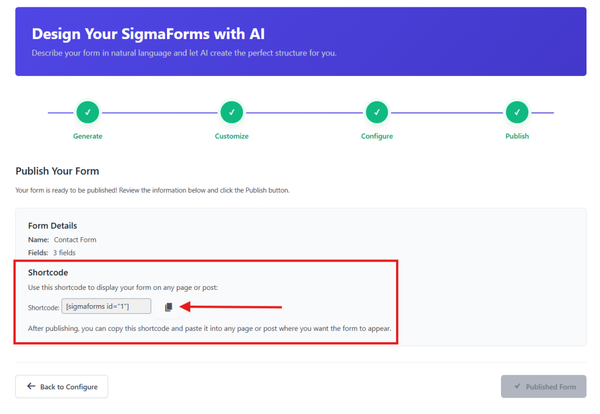
- Open the WordPress page or post where you want the form to appear
- Add a “Shortcode” block in the Gutenberg editor or use the Classic Editor shortcode widget

- Paste your copied shortcode into the block

- Click “Save” or “Update” to save the page
- Preview the page to confirm the form appears correctly
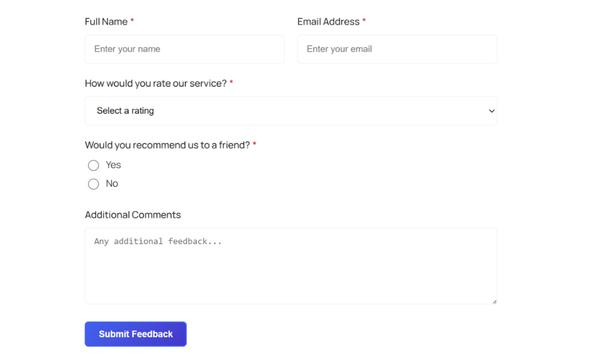
Your bakery order form is now live on your website. Visitors can fill it out, submit their orders and receive an automatic confirmation email. You will also get a notification every time a new order comes in and all submissions will be saved in your dashboard.
If you also want to collect customer feedback or run surveys on your bakery website, check out this tutorial on how to create an online survey form in WordPress for ideas on expanding your forms beyond just order collection.
Tips for Getting the Most Out of Your Bakery Order Form
Now that your form is live, here are a few practical tips to help you maximize its value
Use conditional logic for advanced orders
A WordPress form with conditional logic allows you to show or hide fields based on what a customer selects. For example, if a customer selects “Custom Cake,” you can automatically show additional fields asking about tiers, fondant or buttercream and personalized messages. If they select “Standard Cookies,” those fields stay hidden. This keeps the form clean and reduces confusion.
Keep required fields minimal
Only mark fields as required if you truly need that information to process the order. The fewer required fields there are, the less friction customers experience and the more likely they are to complete and submit the form.
Test your form before launching
Always submit a test order after setting everything up. Check that you receive the email notification, that the customer confirmation email looks professional and that the submission appears in your dashboard. This takes two minutes and can prevent a lot of problems.
Link your form from multiple places
Put a link or button to your bakery order form in your website navigation menu, your homepage and your footer. The easier it is for customers to find, the more orders you will receive.
Review submissions regularly
Even though you will receive email notifications, get into the habit of checking your form submissions dashboard in WordPress at least once a day. This gives you a clear view of all pending and past orders in one organized place.
Frequently Asked Questions
What is the best bakery order form WordPress solution?
The best approach for most bakery owners is to use an AI-powered WordPress form plugin like Sigma Forms. It allows you to describe your form in plain language and have it generated automatically, which saves hours compared to building a form manually. It also handles email notifications, submission storage and spam protection all in one place.
Do I need coding skills to create a bakery order form in WordPress?
Not at all. With a WordPress AI form builder like Sigma Forms, you simply type a description of the form you want and the AI creates it for you. No coding knowledge is required at any step of the process. You can have a fully functional form live on your website within 15 to 20 minutes.
Can I use an online cake order form template instead of building from scratch?
Yes. Sigma Forms offers pre-built templates in addition to AI generation. If you prefer to start from a ready-made structure and customize it to your needs, you can use a template as your starting point and then adjust the fields, labels and settings to match your bakery.
How do I set up an automated bakery ordering system?
An automated bakery ordering system starts with a well-configured order form. By enabling submission storage, setting up email notifications for both you and your customers and optionally connecting webhooks to external tools like Google Sheets, you create a system where every order is captured, confirmed and logged automatically with zero manual effort on your part.
Is there a way to add conditional fields to my bakery order form?
Yes. Sigma Forms supports WordPress form with conditional logic, which means you can set rules that show or hide specific fields based on what a customer selects. This is especially useful for bakeries that offer both standard products and fully custom cakes, as it allows the form to adapt dynamically to each customer choice.
How can I protect my bakery order form from spam?
Sigma Forms includes support for reCAPTCHA, which is one of the most reliable ways to stop automated spam submissions. You can find a step-by-step guide on how to add reCAPTCHA to your WordPress form in the BdThemes knowledge base.
Can I use the same plugin to create other types of forms for my bakery website?
Absolutely. Once you have Sigma Forms installed, you can use it to build any type of form you need, including contact forms, feedback forms, event booking forms and survey forms. If you want ideas, check out this tutorial on how to create an online survey form in WordPress to see how versatile the plugin is.
Conclusion
Building a professional bakery order form in WordPress no longer requires technical expertise or hours of manual setup. With the power of a WordPress AI form builder, you can go from a blank slate to a live, fully automated bakery ordering system in under 30 minutes.
By using Sigma Forms by BdThemes, you get an AI-powered form generator that understands your needs, creates a complete custom cake order form builder experience and handles all the technical details automatically. From email notifications to submission storage to spam protection, everything is taken care of so you can focus on what you love most: running your bakery.
Whether you are a home baker looking for smart forms for home bakers or a growing bakery business that needs a robust bakery website order management system, Sigma Forms gives you everything you need in one clean, easy-to-use plugin. Get started with Sigma Forms today and give your customers the seamless ordering experience they deserve.
For more WordPress form tutorials, explore these related guides:
- How to Create a Custom Contact Form in WordPress
- How to Create an Online Survey Form in WordPress
- How to Create a WordPress Contact Form with a Pre-Built Template
- 10 Steps to Track & Improve WordPress Website Visibility in Search Engines
- 20 Website Layouts Examples to Inspire Your Next Design
- How Can I Make a Business Website (Easy Step-by-Step Guide)
- How to Make a Website for My Business with WordPress
Md Tariqul
The BdThemes team builds WordPress plugins trusted by 3M+ users worldwide. We write about web accessibility, WCAG compliance, and inclusive design.