

WordPress has always been a platform that grows alongside its community and WordPress 7.0 is no exception. Released in 2026, this major version marks the most architecturally significant update since the Gutenberg block editor arrived in WordPress 5.0 back in 2018.
If you have been following WordPress development closely, you already know that 7.0 brings together years of planning under Phase 3 of the Gutenberg roadmap, a phase centered entirely on collaboration, workflows and intelligent publishing.
For developers building products on top of WordPress, this release reshapes how you register blocks, integrate AI capabilities and manage your admin interfaces. For site owners and agencies, it introduces real-time collaborative editing, a modernized dashboard and a cleaner experience that finally rivals what competing SaaS platforms have offered for years.
At BdThemes, we build tools like Element Pack Pro, ZoloBlocks and Ultimate Post Kit that live and breathe on top of WordPress infrastructure. So when WordPress ships a release of this magnitude, we pay close attention to every detail.
This guide walks you through every major feature introduced in WordPress 7.0, explains what each change means in practical terms and helps you understand how to position your site or plugin business to benefit from this new foundation.
Why WordPress 7.0 Is an Important Update
After a difficult 2025 shaped by legal disputes, contributor slowdowns and a compressed release schedule, WordPress 7.0 arrives with something rare for a major open-source release: a coherent, well-tested vision.
The WordPress core team intentionally used the 6.9 cycle to clear technical debt and stabilize the codebase, which means 7.0 does not carry the rough edges you sometimes see in ambitious releases.
Three pillars define this release.
- Collaboration: WordPress is evolving from a tool where one person edits at a time into a genuinely team-based publishing platform.
- Developer ergonomics: PHP-only block registration, the new AI Client API and the Abilities API reduce complexity for plugin and theme authors.
- Modernization: the admin interface has received its most substantial visual update since 2013, bringing WordPress visually in line with the modern web apps users interact with every day.
WordPress is also returning to a three-release-per-year cadence in 2026, with 7.1 tentatively scheduled for August 19 and 7.2 expected around December 2026.
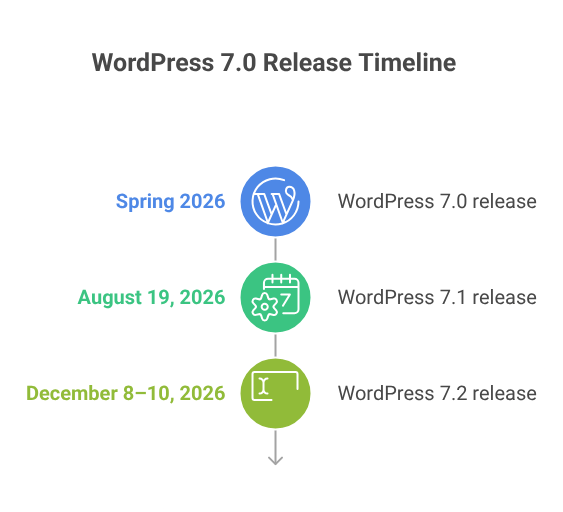
That means 7.0 is the foundation on which the next twelve months of development will build. Understanding it now is not optional for serious WordPress professionals.
What Are the New Features of WordPress 7.0?
WordPress 7.0 ships an extensive list of features spanning the editor, the admin interface, the block API and WordPress core infrastructure. Here is a detailed look at every significant change.
AI Client and Connectors API
The headline infrastructure feature in WordPress 7.0 is the WP AI Client, a provider-agnostic PHP API that lets plugins send prompts to AI models and receive results through a consistent interface. The important word here is provider-agnostic – WordPress Core does not bundle any AI provider directly.
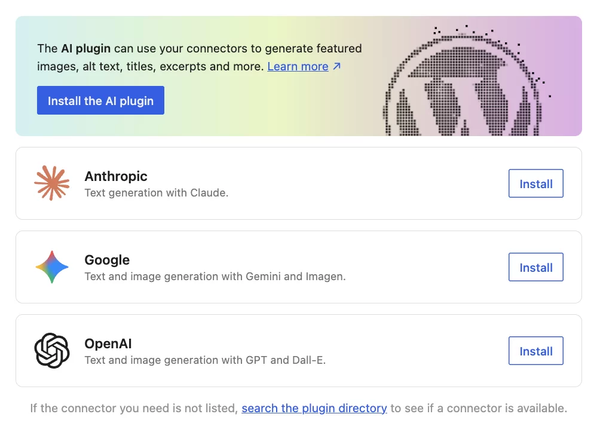
Instead, providers are developed and maintained as plugins, giving the ecosystem the flexibility to keep pace with the AI industry’s rapid evolution.
The AI Client works through a fluent PHP prompt builder. Developers call wp_ai_client_prompt() with their prompt, chain configuration methods for temperature and output format and call generate_text() to receive results.
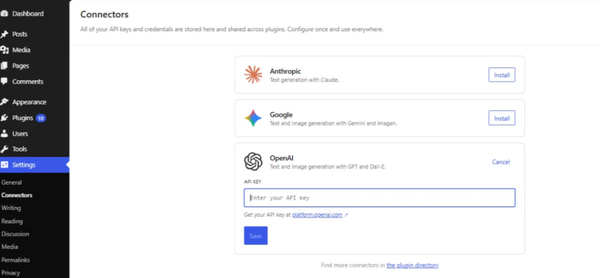
The API returns WP_Error objects on failure, maintaining consistent error handling with WordPress conventions. API keys are managed entirely through the Connectors API, meaning plugin developers who use the AI Client to build features never need to handle credentials themselves.
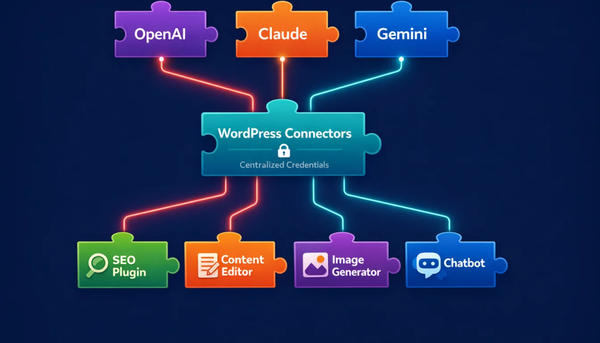
From the user side, a new Settings → Connectors screen allows site administrators to enter and manage API keys for AI providers like OpenAI, Google Gemini and Anthropic Claude.
A separate AI Experiments screen under Settings lets users opt into specific AI-powered features such as excerpt generation, alt text creation and content summarization.
One important security note for production environments – API keys entered through the Connectors UI are masked visually but not encrypted in the database by default.
For production sites, credentials should be loaded through environment variables or PHP constants rather than the settings UI. Plugins and themes built with BdThemes tools like ZoloBlocks will be able to hook into this infrastructure as the ecosystem matures.
Client-Side Abilities API
Alongside the server-side AI Client, WordPress 7.0 introduces the Client-Side Abilities API, a standardized way to register and run capabilities in the browser. The Abilities API allows developers to register specific actions using a clear, machine-readable format, replacing the scattered hooks and custom REST endpoints that previously made plugin interoperability difficult.
The WordPress Abilities API also enables AI agents and automated tools to discover and invoke WordPress capabilities automatically, making the platform more composable and future-ready.
In practical terms, the Abilities API powers improvements to the Command Palette, enables richer workflow automation and provides a consistent foundation for third-party integrations. Developers building complex admin tools or content automation workflows will find this API significantly cleaner than the alternatives available in 6.x.
Gutenberg 22.9
WordPress 7.0 ships with features derived from the Gutenberg plugin versions 22.0 through 22.6, with later releases providing bug fixes backported into the 7.0 release branch.
Gutenberg 22.7, which landed just before the 7.0 freeze, brought several features worth noting independently, including the default-on behavior for Real-Time Collaboration and the new Connectors admin screen.
The Make WordPress Core blog documents each Gutenberg release in detail for developers who want to trace specific changes to their source.
The upgrade to React 19 in the block editor is one of the most significant under-the-hood changes in this release. React 19 delivers meaningful performance improvements but also represents a potentially breaking change for custom block developers.
Any block plugin that relies on deprecated React patterns or modifies the block editor in ways tied to React 18 internals should be tested thoroughly in a staging environment before the upgrade.
Style Variation Transform Previews
Working with style variations in the WordPress Site Editor has historically required a lot of trial and error. You apply a variation, reload, check the result and repeat. WordPress 7.0 addresses this with live previews for style variation transforms.
When you hover over a style variation option in the editor, you can now see exactly how that variation will affect your block before committing to the change. According to the WordPress developer notes, style variations are also now available for patterns used in content-only mode, extending the preview experience to a broader range of editing scenarios.
For theme developers shipping custom style variations, this improvement reduces friction during client reviews and makes the visual customization process significantly more intuitive.
Playlist Block WaveformPlayer
The core Playlist block receives a meaningful upgrade in WordPress 7.0 with the addition of WaveformPlayer visualization. When a visitor plays an audio track in a Playlist block, they now see a waveform alongside standard playback controls.
This brings the WordPress audio experience closer to what users expect from dedicated podcast players and music platforms, without requiring a third-party plugin. The feature was introduced in Gutenberg 22.7 and is included in the WordPress 7.0 Beta 1 release notes.
For content creators running podcast sites or music blogs, this is an out-of-the-box improvement that previously required either a paid plugin or custom development. The waveform rendering is handled client-side and is designed to be lightweight.
Site Logo and Icon in the Design Panel
Site identity elements such as the Site Logo and Site Icon are now accessible directly from the Design panel in the Site Editor, alongside Gutenberg 23.0, which also adds the Site Tagline and Site Title to the same Design → Identity panel.
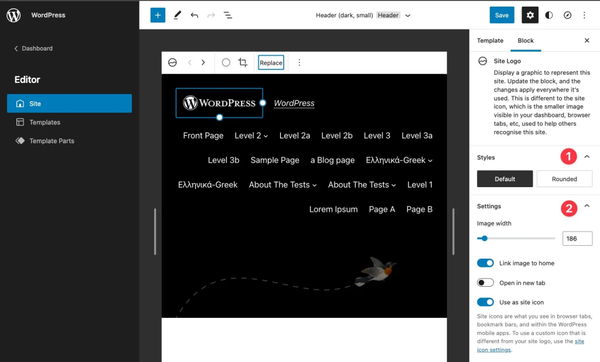
This consolidation reduces the number of places a site editor needs to navigate to manage their brand identity. Previously, these settings lived in the Customizer or in separate admin screens, creating a fragmented experience for editors who preferred to work entirely within the block editor.
From a user experience standpoint, keeping branding controls in a single predictable location reduces onboarding friction for new team members and makes full-site editing workflows more intuitive.
Navigation: Add Links Directly from the Sidebar List View
Managing navigation menus in the WordPress block editor has improved steadily since the Navigation block arrived in core and WordPress 7.0 continues that trajectory.
Editors can now add links directly from the sidebar List View when working inside a Navigation block, eliminating the need to switch contexts between the canvas and the sidebar. The List View acts as both a structural overview and an editing interface for navigation items.
For agencies managing client sites with complex menus, this workflow improvement reduces the number of steps required for routine menu updates and makes it easier to demonstrate navigation editing to clients during training sessions.
RTC: Collaborator Text Selections Now Visible
Real-Time Collaboration is the centerpiece feature of WordPress 7.0 and represents the primary push into Phase 3 of the Gutenberg project. The goal is to transform WordPress from a single-user editor into a collaborative platform where teams can work together with the fluency of Google Docs.
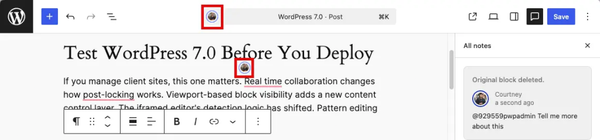
In WordPress 7.0, collaborator text selections are now visible to other participants in the editing session, displayed with color-coded indicators alongside each collaborator’s cursor position.
The Real-Time Collaboration system is built on Yjs, a Conflict-free Replicated Data Type framework and uses HTTP polling as the default sync transport rather than WebSockets. This is a deliberate architectural choice that ensures compatibility with standard PHP hosting environments without requiring special server infrastructure.
The initial implementation limits simultaneous collaborators to two by default, with a wp-config constant available for hosts who want to extend this limit. Real-time collaboration is automatically disabled when legacy meta boxes are present in the editor, since the meta box save cycle is not yet synchronized with the real-time sync mechanism.
Plugin developers with meta boxes can mark them as RTC-compatible using a new __rtc_compatible_meta_box flag introduced in Gutenberg 23.0.
Connectors Extensibility
The new Connectors system introduced in WordPress 7.0 is designed to be extensible from the start. The Settings → Connectors admin screen ships with extension hooks that allow plugins to add their own connectors alongside the core AI provider integrations.
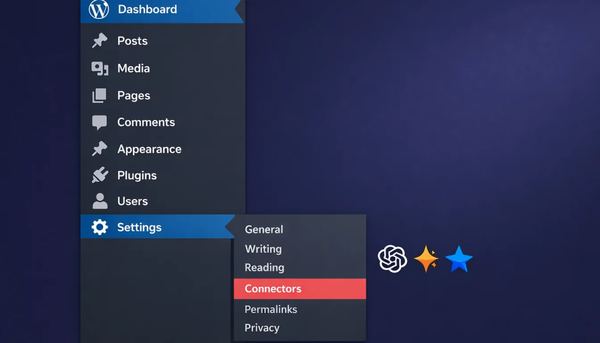
A plugin can register with the Connectors API to provide its own credential management UI, appear in the connectors list and hook into the overall authentication flow. This makes Connectors the standard place for any WordPress plugin that needs to manage API credentials or external service integrations, not just AI providers.
For more details on building extensions, refer to the WordPress Plugin Directory and the official developer documentation.
Client-Side Navigation Block Variant for Create-Block
The official create-block scaffolding tool, which developers use to bootstrap new block plugins, now includes a client-side navigation block variant. This template demonstrates how to build blocks that integrate with WordPress’s client-side navigation system, enabling fast page transitions within the Site Editor without full page reloads.
Having this as an official scaffold variant lowers the barrier for developers who want to ship performant navigation experiences without having to study the internals from scratch.
Pattern Overrides for Custom Blocks
Pattern overrides, which allow site editors to customize specific content within a synced pattern without breaking the global pattern structure, are now extended to custom dynamic blocks in WordPress 7.0. Previously, this capability was limited to a subset of core blocks.
Block Bindings updates mean pattern overrides now extend to custom dynamic blocks, allowing developers to build reusable patterns with editable regions that interact with custom data sources. This is directly relevant to BdThemes products like ZoloBlocks, which give developers the foundation to create sophisticated synced patterns with dynamic content.
Changes to the Interactivity API
The Interactivity API, introduced in WordPress 6.5 as the standard way to add client-side interactivity to blocks without a full React build, receives updates in WordPress 7.0.
The post editor now runs inside an iframe by default, isolating theme styles from editor styles. This significantly reduces the visual conflicts that have frustrated developers building blocks with rich client-side interactions.
Developers still registering blocks with apiVersion 2 will see console warnings in 7.0 and should upgrade to apiVersion 3 to avoid issues when the iframe becomes fully enforced in 7.1. The Interactivity API documentation on the Block Editor Handbook covers migration paths in detail.
Command Palette: Sections and Recently Used
The Command Palette, accessible via Cmd+K or Ctrl+K from anywhere in the WordPress admin, receives structural improvements in WordPress 7.0. Commands are now grouped into sections for easier scanning and a recently used section surfaces the commands you reach for most often.
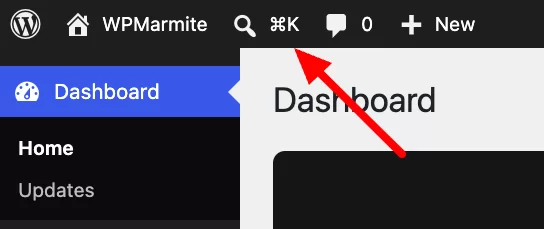
A new shortcut indicator in the admin Omnibar reminds editors that the Command Palette is available, which is particularly useful during client onboarding when you want to demonstrate keyboard-driven workflows.
Forms Block: Hidden Input Field Variation
The Forms block in WordPress 7.0 gains a hidden input field variation. This allows form builders to pass data in form submissions without exposing it to the end user, a common requirement for tracking parameters, honeypot spam protection fields and contextual data like the page or post ID where a form appears.
Previously, this kind of functionality required custom HTML or a third-party form plugin. Having it natively in the Forms block simplifies common form-building scenarios.
Button Pseudo-State Styling in Global Styles
WordPress 7.0 brings a long-requested capability to Global Styles – the ability to define hover, focus, focus-visible and active states for buttons without writing custom CSS. Designers can now configure how buttons look in their interactive states directly from the Site Editor’s Styles panel and those configurations apply globally across the site.
This is part of a broader push toward making theme.json the single source of truth for design decisions, as documented in the WordPress developer notes for pseudo-element support.
Pseudo-Element Support for Buttons in theme.json
Extending the Global Styles improvement, WordPress 7.0 introduces full pseudo-element support for blocks and their style variations in theme.json.
Theme authors can now define hover,: focus, focus-visible and active states directly for any block and any style variation without needing custom CSS.
An Outline button variation, for instance, can have its own distinct hover behavior defined entirely in theme.json. This makes themes more maintainable, more readable and easier to hand off between developers.
Block Visibility: Viewport-Based Controls
Responsive design has always required extra work in WordPress, typically through custom CSS or JavaScript. WordPress 7.0 introduces viewport-based block visibility controls, allowing editors to show or hide any block based on screen size directly from the block settings sidebar, with no code required.
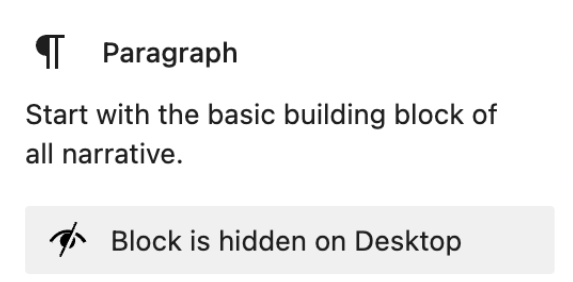
A block can be configured to appear only on mobile, only on desktop or on any combination of viewport sizes.
This is part of the broader WordPress 7.0 Beta 1 features focused on responsive editing mode. For agencies building sites that need different content arrangements across devices, this eliminates a significant amount of custom CSS work.
Navigation Link: Style the Current Menu Item via theme.json
Active menu item styling has historically required custom CSS in WordPress themes. In WordPress 7.0, theme authors can define the visual appearance of the current navigation menu item directly in theme.json.
This means the active state for navigation links becomes part of the theme’s design token system, consistent with how colors, typography and spacing are already managed. For BdThemes themes built on the block editor foundation, this makes navigation styling part of a fully declarative design workflow.
Tabs Block Inner Block Restructure
The Tabs block receives an inner block restructure in WordPress 7.0 that improves how tab content is organized in the block tree. This architectural change makes the Tabs block more composable, allowing developers to use other blocks inside tab panels with fewer restrictions.
The restructure also improves compatibility with pattern overrides, meaning synced patterns that include Tab blocks can now take advantage of the expanded pattern override capabilities introduced elsewhere in this release.
Cover Block: Loop YouTube Background Videos
The Cover block, one of the most widely used layout blocks in WordPress, gains YouTube background video looping in WordPress 7.0. Previously, embedding a YouTube video as a background in a Cover block would play the video once and stop.
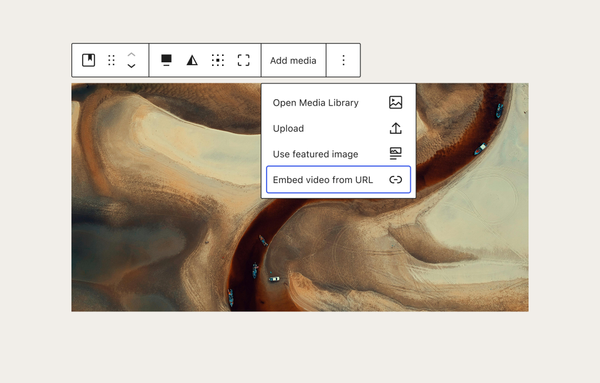
With this update, the video loops continuously, matching the behavior of self-hosted video backgrounds and making YouTube background videos viable for hero sections and landing pages.
This reduces the need for custom embed solutions or third-party block plugins for this specific use case. Refer to the WordPress block editor documentation for implementation details.
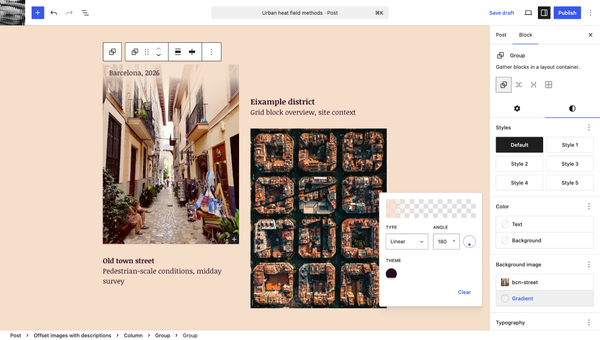
Background Gradient Support for Background Images
WordPress 7.0 adds the ability to layer gradients over background images in blocks that support background image settings. This means designers can create overlay effects without needing custom CSS or additional block wrappers.
A gradient can be defined directly alongside the background image, using the same gradient controls available elsewhere in the Site Editor. For sections that need color-tinted image backgrounds for text legibility, this is a significant time-saver.
WordPress Playground MCP Server
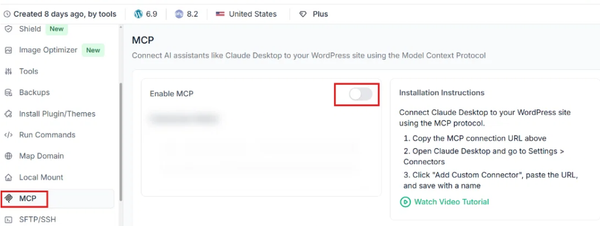
WordPress Playground, the browser-based WordPress runtime that allows you to spin up a fresh WordPress installation instantly without a server, now ships an MCP (Model Context Protocol) server.
This means AI agents and development tools that support MCP can interact with a WordPress Playground instance programmatically: creating posts, installing plugins, running tests or inspecting content through a standardized protocol.
For developers building AI-assisted WordPress tooling or automated testing pipelines, the WordPress Playground MCP server opens entirely new workflows. It also aligns WordPress with the broader trend toward AI-native development tooling that is reshaping how developers build and test web applications.
Benefits of Upgrading to WordPress 7.0
The practical benefits of upgrading to WordPress 7.0 extend across every role in a WordPress team. Here is what each stakeholder gains. For users of BdThemes plugins like Element Pack Pro and Ultimate Post Kit, the improvements described below translate directly into better day-to-day publishing workflows.
- Real-time team editing: Multiple editors can now work on the same post simultaneously, with visual selection indicators and live syncing. This eliminates the document-locking friction that previously made collaborative editorial workflows awkward in WordPress.
- A modernized admin interface: DataViews replaces the traditional WP_List_Table with a modern, filterable, sortable interface that feels consistent with contemporary web applications. Animated page transitions and unified form elements bring the admin experience up to 2026 standards.
- Native AI infrastructure without lock-in: The WP AI Client and Connectors API give site operators a clean, provider-agnostic way to connect AI services to their WordPress installation. There is no dependency on any single AI vendor and no AI calls are made unless a provider is explicitly configured.
- Simpler block development: PHP-only block registration means that for a wide range of common block use cases, developers no longer need a JavaScript build pipeline. One PHP file with register_block_type() is sufficient, dramatically lowering the barrier to custom block development.
- Better responsive design workflows: Viewport-based block visibility controls, aspect ratio support for images and improved responsive grid layouts reduce the custom CSS work required to build sites that look great across all screen sizes.
- Stronger theme consistency: Pseudo-element support in theme.json, navigation link current-item styling and Global Styles pseudo-state controls for buttons mean more of the theme’s visual logic lives in declarative configuration rather than scattered CSS files.
- Improved performance: The upgrade to React 19 in the block editor brings meaningful performance improvements. Client-side media processing reduces server load for image uploads. The iframed post editor isolates styles more cleanly, reducing unexpected visual regressions.
- Future-ready architecture: WordPress 7.0 completes Phase 3 of the Gutenberg roadmap. Phase 4, planned for post-7.2, will bring native multilingual support to WordPress core. Building on 7.0 now positions sites and plugins well for that next major evolution. Explore WordPress.org’s official release notes for the full changelog.
Conclusion
WordPress 7.0 is not a release you can afford to treat as a routine maintenance update. It changes how blocks are built, how the admin works, how teams edit together and how AI integrates with the platform.
For developers, the shift to PHP-only block registration and the introduction of the AI Client API will reshape common workflows. For site owners and agencies, Real-Time Collaboration and the modernized dashboard address long-standing frustrations that have driven teams to use external tools like Google Docs.
At BdThemes, we are tracking every aspect of this release to ensure our products remain fully compatible and take advantage of the new capabilities where they benefit our users. Whether you are using Element Pack Pro for Elementor, ZoloBlocks for Gutenberg or Ultimate Post Kit for blogging, WordPress 7.0 creates a stronger foundation for everything we build together.
The safest approach for most production sites is to test on a staging environment first, update all plugins to their latest versions and verify your PHP version meets the new 7.4 minimum requirement.
Check the official WordPress support resources for guidance specific to your hosting environment. Once you have validated compatibility, the upgrade to WordPress 7.0 is one of the most worthwhile investments you can make in your WordPress infrastructure this year.
Md Tariqul
The BdThemes team builds WordPress plugins trusted by 3M+ users worldwide. We write about web accessibility, WCAG compliance, and inclusive design.