

Manage your WordPress media the smart way
Folders, AI-generated metadata, cloud offloading, and file protection, all inside your WordPress dashboard. No re-uploading, no broken links, no complexity.
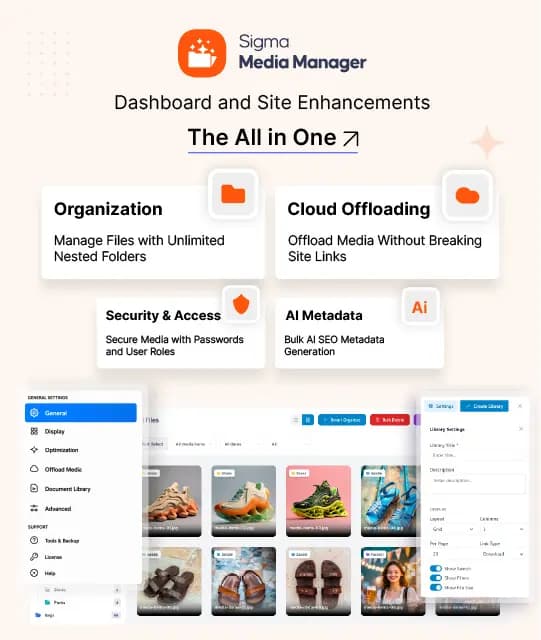
Your media library, finally under control
Your Library, Finally Organized
Stop scrolling through a flat list of thousands of files. Create nested folders with color labels and move files instantly with drag-and-drop.
- Unlimited nested folder structure
- Color-coded folder labels
- Bulk move, rename, and delete
Cloud Offload Without the Headache
Offload media to S3, DigitalOcean, GCS, or Cloudflare R2 in minutes. Links update automatically, nothing on your site breaks.
- 4 major cloud providers supported
- Auto-relinks on offload
- Scan unused files before deleting
AI That Handles the Metadata
Select a folder (or your entire library) and let AI bulk-write alt text, captions, and titles, saving hours of manual SEO work.
- Bulk alt text & caption generation
- Auto-tag images by content
- Process empty fields or full library
Everything your media library needs
Five powerful modules covering every aspect of WordPress media management, from folders and cloud storage to AI metadata and file security.
Organization
Create unlimited nested folders, color-code them, and manage your entire library through drag-and-drop, with grid and list views built in.
Cloud Offloading
Offload media to Amazon S3, DigitalOcean Spaces, Google Cloud Storage, or Cloudflare R2, media syncs without breaking a single link on your site.
AI Metadata
Bulk-generate SEO-ready alt text, captions, and titles across your entire library. AI does it all, no manual editing required.
Security & Access
Password-protect sensitive files, set expiring links, and restrict folder access by user role, granular media security without code.
Search & Editing
Find any file instantly with smart filters, custom tags, and taxonomy search. Edit images directly in WordPress with a built-in photo editor.
What’s inside
Organization
Create unlimited nested folders, color-code them, and manage your entire library through drag-and-drop, with grid and list views built in.
Simple, transparent pricing
- All folder & organization features
- 4 cloud storage integrations
- AI metadata generation
- 1 website licence
- Standard email support
- 60-day money-back guarantee
- All folder & organization features
- 4 cloud storage integrations
- Full AI metadata suite
- 5 website licences
- Priority email support
- Security & access control
- 60-day money-back guarantee
- All folder & organization features
- 4 cloud storage integrations
- Full AI metadata suite
- 15+ website licences
- VIP support + Zoom call
- White-label branding
- Multisite licence system
- 60-day money-back guarantee
Get Sigma Media Manager + 10 more premium plugins from $199/yr
Save up to 80% vs buying individually · Unlimited website licences
100% Risk-Free Guarantee
Try every plugin for 60 full days. If you're not completely satisfied for any reason, we'll refund every cent, no questions, no forms, no hard feelings.
Frequently asked questions
Everything you need to know about Sigma Media Manager, folders, cloud, and support.
Still have questions?Chat with our 24/7 support team →Yes. Sigma Media Manager uses virtual folders, your files stay exactly where they are on the server. Organizing means adding folder labels, not moving physical files. No re-uploads, no broken links, no downtime.
Sigma Media Manager integrates with Amazon S3, DigitalOcean Spaces, Google Cloud Storage (GCS), and Cloudflare R2. Once connected, media syncs to your chosen provider and all existing post/page links update automatically.
AI analyzes each image and generates descriptive, SEO-friendly alt text, captions, and titles. You can process your entire library in bulk, target only files with empty fields, or pick specific folders. A smart time estimate is shown before processing begins.
Yes. You can restrict folder access by WordPress user role, password-protect individual files, set expiring download links, and cap the number of times a file can be downloaded. Folder-level permissions are available on Business and Agency plans.
No. Sigma Media Manager uses lightweight, optimized scripts and is designed to handle libraries of thousands of files without any performance impact. Cloud offloading actually speeds up your site by moving media off your primary server.
Yes. The Agency plan includes a multisite licence system, letting you manage media across all sites in your network from a single plugin installation.
Yes. Sigma Media Manager enhances the native library, your folders appear inside the standard media modal everywhere it is used, including posts, pages, and builders.
Yes. Drag-and-drop organizing plus bulk actions let you move, tag, and sort thousands of files at once without touching them individually.
No. When media syncs to your chosen cloud provider, all existing post and page links update automatically, so nothing breaks and there is no downtime.
Yes. Folders and the enhanced media picker work inside Elementor, Gutenberg, and other builders, so your organized library is available wherever you edit.
A media library that works for you.
Join thousands of WordPress site owners who finally have their media under control, organized, optimized, and protected.
60-DAY MONEY-BACK · AI-POWERED METADATA · 4 CLOUD PROVIDERS