

Every serious online business needs a landing page that works. Not just one that looks good, but one that actually converts visitors into leads, buyers, or subscribers. Yet most people building websites focus on the homepage and overlook the dedicated landing page entirely. That is a missed opportunity because a well-crafted landing page targets one specific goal and guides visitors toward it without distraction.
This guide answers the central question most WordPress site owners ask at some point. Understanding what makes a good landing page in WordPress goes far beyond picking a pretty template. It involves a clear understanding of layout psychology, persuasion architecture, technical performance, and the right tools to bring it all together inside WordPress.
Whether you are launching a new product, collecting email subscribers, running a promotion, or announcing your business, the principles covered here apply to every scenario.
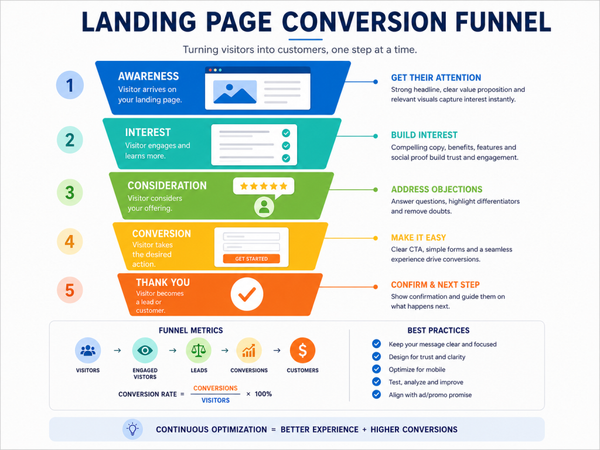
In this blog, you will also discover how Element Pack Pro gives you a powerful library of ready-made landing page templates built for conversion, and how the Launch Guard plugin from BdThemes helps you manage pre-launch pages with precision.
The Anatomy of Conversion: What Makes a Good Landing Page?
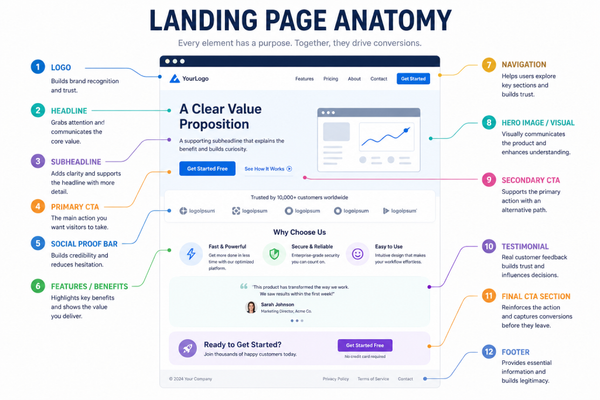
A high-converting landing page is not built on guesswork. We assemble it from proven elements, each serving a specific role in moving a visitor from curiosity to action. Understanding the anatomy of a landing page gives you the blueprint to build one that consistently delivers results.
A Compelling Headline That Captures Attention Instantly
The headline is the first thing a visitor reads, and it determines whether they stay or leave within seconds. A strong headline communicates the core value proposition clearly and immediately. It answers the visitor’s unspoken question of what this page offers and why it matters to them. According to landing page best practices followed by top conversion specialists, the most effective headlines are specific, benefit-focused, and free from jargon.
For example, a vague headline like ‘Welcome to Our Platform’ does nothing to hook the reader. A specific one like ‘Build Your Email List Three Times Faster with Smart Opt-In Forms’ tells the visitor exactly what they will gain and makes them want to read more.
A Single Clear Call to Action
Every element on a high-converting landing page layout points toward one action. Whether that action is signing up, downloading, purchasing, or booking a call, only one primary CTA should appear on the page. The moment you introduce multiple competing calls to action, you split the visitor’s attention and reduce conversions.
The CTA button should stand out visually from the rest of the page. It needs to use action-oriented language and position itself strategically above the fold as well as at key scroll points further down the page. Color contrast, button size, and surrounding whitespace all influence how prominently the CTA registers in the visitor’s mind.
Social Proof That Builds Trust
Visitors who arrive on a landing page for the first time bring skepticism with them. Social proof is the mechanism that dissolves that skepticism. Customer testimonials, star ratings, client logos, case study results, and user counts are all forms of social proof that signal to new visitors that other people have trusted this offer and benefited from it.
The placement of social proof matters as much as its presence. Placing a testimonial immediately below the headline and CTA removes doubt at the exact moment visitors are making their first impression. Adding case study numbers near the offer details reinforces the decision when visitors are evaluating whether to commit. These are core elements of a good landing page that no high-performing page skips.
Benefit-Driven Copy Above the Fold
The section of a landing page that is visible without scrolling carries enormous weight. This area must communicate the primary benefit of the offer, establish immediate relevance for the target audience, and present the CTA in a way that feels natural and compelling. Everything above the fold should work together as a cohesive unit that makes the visitor want to see more.
Body copy throughout the page should focus on benefits rather than features. Instead of explaining what a product does in technical terms, great landing page copy explains what the visitor gains from using it. That shift from feature to benefit is one of the most consistent differences between pages that convert and pages that do not.
Fast Load Speed and Mobile Responsiveness
No matter how perfectly a landing page is designed, slow load times destroy conversions. Research consistently shows that even a one-second delay in page load time reduces conversions significantly. Landing page optimization tips from conversion experts always place page speed at the top of the list. Compress images, minimize scripts, and use a lightweight theme to ensure your page loads fast on every device.
Mobile responsiveness is equally non-negotiable. More than half of all web traffic now comes from mobile devices, and a landing page that breaks or becomes difficult to use on a small screen loses that entire audience immediately.
A Distraction-Free Layout
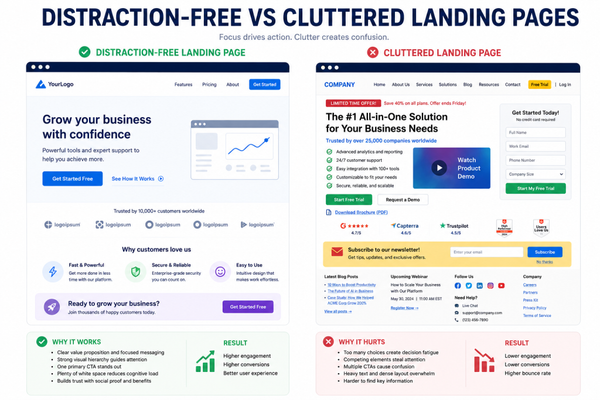
A landing page is not a website. It should not include your main navigation menu, sidebar widgets, footer links to other pages, or anything else that pulls the visitor’s attention away from the single goal of the page. Removing navigation from landing pages is one of the most impactful landing page best practices you can implement, and studies have shown it can increase conversion rates substantially.
Landing Pages vs. Homepages: Key Functional Differences
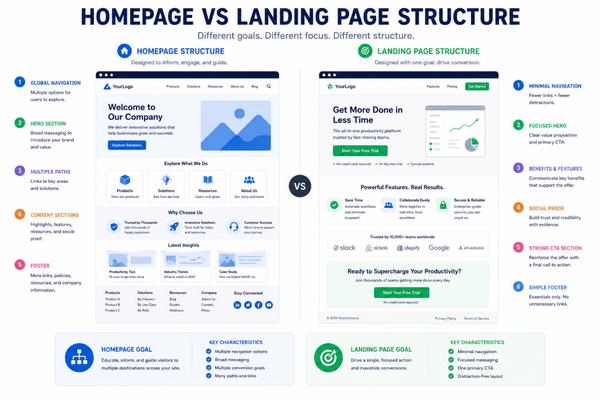
Many WordPress site owners treat their homepage as a landing page, and while some homepages do convert well, the two serve fundamentally different purposes. Understanding the distinction helps you build each one more effectively.
The Homepage Serves Multiple Audiences
Your homepage greets everyone who visits your site. It needs to address multiple audience segments, communicate your overall brand identity, provide navigation to other parts of your site, and establish general credibility. A homepage is a hub that routes visitors to where they need to go.
Because it serves many purposes, a homepage cannot be fully optimized for a single conversion goal. It will always carry multiple messages and multiple CTAs pointing to different destinations. That breadth is appropriate for a homepage but counterproductive for a landing page.
The Landing Page Serves One Audience and One Goal
A landing page targets a specific audience segment arriving from a specific source, whether that is a paid ad, an email campaign, a social post, or a search result. That audience has a specific intent, and the question of what makes a high-converting landing page gets answered by how precisely the page matches that intent.
Every design decision, every word of copy, and every visual element on a landing page exists to serve the single conversion goal. There are no links to your blog, no navigation to your about page, and no sidebar with unrelated offers. The visitor arrives, reads the focused message, and either takes the action or leaves. This singular focus is what gives a landing page its conversion power.
Traffic Sources Determine Which Page to Use
Cold traffic from paid ads generally performs better when sent to a dedicated landing page rather than a homepage. The landing page can mirror the language and offer of the ad, creating a seamless experience that reinforces the visitor’s decision to click. Sending paid ad traffic to a homepage wastes budget by presenting too many options and not enough focused persuasion.
Organic traffic from search engines often arrives on content pages or category pages. A landing page optimized for a specific search intent can intercept that traffic and convert it more effectively than a generic homepage. Understanding where your traffic comes from helps you build the right page for the right audience.
Technical Architecture: What Makes a Good WordPress Landing Page?
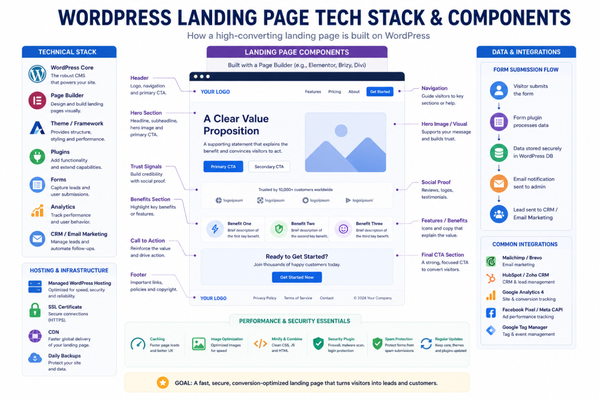
WordPress gives you tremendous flexibility to build landing pages, but that flexibility also means that making the right technical choices matters a great deal. The foundation you build on will determine how fast your page loads, how easily it renders on all devices, and how effectively it can be tested and optimized over time. These factors sit at the heart of how to create a landing page in WordPress that actually performs.
Start with a Lightweight, Purpose-Built Theme
Your WordPress theme is the foundation of every page on your site, including your landing pages. A heavy theme loaded with unnecessary features, scripts, and styles will drag down your page load times and fight against every optimization you try to make. Start with a lightweight, well-coded theme that gives you clean HTML output and minimal frontend overhead.
Some themes are specifically designed with landing pages in mind and include blank page templates that strip out navigation, sidebars, and footers automatically. This is exactly the kind of theme setup that makes building a distraction-free landing page in WordPress simple and efficient.
Use a Block-Based or Widget-Based Page Builder
The most practical way to build a WordPress landing page without coding is through a block-based or widget-based page builder. Elementor is the most widely used option, and for good reason. It gives you visual control over every element of your page through a drag-and-drop interface, complete with a real-time preview.
When Elementor is extended with Element Pack Pro, the capabilities available to you expand dramatically. You get access to advanced widgets for testimonials, pricing tables, countdown timers, progress bars, animated headings, and much more, all of which are purpose-built for landing page layouts. You can also browse and deploy from a professionally curated library of landing page templates that are designed and coded for high conversion rates.
Optimize Images for Web Performance
Images are one of the most common causes of slow-loading pages. Every image you use on a landing page should be compressed to the smallest file size that still maintains acceptable visual quality. Use modern image formats where possible, set appropriate dimensions to prevent browser-side scaling, and implement lazy loading for images that appear below the fold.
A fast landing page is not only better for conversions but also for search engine rankings. Page speed is a confirmed ranking factor, which means a faster page is more likely to be found by the people you are targeting.
Remove Unnecessary Scripts and Plugins
Every plugin you have active on your WordPress site can add scripts and styles to your landing pages, even if those scripts serve no purpose on that specific page. Audit your active plugins regularly and deactivate anything that is not needed. Use a caching solution and a content delivery network to serve your assets quickly to visitors regardless of their location.
Set up Conversion Tracking Before You Launch
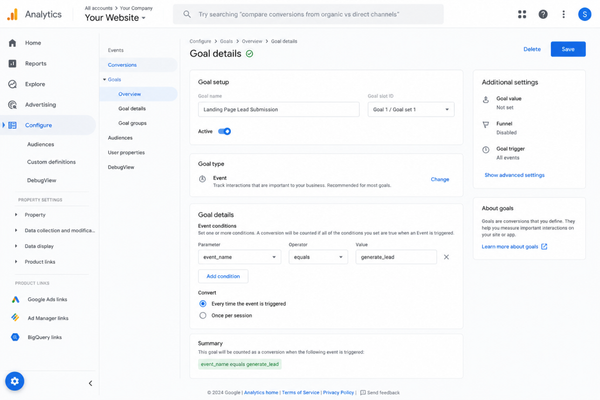
A landing page without conversion tracking is a landing page you cannot improve. Before you publish, connect your Google Analytics account, set up goal tracking for your primary CTA, and if you are running paid ads, install the relevant conversion pixels. Data collected from the first visitors who arrive on your page gives you the insight needed to optimize it over time.
Essential Elementor Elements for Building High-Converting Layouts
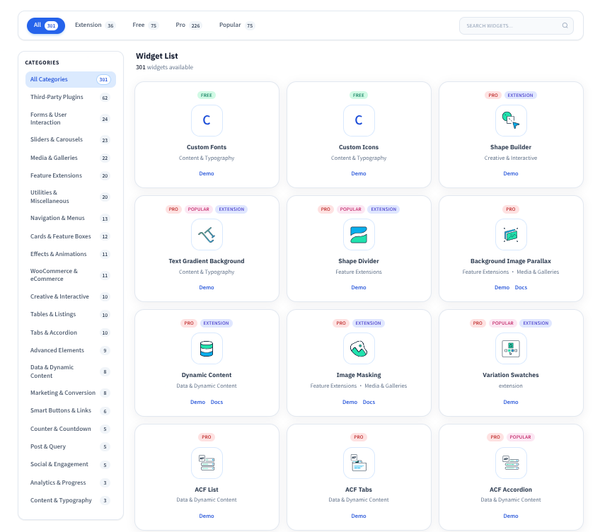
Elementor provides the visual building environment, and Element Pack Pro provides the specialized widgets that take your landing pages from functional to exceptional. Below are the essential widgets and layout elements that appear most often in high-converting landing page layouts built with this combination.
Hero Section Widget
The hero section is the first thing visitors see, and it needs to make an immediate impact. The Hero Section widget available in Element Pack Pro gives you full control over background media, headline typography, subheadline placement, CTA button styling, and overlay effects. You can build a hero that grabs attention the moment the page loads without writing a single line of code.
Countdown Timer Widget
Urgency is one of the most powerful psychological drivers of conversion. A countdown timer communicates scarcity and deadline pressure in a way that motivates fence-sitters to act now rather than later. Element Pack Pro includes a highly customizable countdown timer that integrates naturally into any landing page anatomy without looking out of place or amateurish.
Testimonial and Review Widgets
Authentic social proof displayed in a visually appealing way significantly improves conversion rates. Element Pack Pro gives you multiple testimonial and review widget options, from simple text-based quotes with avatar images to star-rated review cards and auto-scrolling testimonial carousels. Each is fully customizable to match your brand’s visual identity.
Pricing Table Widget
For landing pages designed to sell a product or service, a clear and well-structured pricing table removes hesitation from potential buyers. When pricing options are presented side by side with a highlighted recommended tier, visitors can make decisions faster. The Pricing Table widget in Element Pack Pro lets you build visually compelling pricing sections that drive click-throughs to your checkout page.
Contact and Lead Capture Forms
Every lead generation landing page needs a form, and that form needs to be simple, fast, and visually well-integrated into the page layout. Whether you are capturing email addresses, booking consultations, or qualifying leads, form design plays a large role in conversion rates. The Element Pack Pro ecosystem integrates with form solutions that let you build and style forms directly within the Elementor editor.
Animated Heading and Text Effects
Static headlines blend into the background. Animated text that cycles through multiple messages or reveals itself dynamically draws the eye and communicates multiple value propositions within the same visual space. Element Pack Pro offers animated heading widgets that add motion and personality to your landing page headlines without requiring any JavaScript knowledge.
Progress Bar and Feature List Widgets
Communicating what your product or service delivers is easier when you use visual elements. Progress bars, feature lists with icons, and comparison tables all help visitors quickly scan and understand the key benefits of your offer. These visual shortcuts reduce cognitive load and make it easier for visitors to decide whether your offer is right for them.
Advanced Layout Enhancements with Element Pack
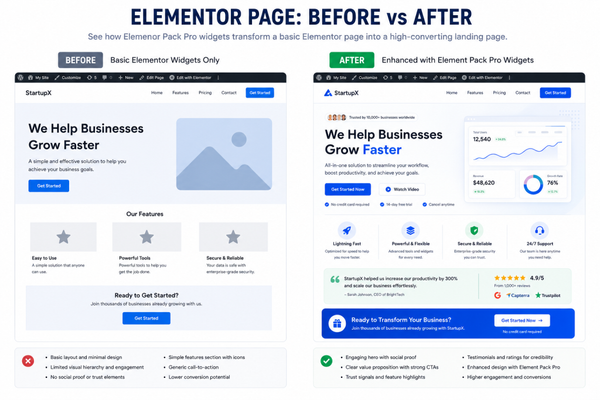
Beyond individual widgets, Element Pack Pro offers layout-level enhancements that address the more sophisticated needs of professional landing pages. These capabilities separate a polished, high-performance landing page from a basic one built with default tools.
Sticky Header and Navigation Alternatives
Since landing pages should avoid standard navigation menus, the sticky header needs to serve a different purpose. A floating CTA bar that stays visible as visitors scroll down keeps the primary action always within reach. Element Pack Pro includes sticky elements and floating bar configurations that let you keep your most important CTA visible throughout the entire scroll experience without adding navigation clutter.
Popup and Slide-In Lead Capture Overlays
Exit-intent popups, timed overlays, and slide-in forms are proven tools for capturing leads from visitors who would otherwise leave without converting. Element Pack Pro provides popup trigger functionality that lets you configure these overlays with pixel-perfect design quality. A well-timed pop-up presenting a compelling incentive, such as a free resource or a discount, can recover a meaningful percentage of otherwise lost conversions. This is a key landing page optimization tip that many WordPress users overlook entirely.
Video Background and Media Embeds
A looping video background in the hero section communicates energy, professionalism, and context far more effectively than a static image in many niches. Element Pack Pro supports video backgrounds with full control over playback settings, overlay colors, and fallback images for mobile devices. Embedded product demo videos placed at key decision points in the page also contribute substantially to conversion rates on complex or premium offers.
Dynamic Content and Personalization
Advanced landing pages deliver personalized experiences based on where the visitor came from. Dynamic text replacement, for example, lets you show different headlines to visitors arriving from different ad campaigns without building separate pages for each one. Element Pack Pro supports dynamic content integration with Elementor’s native dynamic tags system, giving you landing page best practices-level personalization without complex development work.
Section-Level Animations and Scroll Effects
Scroll-triggered animations draw attention to key sections as visitors move down the page. A headline that fades in, a testimonial card that slides into view, or a CTA button that pulses slightly all create micro-moments of engagement that keep visitors reading. Element Pack Pro gives you granular control over entrance animations, parallax scroll effects, and interaction triggers that make your landing page feel alive and engaging rather than static and flat.
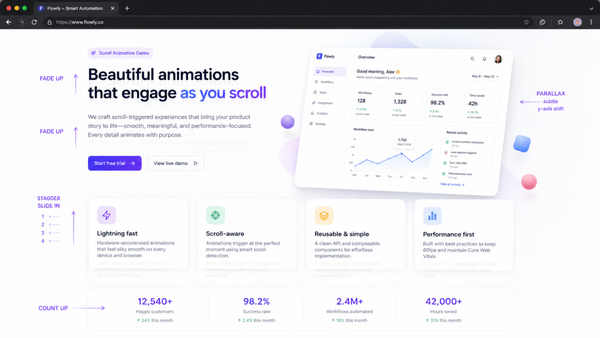
Curated Showcase: 10 Exceptional Elementor Landing Page Templates
One of the biggest advantages of building with Element Pack Pro is access to a professionally designed library of landing page templates that are ready to customize and deploy. Below is a curated selection of ten template categories available in the library, each suited to a different business goal.
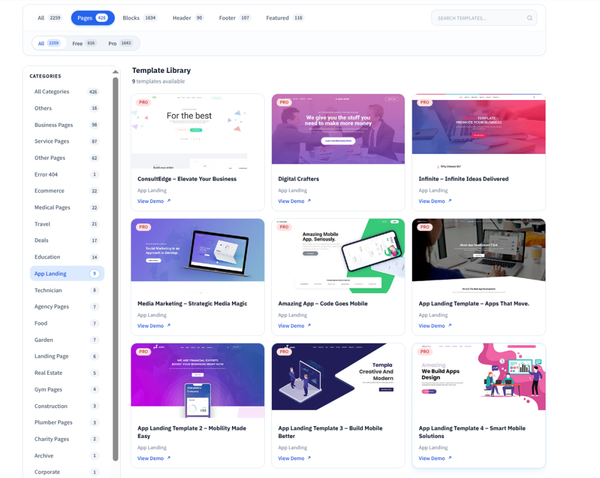
1. Business Service Landing Page
A clean, professional layout designed for agencies, consultants, and B2B service providers. It features a strong hero section, a structured benefits block, a client logo bar for social proof, and a contact form, all built to convert cold traffic from paid campaigns.
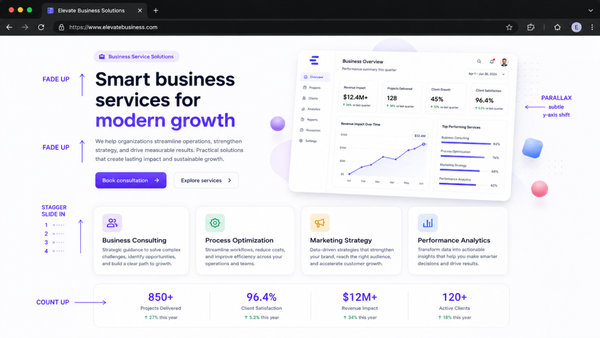
2. SaaS Product Launch Page
Purpose-built for software product launches, this template includes a feature showcase grid, a pricing table with highlighted tiers, a FAQ accordion, and a multi-step CTA section. It supports the full narrative arc of a compelling SaaS sales page from awareness to decision.
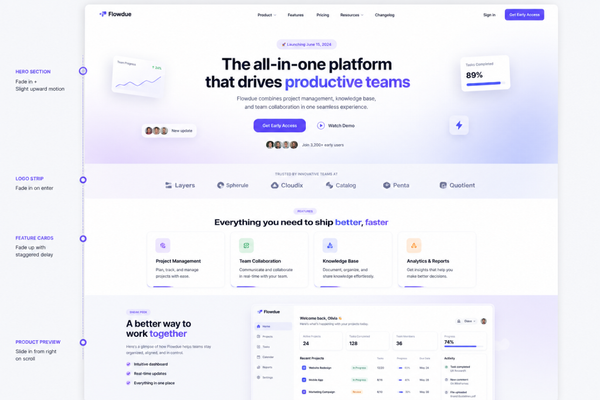
3. Lead Generation Squeeze Page
A minimal, high-focus template designed for email list building. The layout strips away every non-essential element and centers the entire page around a single opt-in form with a compelling offer headline and brief benefit points.
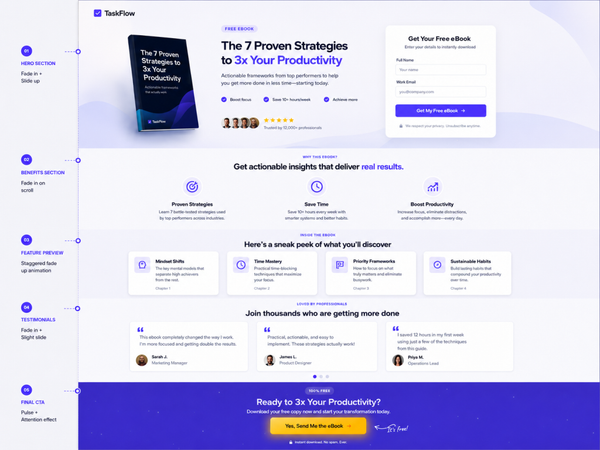
4. Event and Webinar Registration Page
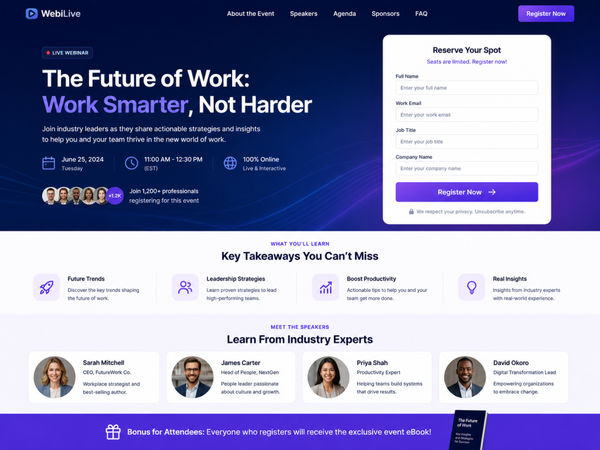
Designed for webinar hosts, online event organizers, and course creators, this template includes a countdown timer, speaker profile section, agenda block, and prominent registration form to drive event sign-ups.
5. Product Sales Page
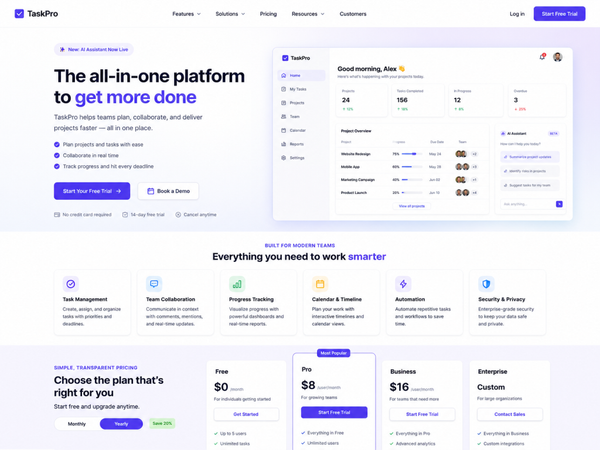
A long-form sales page template with sections for product hero, feature highlights, video embed, testimonials, FAQ, and a multi-placement CTA. Ideal for digital products, online courses, and physical goods sold through a single focused page.
6. App Download Landing Page
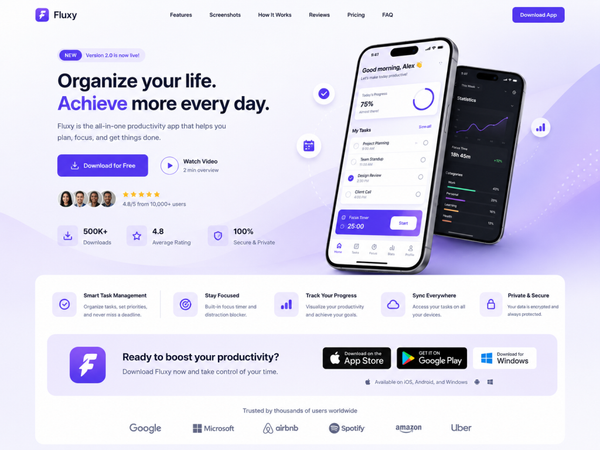
Built to promote mobile or desktop apps, this template features device mockup sections, app store badge links, a feature benefit grid, and a ratings and reviews section designed to drive download conversions.
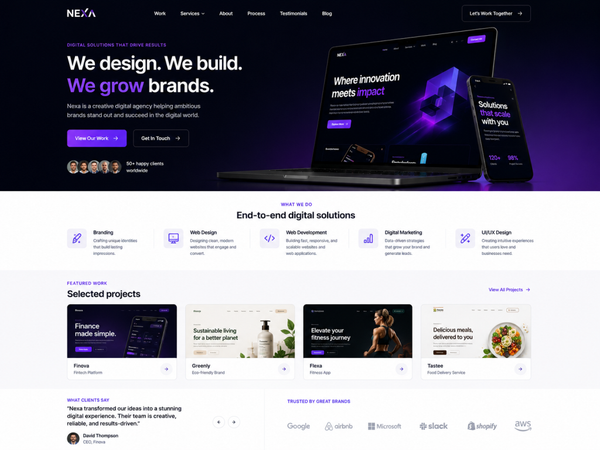
7. Agency Portfolio Page
A visually dynamic template for creative agencies and freelancers showcasing work, services, and results. It includes a portfolio grid, case study highlights, a team section, and a prominent contact CTA.
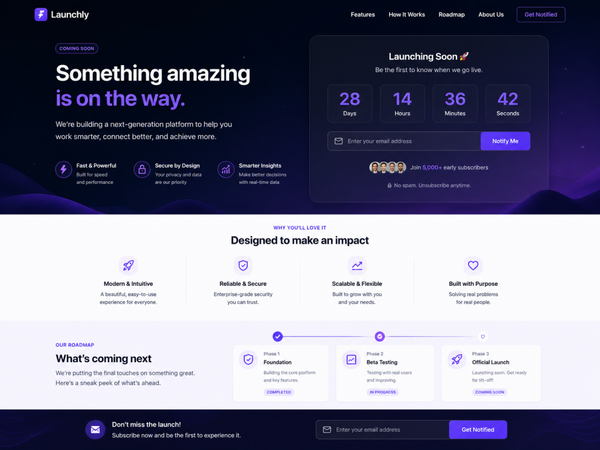
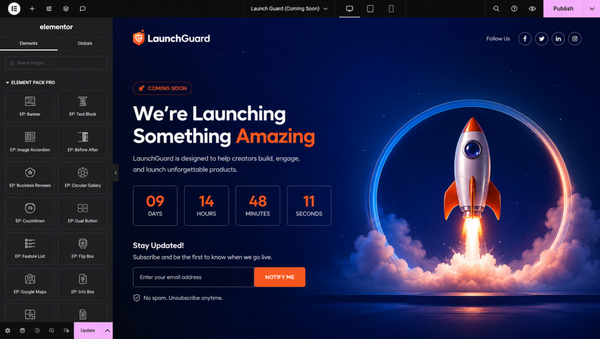
8. Coming Soon and Pre-Launch Page
A targeted template for businesses preparing to launch. It features a countdown timer, an email capture form for early access sign-ups, a teaser copy section, and social sharing buttons. This template pairs perfectly with the Launch Guard plugin from BdThemes.
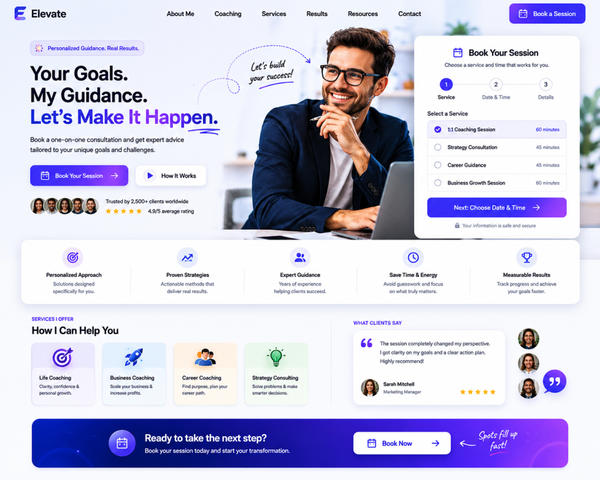
9. Coaching and Consultation Booking Page
Designed for coaches, consultants, and service professionals, this template includes a compelling bio section, a results and testimonials block, a clear service overview, and a booking form to drive consultation requests.
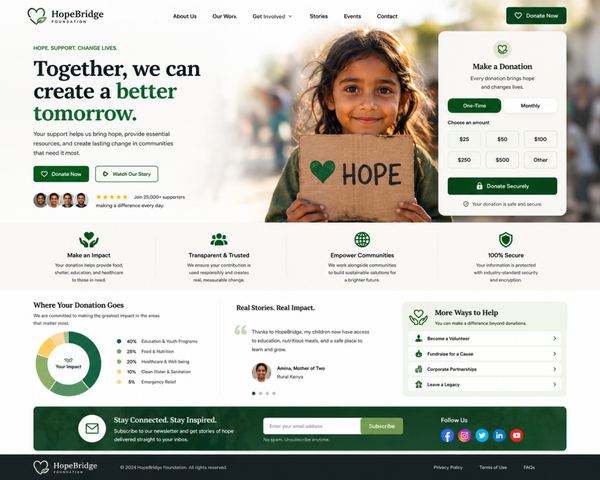
10. Nonprofit and Charity Donation Page
An emotionally resonant template built for charitable organizations and causes. It features a mission statement block, impact statistics, donor testimonials, and a donation form with preset giving amounts to reduce friction.
All of these templates are available directly from the Element Pack Pro template library. Each one is fully editable within Elementor and designed to give you a professional head start on any landing page project.
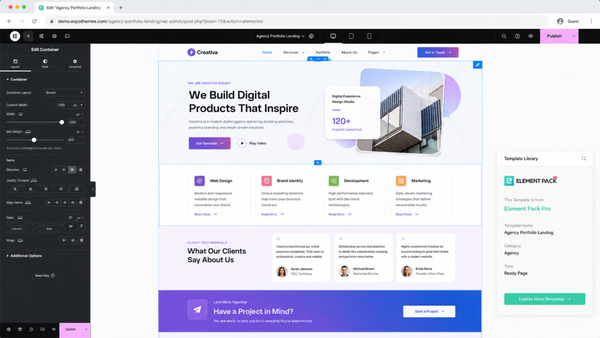
Landing Page for Coming Soon and Under Construction: Launch Guard
Before a landing page goes live, there is often a period when the site or page is still being built. Handling that pre-launch window well can make the difference between losing potential customers and actually building anticipation. The Launch Guard plugin from BdThemes is designed specifically to manage this phase with professionalism and flexibility.
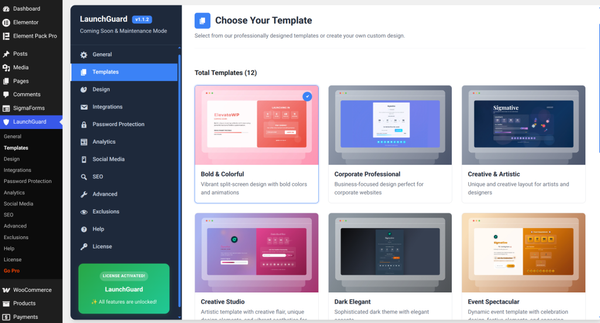
What Launch Guard Does
Launch Guard is a WordPress plugin that lets you put any page, post, or your entire site into a controlled access state. Instead of showing an unfinished page or a generic maintenance mode screen to visitors, you display a fully branded coming soon or under construction experience that builds excitement and captures leads while you prepare your actual launch.
The plugin gives you control over who sees the maintenance state and who sees the actual content. You can whitelist specific IP addresses, logged-in user roles, or use a bypass password so that clients, team members, or stakeholders can preview the real content while the public sees the Launch Guard page. This is a sophisticated capability that many simple maintenance mode tools lack entirely.
Key Features That Set Launch Guard Apart
- A visual page builder integration that lets you design your coming soon page with the full power of Elementor
- Countdown timer support to build urgency and communicate your planned launch date to early visitors
- Email capture integration so you can collect subscribers during the pre-launch period and launch to a warm audience
- Granular access control at the page level, not just the site level, so you can keep parts of your site live while others are under construction
- SEO-friendly maintenance mode that sends appropriate HTTP status codes to search engines to protect your rankings
- Social media links and sharing options are built into the coming soon page layout
How Launch Guard Fits Into a Landing Page Strategy
A coming soon page is itself a form of landing page, and when it is built with Launch Guard. It becomes a conversion tool during the launch preparation phase. You capture email addresses, build social proof through social links, and create genuine anticipation that drives strong engagement the moment the full page goes live.
The combination of a professionally designed coming soon experience with a high-converting main landing page creates a seamless journey from first discovery to eventual conversion, even for visitors who find you before you officially launch.
Launch Guard is available from BdThemes, the same team behind Element Pack Pro, StoreKit Pro and ZoloBlocks. The consistent quality and deep integration between these tools make them a natural choice for WordPress users who want a cohesive, professional toolkit.
Frequently Asked Questions
What makes a good landing page for lead generation?
A good lead generation landing page focuses on a single offer and presents it with a compelling headline, a clear benefit statement, and a simple form. It removes navigation and other distractions, uses social proof to build trust, and loads quickly on all devices. The fewer fields the form asks for, the higher the conversion rate tends to be. Pages built with Element Pack Pro templates follow these principles out of the box.
What should be on a landing page above the fold?
Above the fold, your landing page anatomy should include the primary headline that communicates your value proposition, a supporting subheadline that elaborates on the main benefit, a visual element such as a product image or illustration, and a prominent CTA button. Everything in this section should work together to give the visitor a clear reason to stay and scroll.
How do I create a landing page in WordPress without coding?
You can create a landing page in WordPress without writing a single line of code by using Elementor as your page builder and Element Pack Pro for advanced widgets and pre-built templates. Install both plugins, create a new page with a blank template so navigation and sidebars are removed, and then select a landing page template from the library. Customize the text, images, and colors to match your brand and publish.
What is the best WordPress landing page builder?
Elementor is widely regarded as the best WordPress landing page builder because of its visual editing interface, extensive widget library, and large community of third-party extensions. When paired with Element Pack Pro, it becomes a complete professional landing page solution with advanced widgets, animation capabilities, popup functionality, and a growing library of conversion-focused templates.
How many CTAs should a landing page have?
A landing page should have one primary CTA that appears multiple times throughout the page at strategic scroll points. The goal of every section of the page is to build toward that single action. Multiple different CTAs pointing to different destinations dilute focus and reduce conversions. Repeat the same CTA consistently rather than introducing alternatives.
What landing page optimization tips make the biggest difference?
The optimization changes that consistently deliver the biggest conversion lifts include removing navigation menus from the page, reducing form fields to the minimum necessary, placing a testimonial near the headline, adding a specific number or statistic to the headline for credibility, and improving page load speed. A/B testing two headline variations is often the single most impactful landing page optimization tip you can act on immediately.
How can I add a coming soon page to my WordPress site?
The simplest and most professional way to add a coming soon page to WordPress is to install the Launch Guard plugin from BdThemes. It lets you design a fully branded coming soon experience using Elementor, set a countdown timer, collect email sign-ups, and control who sees the maintenance state vs. the live content. You can apply it to your entire site or individual pages.
Do landing page templates really improve conversion rates?
Yes, professionally designed landing page templates improve conversion rates because they are built on layouts that have been tested and refined across many campaigns. The landing page templates in Element Pack Pro are structured around conversion principles, with attention given to visual hierarchy, CTA placement, trust signal positioning, and mobile rendering. Starting from a proven template is significantly more effective than building from a blank canvas without a background in conversion design.
Key Takeaways
Building a landing page that genuinely converts is one of the highest-leverage investments you can make in your online presence. Every element on the page, from the headline to the CTA button to the load time, plays a role in whether a visitor takes action or leaves. The principles in this guide give you the foundation to build pages that work.
Here are the most important points to carry forward from this guide.
- A good landing page serves one audience and one goal, with every element aligned toward a single conversion action
- The headline, CTA, social proof, and hero section above the fold carry the heaviest conversion weight on the entire page
- Removing navigation and other distractions is one of the fastest ways to improve conversion rates on any existing landing page
- WordPress with Elementor gives you a powerful visual building environment, and Element Pack Pro extends it with the advanced widgets and templates needed for professional results
- Conversion tracking set up before launch gives you the data needed to optimize performance over time
- The Launch Guard plugin from BdThemes handles the pre-launch phase with a professional coming soon experience that captures leads while you prepare your main page
The Element Pack Pro template library gives you the fastest path to a professionally designed, conversion-ready landing page inside WordPress. Choose a template that matches your goal, customize it to your brand, and apply the principles from this guide to make it perform.
Md Tariqul
The BdThemes team builds WordPress plugins trusted by 3M+ users worldwide. We write about web accessibility, WCAG compliance, and inclusive design.