

The best WooCommerce subscription alternative is not automatically the plugin with the longest feature page. It is the one that can renew payments through your exact gateway, model your product correctly, recover failed charges and give customers the lifecycle controls your business can safely support.
For stores that want recurring billing, membership access, configurable subscription boxes, fixed subscription bundles, retention offers, store credit, customer-experience builders and analytics in one WooCommerce system, ArraySubs Pro is the most complete all-in-one option in this comparison. WooCommerce Subscriptions remains the safer benchmark for maximum official ecosystem maturity. YITH is particularly strong for build-a-box and delivery operations, while the other five plugins suit narrower budgets and operating models.
Quick answer: Which WooCommerce subscription plugin should you choose?
- Best all-in-one operating stack: ArraySubs Pro, for billing, Mollie, build-your-own boxes, fixed bundles, member access, retention, store credit, account builders and analytics in one system.
- Best official WooCommerce option: WooCommerce Subscriptions, for the broadest documented automatic-gateway matrix, mature developer APIs and marketplace compatibility.
- Best for membership subscriptions, content restriction and flexible payment options: ARMember, for unlimited recurring membership plans, paywalls, content dripping, 22+ payment gateways and WooCommerce product-to-plan mapping.
- Best for regional gateways, split payments and win-back campaigns: WPSubscription, for reusable plans, installments, Razorpay or Mollie-oriented stores and cancellation surveys.
- Best for configurable boxes and separate delivery schedules: YITH WooCommerce Subscription.
- Best broad alternative with boxes, switching, memberships and retries: Subscriptions for WooCommerce Pro by WP Swings.
- Best lower-cost conventional subscription plugin: Subscriptions for WooCommerce by ThemeHigh, formerly WebToffee.
- Best inexpensive lightweight option: Flexi Subscription for WooCommerce, provided its newer codebase and narrower verified gateway support suit your risk tolerance.
Contents
- Comparison snapshot
- How this review was researched
- ArraySubs Pro
- WooCommerce Subscriptions
- ARMember
- WPSubscription
- YITH WooCommerce Subscription
- Subscriptions for WooCommerce Pro by WP Swings
- Subscriptions for WooCommerce by ThemeHigh
- Flexi Subscription for WooCommerce
- Inside ArraySubs Pro
- Migration and buying checklist
- Frequently asked questions
WooCommerce subscription alternatives: comparison snapshot
Prices and versions below were checked on August 5, 2026. Vendors localize currency, add tax at checkout and run promotions, so treat every price as a dated snapshot rather than a permanent quote.
Billing and automatic gateway fit
- ArraySubs Pro: regular Personal price $129/year; four native automatic paths verified in the current build: Stripe, PayPal, Paddle and Mollie. The free core creates manual renewal invoices for WooCommerce gateways.
- WooCommerce Subscriptions: from US$279/year on the US page; the official matrix currently contains 36 automatic-recurring gateway extension rows. Feature support still varies by gateway and payment method.
- ARMember: free version available; Pro from $89/year for a single site with a 14-day money-back guarantee. 22+ payment gateways, including Stripe, PayPal, Razorpay, Mollie, Paddle, Square, Paystack and WooCommerce; recurring membership payments run through supported gateways.
- WPSubscription: free core on WordPress.org; Pro from $89/year. Automatic renewals claimed for Stripe, PayPal, Paddle, Mollie, Razorpay and Xendit depending on plan and gateway configuration.
- YITH WooCommerce Subscription: US$199.99/year; 12 named automatic integrations. The original recurring payment method cannot be switched later.
- WP Swings Pro: $129/year as displayed; 12 named automatic integrations, with method and country restrictions. Mollie support is limited to cards on the current sales page.
- ThemeHigh: $89/year as displayed; the latest detailed former-vendor guide names 10 recurring integrations, but buyers should reconfirm them after the 2025 ownership transfer.
- Flexi Subscription: $49/year; only built-in PayPal and the official WooCommerce Stripe gateway are explicitly verified for automatic billing in its detailed current listing.
Advanced workflow coverage
- ArraySubs Pro: customer-built boxes, merchant-fixed bundles, cross-product plan switching with three proration methods, configurable retries, two-phase grace handling, retention offers, member access, store credit and customer-experience builders.
- WooCommerce Subscriptions: mature switching, proration, retries, REST APIs and gateway coverage; customer-built boxes, content restriction, independent delivery schedules and richer analytics require other extensions.
- ARMember: membership-first rather than product-subscription-first: unlimited recurring membership plans with trials, upgrades, downgrades and cancellation, content restriction and paywalls, content dripping, member dashboards, custom registration forms, courses and WooCommerce product-to-plan mapping; advanced physical-product subscription workflows need validation.
- WPSubscription: reusable subscription plans, built-in installment or split payments, failed-payment retries, cancellation surveys with win-back offers, early renewal and MRR or churn reporting; no customer build-a-box composer.
- YITH: one of the strongest built-in customer box builders and separate delivery scheduling; switching is limited to variations of the same variable product and content restriction needs YITH Membership.
- WP Swings Pro: customer-selected boxes, variable-plan switching and proration, configurable retries, membership controls and reports; bundle subscriptions depend on WooCommerce Product Bundles.
- ThemeHigh: strong fundamentals such as trials, fees, recurring coupons, sync and initial proration; no current evidence of plan switching, automatic retry, native access rules, or a customer build-a-box flow.
- Flexi: trials and basic self-service in free, with retries, delivery schedules, analytics, webhooks and a read-only API in Pro; no documented proration or configurable box builder.
Maturity signal and verified feature-count basis
- ArraySubs: WordPress.org lists version 1.8.11 and 100+ active free-plugin installs. Its audited catalog contains 74 feature cards and its granular Free-vs-Pro table contains 97 rows.
- WooCommerce Subscriptions: version 9.0.1 and 100,000+ active installs on the Woo marketplace page. Count: 20 official product-page entries.
- ARMember: Count: 62+ in-built addons and 22+ payment gateways, as listed by the vendor.
- WPSubscription: WordPress.org lists version 1.10.x, 1,000+ active installs and a 4.9-star rating. Count: around 44 core and Pro capability comparison rows across billing, customer management, retention and reporting.
- YITH: Premium 4.24.0; its free directory plugin has 7,000+ active installs. Count: 59 rows in the official Free-vs-Premium matrix.
- WP Swings: Pro 2.7.1 and required free core 2.0.1; the free plugin has 10,000+ active installs. Count: 42 unique labels in the Free/Pro checklist, plus newer headline modules outside that checklist.
- ThemeHigh: version 4.0.3. Count: 25 independently named capabilities on its current product page.
- Flexi: version 1.0.3 and fewer than 10 active installs. Count: 21 cards on the official Features page.
Feature-count warning: these totals are not apples-to-apples scores. One vendor may count a broad module once while another counts every setting separately. Each total below states exactly what was counted so you can use it as a scope reference, not a winner-selection formula.
How this comparison was researched
This comparison checks the purchase decisions that cause real problems after launch: product type, billing intervals, trials and fees, automatic gateway support, customer payment-method changes, switching and proration, failed-payment recovery, boxes and bundles, membership access, delivery, reporting, APIs, price and product maturity.
Competitor claims come from first-party product pages, official documentation, official changelogs and WordPress.org. Reseller roundups were not treated as evidence and a gateway logo was not treated as proof that every recurring action is supported. When a vendor's pages conflict, the conflict is disclosed instead of silently choosing the more flattering claim.
ArraySubs received a deeper hands-on review because both the current codebase and a working local store were available for inspection. The separate walkthrough after the eight-plugin list shows real admin and customer interfaces. WordPress.org active-install numbers are included only as a maturity signal for each free directory plugin; they do not reveal paid installs or product quality on their own.
1. ArraySubs Pro: Best all-in-one WooCommerce subscription alternative
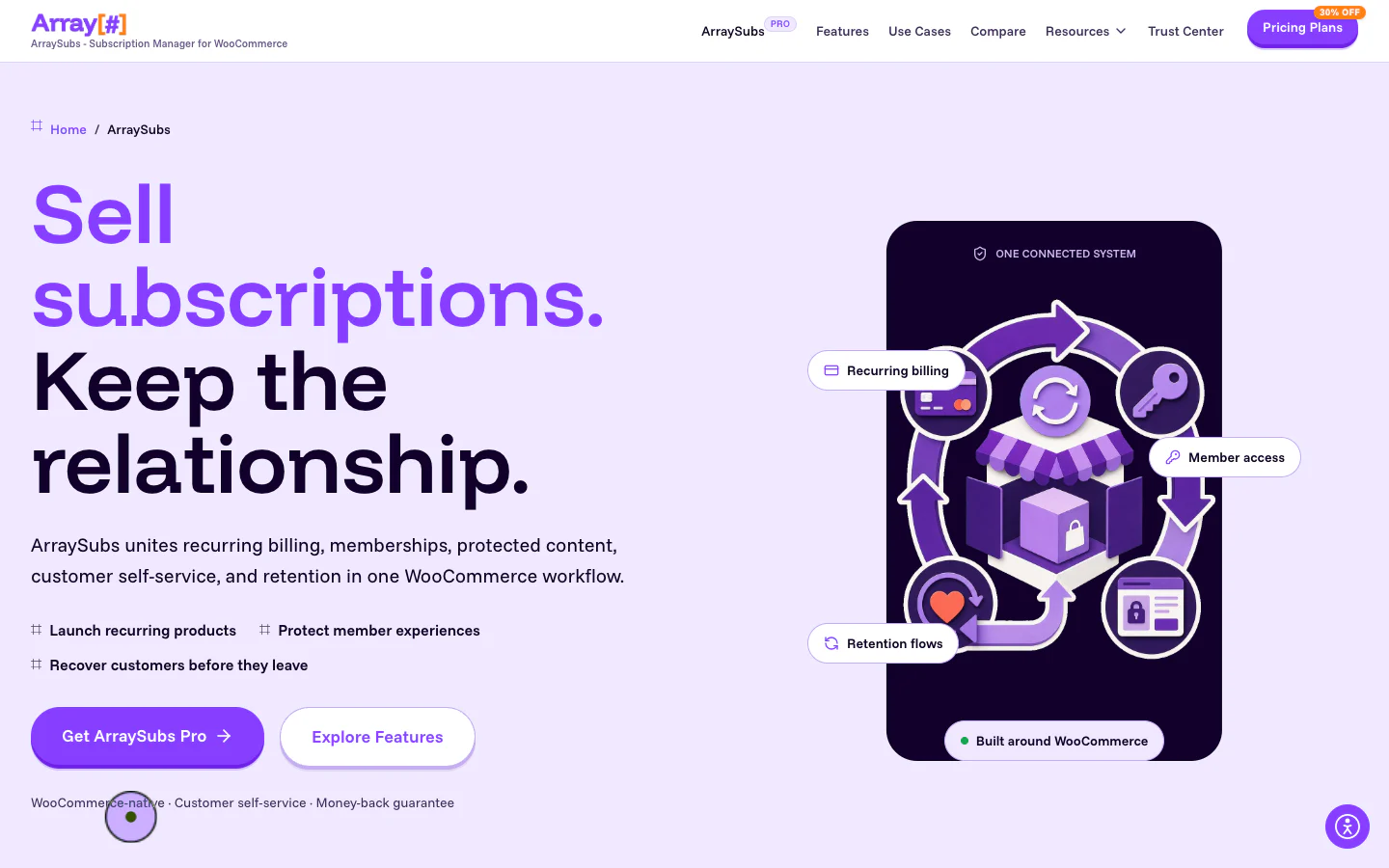
The ArraySubs product website. The ranked entry uses one website image; 12 real plugin screenshots appear in the hands-on walkthrough after the list.
ArraySubs connects subscription products, automatic renewals, member access, protected content, customer self-service, cancellation retention, store credit and reporting to the same WooCommerce subscription record. The current Pro build also includes two distinct recurring-merchandising products: a customer-configurable Subscription Box and a merchant-configured Subscription Bundle.
The free core is a usable manual-renewal product, not a demo. Pro is required for automatic Stripe, PayPal, Paddle and Mollie renewals and for premium operating modules such as store credit, configurable boxes and bundles, the Checkout Builder, Member Insight and gateway-health tooling.
Current facts and feature count
- Price: free core; Personal regular price $129/year for one site. The pricing page showed a temporary $90 early-bird price during this review, plus annual and lifetime options, a 10-day trial and a 30-day refund window.
- Version and footprint: WordPress.org listed version 1.8.11, 100+ active installs and two public ratings at the time checked.
- Verified feature count: 74 current feature cards, 51 core-accessible and 23 Pro-only, plus 97 granular capability rows in the audited Free-vs-Pro table. Items labeled coming soon are not treated as available features in this article.
- Automatic renewals: Stripe, PayPal, Paddle and Mollie in Pro. Manual renewal invoices can use the wider WooCommerce gateway ecosystem in free.
Main features
- Simple and variable subscriptions with free trials, signup fees, different renewal prices, fixed-date periods, lifetime deals, coupons, fixed or unlimited durations and direct checkout URLs.
- A customizable Subscription Box with multi-step layouts, product and category selectors, customer text, choice and file fields, required rules, minimum and maximum quantities, discounts, freebies, unlock hints, frozen renewal pricing and exact renewal reproduction.
- A separate Subscription Bundle for merchant-fixed contents, quantities, one Add to Cart action, one recurring total and fixed or percentage bundle discounts.
- Automatic billing through Stripe, PayPal, Paddle and Mollie, plus scheduled retries, grace phases, double-charge protection, reconciliation and optional fallback-plan downgrades.
- Customer actions for cancellation, scheduled-cancellation undo, reactivation, pause, skip-next-renewal, payment-method updates, invoices and eligible plan changes with three proration methods.
- Membership and access rules for posts, pages, custom post types, taxonomies, URL paths, partial content, downloads, Elementor containers, Gutenberg blocks, shop visibility, comments, roles, discounts and purchase limits.
- Retention flows that collect a cancellation reason and can present a conditional discount, pause, downgrade, or support route before final cancellation, with retained-revenue reporting.
- Store-credit wallets, manual adjustments, refund-to-credit, prepaid credit products, expiration rules, transaction histories and customer credit emails.
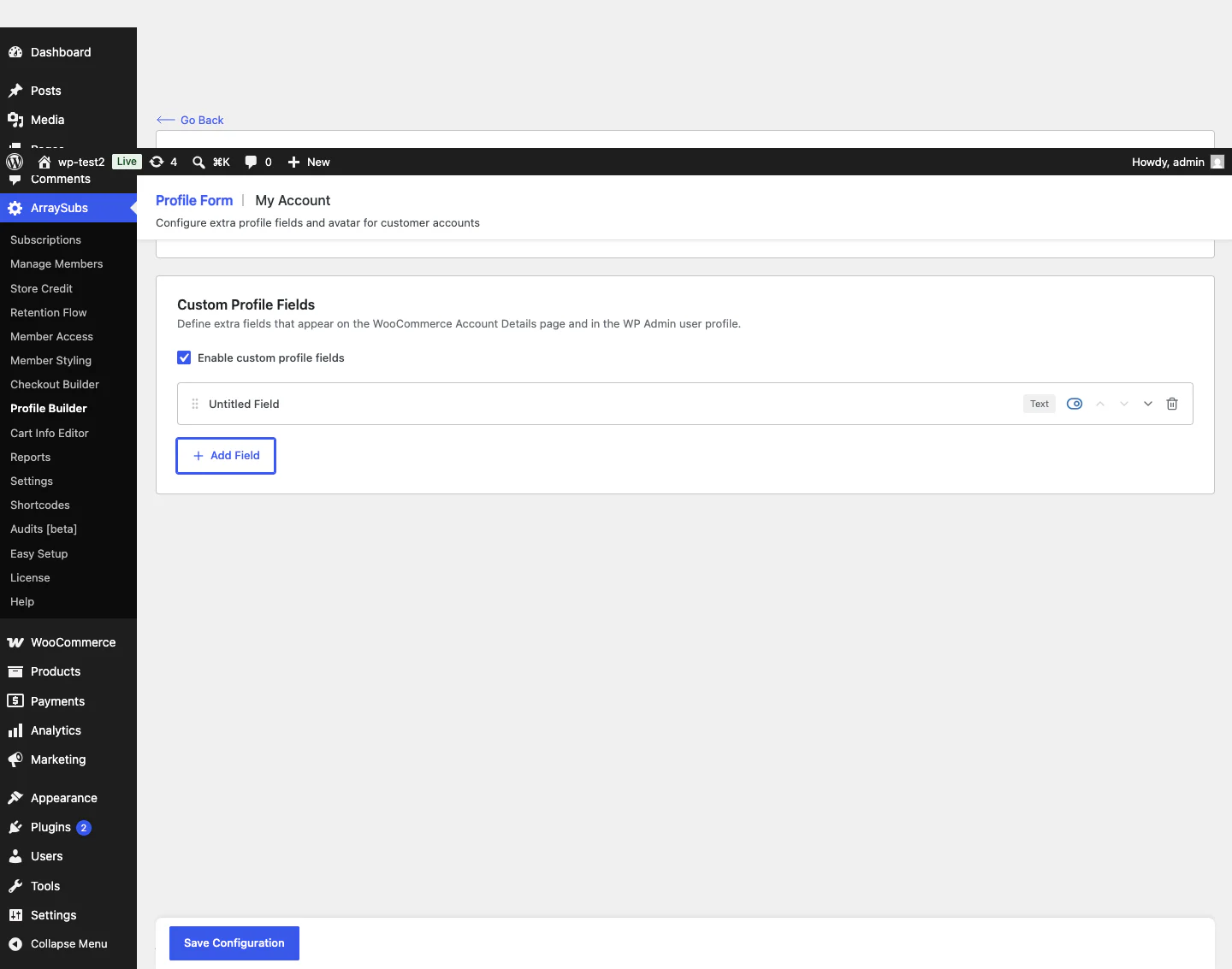
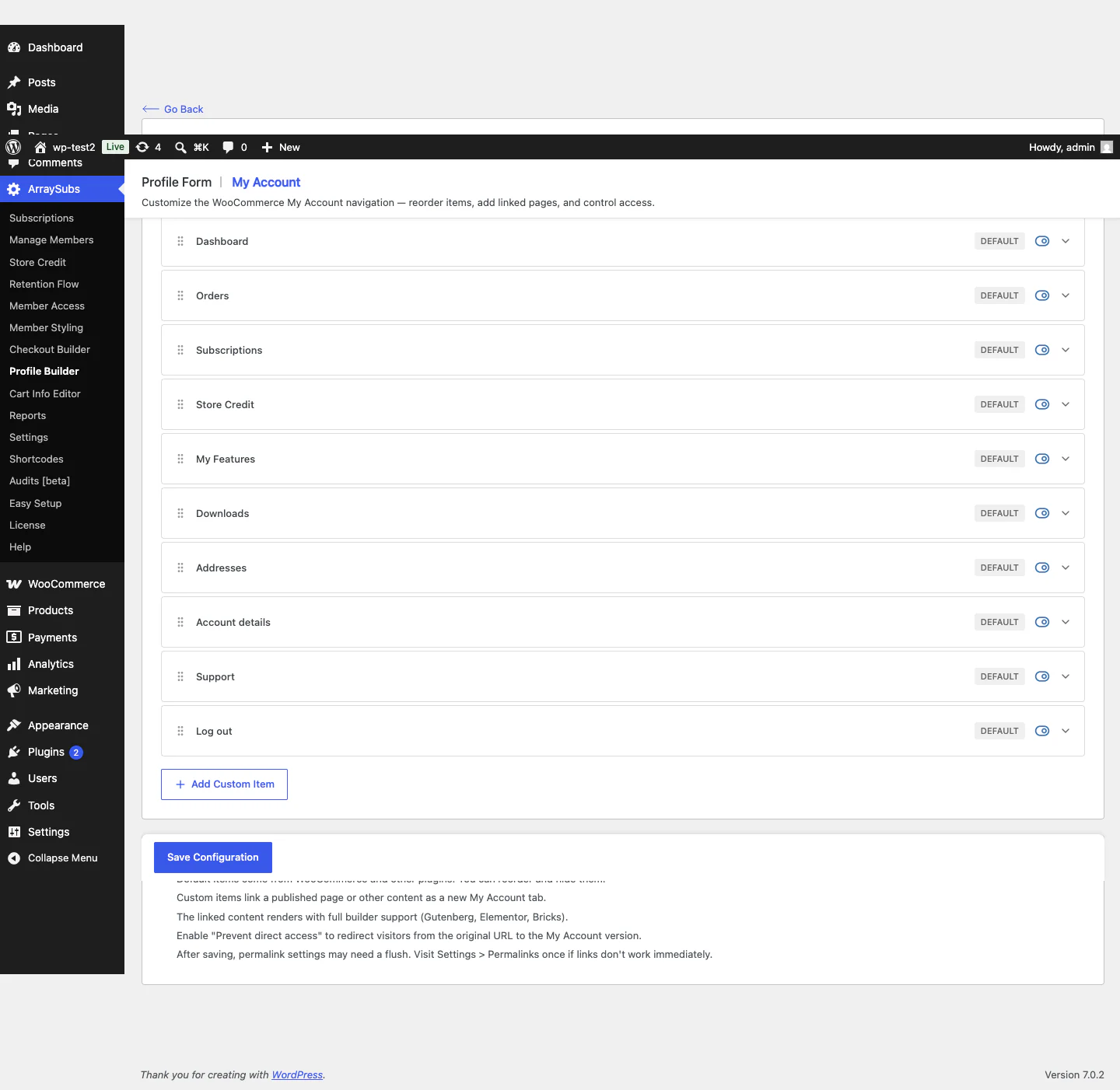
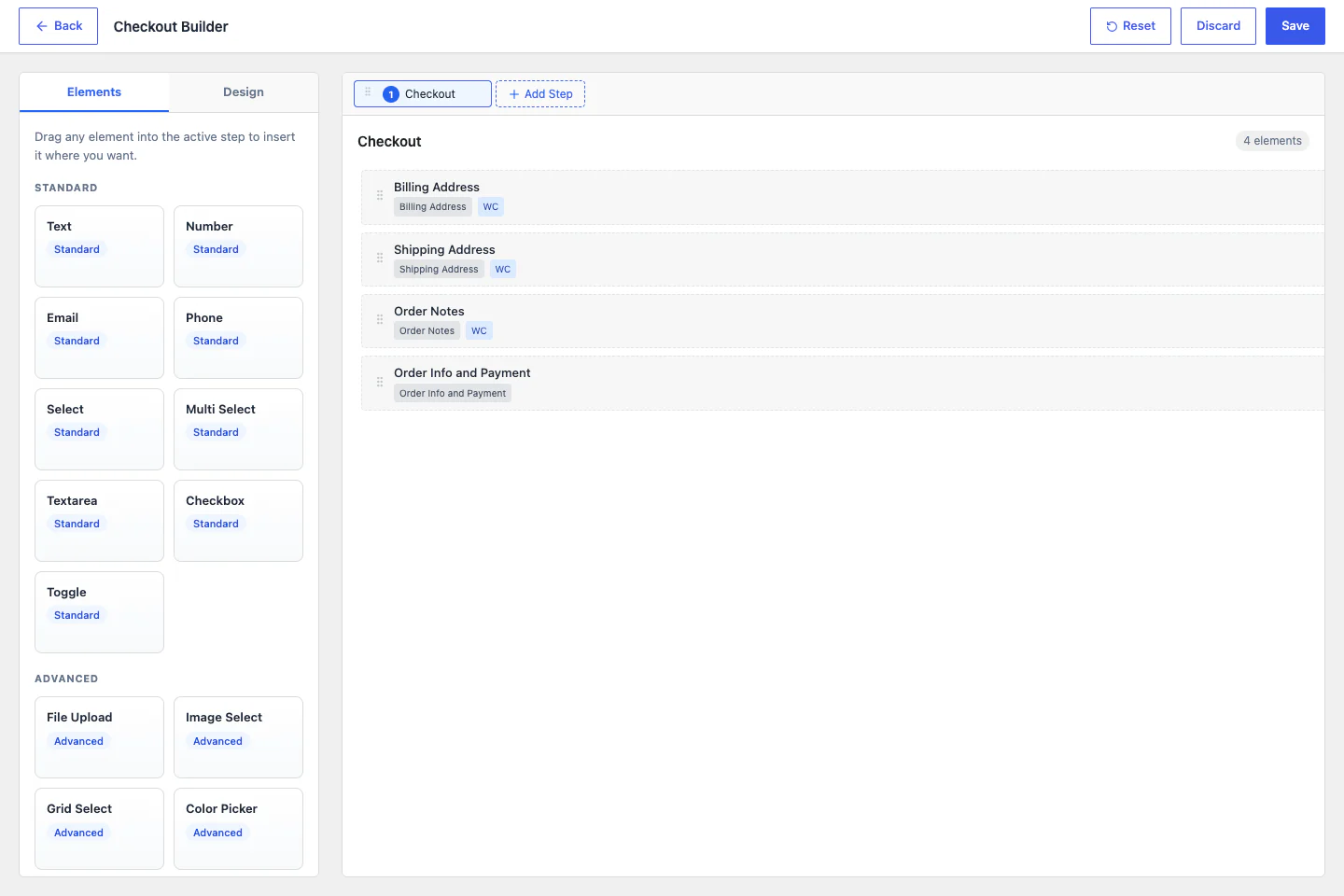
- Drag-and-drop Checkout Builder, Profile Builder, My Account menu builder, Member Insight, manage-members and manage-subscriptions workspaces, gateway health, activity logs, scheduled-job logs, CSV exports and WooCommerce Analytics reports.
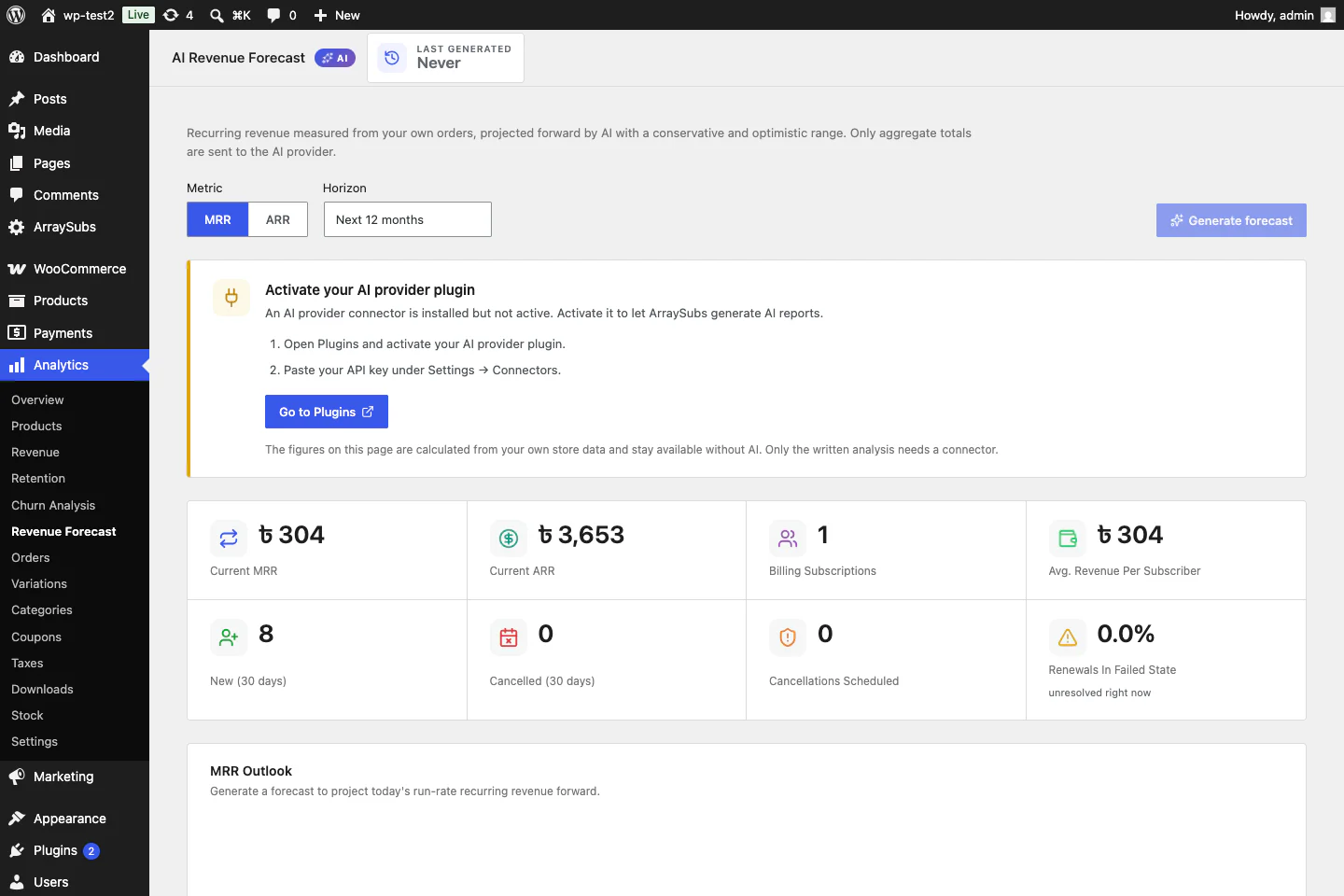
- Revenue, MRR, ARR, churn, retention, product, member, gateway, store-credit, forecasting and AI-assisted analysis views. AI output requires a configured provider and should be treated as analysis assistance, not guaranteed prediction.
Gateway and operational reality
ArraySubs Pro has four current automatic-payment paths, which are broader than a Stripe-only plugin but narrower than the official Woo extension's 36-row gateway matrix. Mollie support is mandate-driven: ArraySubs keeps the renewal schedule and charges the Mollie mandate rather than creating a Mollie Subscription object. It handles mandate rotation, delayed SEPA settlement, reconciliation, idempotency and supported payment-method updates; guest Mollie purchases that cannot store a mandate fall back to manual renewal invoices. The distinction between manual and automatic subscription renewals matters here. Stores should still run a real test-mode checkout, renewal, failed charge, webhook and payment-method update for the exact Mollie method and country they plan to use.
Why and when to choose ArraySubs Pro
Choose ArraySubs Pro when the subscription is also a membership, a gated-content relationship, a customizable box, a curated recurring bundle, or a service account that support staff must manage. Its clearest strength is consolidation: billing, access, customer experience, retention, credit, member operations and analytics use one subscription data model instead of a chain of unrelated add-ons. That is valuable for teams designing subscriptions and memberships together, or for those trying to reduce subscription churn without splitting the customer story across several plugins. It is also the strongest option here when ArraySubs-specific modules, such as the Profile Builder, Checkout Builder, Member Insight, unified manage screens, or store credit, are part of the requirement.
Where ArraySubs is weaker or needs validation
ArraySubs is newer and has a much smaller public install footprint than WooCommerce Subscriptions, YITH, or WP Swings. Automatic billing requires Pro and currently covers four native paths rather than the official plugin's much wider matrix. Customer-built boxes and merchant-fixed bundles are Pro workflows and any feature marked coming soon in the catalog, such as installment payments, donations, or customer-chosen duration, should not influence a purchase today. Before migration, validate the exact gateway, saved token or mandate, renewal scheduler, proration case and customer portal flow on staging. Review the complete ArraySubs feature catalog and Free-vs-Pro data and ArraySubs documentation rather than relying on the summary above.
2. WooCommerce Subscriptions: Best official ecosystem benchmark
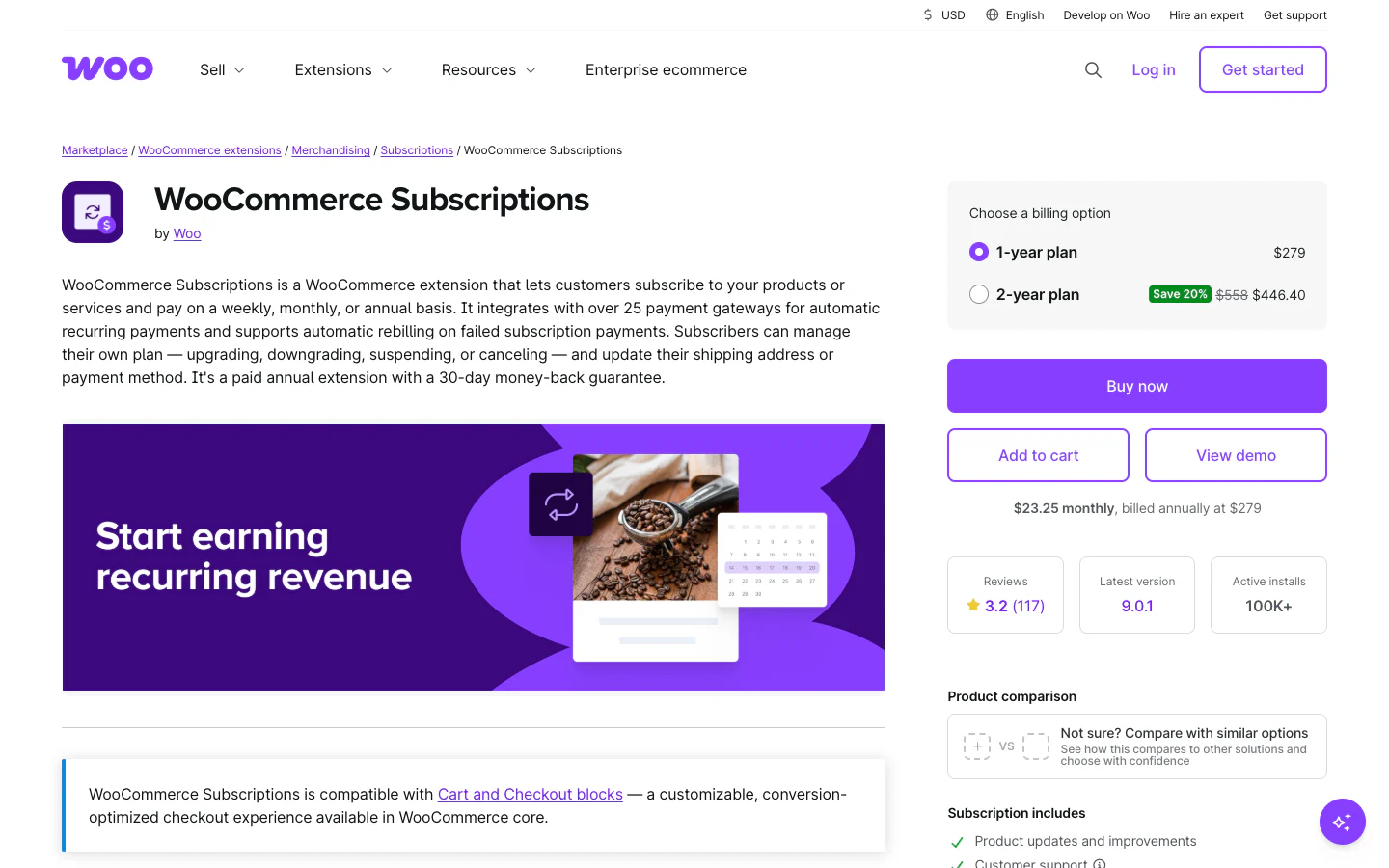
The current WooCommerce Subscriptions product website.
WooCommerce Subscriptions is technically the benchmark rather than an alternative to itself, but excluding it would make every comparison less useful. Version 9.0 incorporated the former All Products for WooCommerce Subscriptions functionality, so stores can attach multiple plans or a one-time-versus-subscribe option to more existing WooCommerce product types.
It remains the most mature choice for official Woo support, gateway documentation, extension compatibility and developer customization. The important buying question is not whether its billing engine is capable; it is how many additional extensions your complete business model will require.
Current facts and feature count
- Price: from US$279/year on the US page, with localized currency and tax elsewhere; one production activation plus one development or staging activation, one year of support and updates and a 30-day refund policy.
- Version and footprint: version 9.0.1 and 100,000+ active installs on the Woo marketplace page.
- Verified feature count: 20 official product-page entries, 10 summary bullets and 10 detailed blocks. Some overlap, so this is a transparent page count, not a limit on underlying behavior.
- Automatic renewals: 36 extension rows in the current official automatic-recurring gateway matrix; manual renewals work through other Woo gateways.
Main features
- Daily, weekly, monthly and yearly billing with intervals up to ten years, fixed expiration, free trials and signup fees.
- Simple and variable subscription products, multiple plans per product and one-time or subscription choices.
- Subscription plans for existing simple, variable, bundle and composite products; Bundle and Composite product types still require their own extensions.
- Synchronized renewals, prorated first payments, recurring and signup-fee coupons, multiple subscriptions in one transaction, gifting, early renewal and resubscribe flows.
- Customer suspension, cancellation, reactivation, address updates and supported payment-method changes.
- Upgrade, downgrade and cross-grade controls with recurring price, signup-fee and length proration.
- Configurable failed-payment retry rules, renewal-order management, lifecycle emails and downloadable-access handling.
- REST API, developer APIs, extensive hooks, HPOS support and Cart and Checkout Block compatibility.
Gateway and operational reality
The official payment-gateway matrix is the strongest gateway reference in this category, but 36 rows do not mean 36 identical experiences. Recurring-total changes, date changes, customer payment-method changes, suspension and multiple-subscription transactions vary by gateway. Mollie supports automatic renewals and several lifecycle actions, but the matrix does not list customer-side payment-method switching for it. The failed-payment retry engine is real and configurable, yet disabled by default; its default five-retry sequence spans seven days and does not run for SEPA payments.
Why and when to choose WooCommerce Subscriptions
Choose the official extension when first-party support, broad gateway choice, agency familiarity, custom development and compatibility with the Woo marketplace matter more than having every advanced workflow in one plugin. It is especially strong for established stores with complex billing rules, unusual gateways, custom integrations, or existing Bundle and Composite products. Its lifecycle, switching, retry, API and hook documentation are among the most mature in the category. The official data model also makes it a common integration target for third-party extensions and migration services.
Where WooCommerce Subscriptions is weaker or needs add-ons
Core switching is not unrestricted between arbitrary products: it covers variations of the same variable subscription and simple subscriptions inside a grouped product, is disabled by default and still depends on gateway capabilities. A customer-built mix-and-match box needs Product Bundles, Mix and Match, or another builder. Membership and content restriction, independent delivery scheduling and modern Woo Analytics subscription dashboards require separate extensions. Base subscription reporting still sits in Woo's deprecated Reports area, so the apparent $279 entry price can understate the cost and maintenance of the complete stack. See the official product-creation guide and switching rules for the exact boundaries.
3. ARMember: Best for membership subscriptions, content restriction, and flexible payment options

The ARMember product website.
ARMember is a powerful WordPress membership plugin that can also handle subscription-based businesses. It lets you create unlimited membership plans, recurring subscriptions, content restrictions and paywalls while giving members a complete dashboard to manage their accounts. It also stands out with 22+ payment gateways, 62+ in-built addons, content dripping, online courses, and WooCommerce integration.
The free version of ARMember provides essential membership features, while the Pro version adds advanced payment gateways, premium addons, recurring membership plans, membership proration, WooCommerce integration and other tools for building a complete subscription-based membership website.
Current facts and feature count
- Price: free version available; Pro starts at $89/year for a single site, with a 14-day money-back guarantee.
- Membership plans: unlimited membership plans with recurring subscription options, trial periods and different access levels.
- Payment gateways: 22+ payment gateways, including Stripe, PayPal, Razorpay, Mollie, Paddle, Square, Paystack and WooCommerce.
- Addons: 62+ in-built addons covering payments, content restriction, forms, WooCommerce, online courses, social communities and more.
- WooCommerce integration: connect WooCommerce products with ARMember membership plans and use WooCommerce checkout to process membership purchases.
Main features
- Membership plans: create unlimited membership plans with different pricing, durations, trial periods and access permissions. You can offer recurring memberships and allow members to upgrade, downgrade or cancel their plans.
- Content restriction: restrict posts, pages, categories, custom post types, menus and specific sections of your content based on membership plans. You can also show teaser content before the paywall.
- Recurring subscriptions: create subscription-based membership plans and accept recurring payments through supported payment gateways. This makes it suitable for membership sites, online communities, courses and subscription-based content.
- Content dripping: release content gradually according to a schedule so members can access lessons, articles or other resources over time instead of getting everything at once.
- Payment gateway coverage: accept payments through 22+ gateways, including international and regional options such as Stripe, PayPal, Razorpay, Mollie, Paddle, Paystack and Square.
- WooCommerce integration: connect WooCommerce products with ARMember membership plans and assign the appropriate membership after a qualifying WooCommerce purchase. You can also use WooCommerce as a payment method for ARMember memberships.
- Member dashboard controls: give members a centralized area where they can manage their profiles, memberships, subscriptions and account information.
- Custom registration and login forms: create customized registration, login, profile and password-reset forms using the built-in form builder without writing code.
- Online courses and digital products: sell courses and digital downloads through membership plans and control access based on the member's subscription.
- Membership discounts: offer membership-based discounts on WooCommerce products and categories using the WooCommerce Discount addon.
- Reports and member management: manage members, subscriptions and payment information while tracking important membership activity from the WordPress dashboard.
Payment and operational reality
ARMember is designed more around membership subscriptions and access management than traditional WooCommerce product subscriptions. Its 22+ payment gateways give you flexibility when selling memberships, including regional options such as Razorpay and Mollie alongside Stripe and PayPal.
If you already use WooCommerce, ARMember can connect membership plans with WooCommerce products and use WooCommerce checkout for membership purchases. However, there are some limitations to understand: mapped plans are assigned after the WooCommerce order reaches the required completed status, and guest checkout does not assign the mapped membership plan.
Why and when to choose ARMember
Choose ARMember when you want more than basic WooCommerce subscription billing. It fits membership websites, online courses, paid content, communities and businesses that need recurring memberships combined with content restriction, content dripping, member profiles and multiple payment options.
It is also a strong alternative to WooCommerce Subscriptions when your subscription model is based on membership access rather than simply recurring product purchases. You can create different membership levels, restrict content for each level, offer recurring plans and connect WooCommerce products with membership access.
Where ARMember is weaker or needs validation
ARMember is primarily a WordPress membership and subscription management plugin, so stores that mainly need advanced physical-product subscription workflows should compare its WooCommerce integration with a dedicated WooCommerce subscription solution before switching.
For membership-focused businesses, however, ARMember brings the subscription, access-control and membership-management features into one WordPress plugin instead of requiring a separate membership system alongside WooCommerce.
4. WPSubscription: Best for regional gateways, split payments, and win-back campaigns
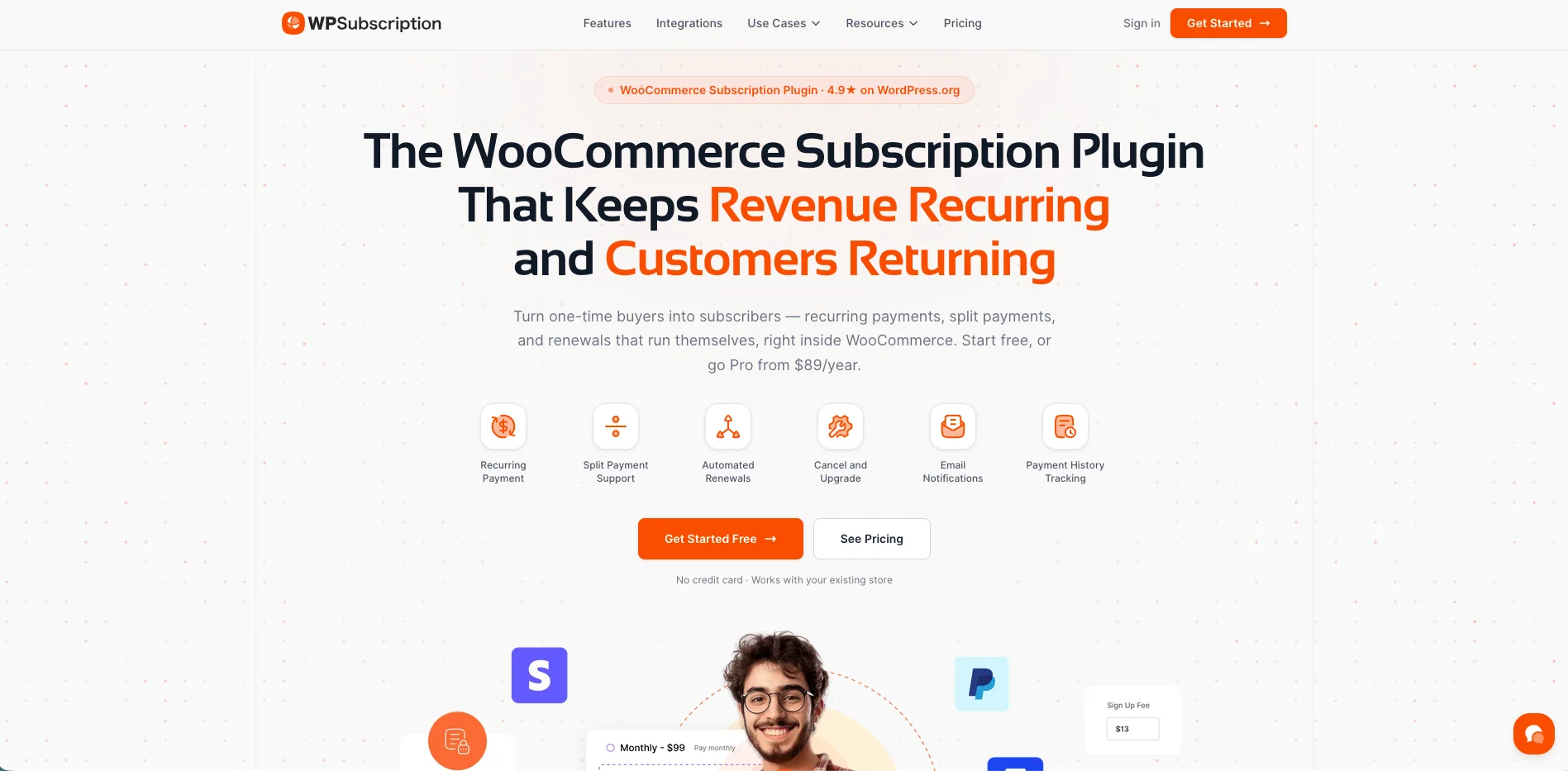
The WPSubscription product website.
WPSubscription is a straightforward WooCommerce subscription plugin built to turn one-time purchases into recurring revenue. It covers the essentials—automatic renewals, trial periods and a customer portal—while differentiating with reusable subscription plans, built-in installment payments, multi-gateway coverage and a cancellation survey system aimed at reducing churn.
The free core on WordPress.org handles basic subscription products and manual renewals. Pro enables automated recurring billing through supported gateways, customizable payment plans, early-renewal tools and retention flows for keeping subscribers.
Current facts and feature count
- Price: free core on WordPress.org; Pro starts at $89/year for a single site, with a 14-day refund policy.
- Version and footprint: WordPress.org lists version 1.10.x, 1,000+ active installs and a 4.9-star rating.
- Verified feature count: around 44 core and Pro capability comparison rows across recurring billing, customer management, retention and reporting.
- Automatic renewals: Stripe, PayPal, Paddle, Mollie, Razorpay and Xendit, depending on plan and gateway configuration.
Main features
- Subscription plans: create reusable plans with billing schedules, free trials and signup fees, then attach them to products and categories. Offer monthly, quarterly and yearly options with separate discounts from one product page.
- Simple and variable subscriptions: daily, weekly, monthly and annual billing, free trials and signup fees so shoppers can pick the schedule that fits.
- Split payments (installments): let customers divide higher-priced purchases into scheduled payment plans instead of paying the full amount upfront.
- Payment gateway coverage: automatic recurring billing for standard and regional gateways including Stripe, PayPal, Paddle and Mollie.
- Smart failed-payment recovery: automated retries and renewal reminders to reduce involuntary churn from expired or declined payment methods.
- Cancellation surveys and win-back flows: capture cancellation reasons in the customer dashboard, then trigger retention discounts and win-back offers.
- Customer dashboard controls: pause, cancel and renew early from WooCommerce My Account.
- Reporting and analytics: admin dashboards for monthly recurring revenue (MRR), subscriber counts and churn.
Gateway and operational reality
WPSubscription positions itself for stores that need regional as well as international processors: Razorpay, Mollie and Paddle sit alongside Stripe and PayPal. Stripe and PayPal integrate more directly, while regional options such as Razorpay and Mollie typically need their separate gateway plugins. Before going live, test webhooks and renewal notifications in sandbox mode for every gateway you plan to use.
Why and when to choose WPSubscription
Choose WPSubscription when you want a budget-friendly plugin with reusable plans, installment payments and payment processors available in your market, including Razorpay and Mollie. It fits software licenses, digital courses, agency retainers and membership-style programs that need cancellation insight and win-back tools without an expensive enterprise stack.
Where WPSubscription is weaker or needs validation
WPSubscription does not offer an interactive customer-facing box builder like YITH or ArraySubs Pro, so it is a weaker fit for advanced physical subscription-box merchandising. Its free-plugin install base is smaller than WooCommerce Subscriptions, so larger retail operations should validate API and third-party extension compatibility on staging before migration.
5. YITH WooCommerce Subscription: Best for configurable boxes and delivery schedules
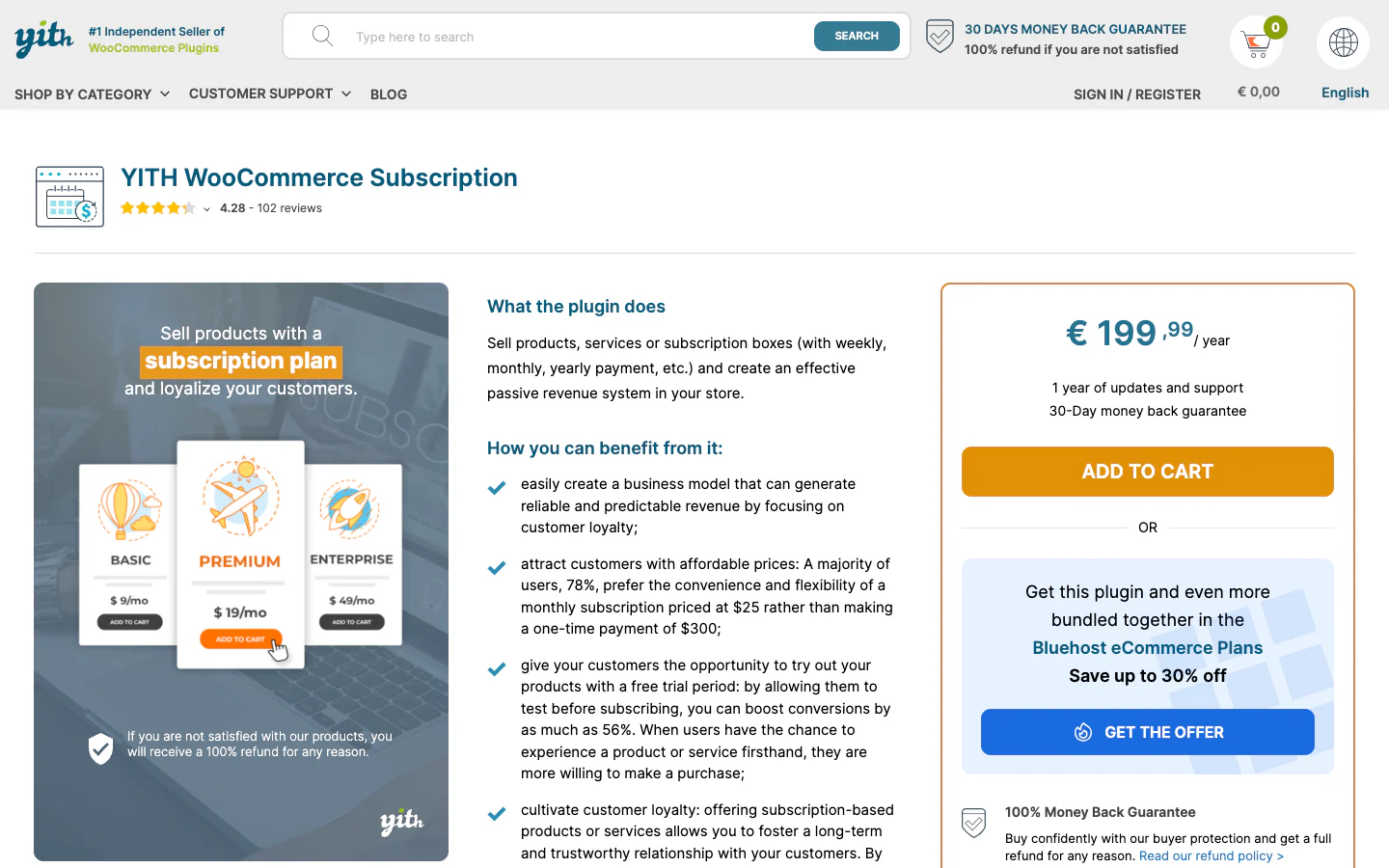
The current YITH WooCommerce Subscription product website.
YITH WooCommerce Subscription combines standard recurring billing with one of the clearest built-in customer box composers in this list. Its delivery module can schedule fulfillment separately from billing, which matters when customers pay monthly but receive products on a different cadence.
It also supports variable-plan changes, synchronization, proration, customer controls, webhooks and subscription reporting. The main caveats are a narrower list of automatic gateways than Woo's official extension and several workflows that depend on other YITH products.
Current facts and feature count
- Price: US$199.99/year for the Premium license, excluding location-dependent tax, with one year of updates and support for the activated site.
- Version and footprint: Premium version 4.24.0, released July 22, 2026; the free WordPress.org plugin had 7,000+ active installs.
- Verified feature count: 59 capability rows in YITH's official Free-vs-Premium matrix, 7 product-creation, 9 box, 9 payment, 11 administration, 11 customer, 5 customization, 3 delivery and 4 advanced rows.
- Automatic renewals: 12 named integrations; other active Woo gateways can be used for manual renewals.
Main features
- Simple physical, virtual and downloadable subscriptions plus variable products with different terms per variation.
- Day, week, month and year billing, expiration, free trials, signup fees, synchronization and initial-payment proration.
- A dedicated Subscription Box type with a multi-step shopper builder, fixed or calculated box price, product and category rules, quantity and value limits, discounts and customer edits before renewal.
- Delivery schedules independent of billing, synchronized delivery days, product-level overrides and recurring-shipment administration.
- Pause and resume limits, automatic reactivation, cancellation constraints, resubscribe rules and eligible upgrade or downgrade controls.
- Variable-plan switching with recurring-price and signup-fee proration.
- Admin subscription creation and editing, CSV export, lifecycle emails, staging mode, MRR, ARR, renewal, trial and conversion reports.
- REST API, subscription webhooks and a Gutenberg subscription-plan block.
Gateway and operational reality
YITH documents 12 automatic paths: PayPal Standard, several YITH Stripe and PayPal extensions, YITH Account Funds, Amazon Pay, WooCommerce Stripe cards, eWay, WooPayments, WooCommerce PayPal Payments and Redsys. Some require separate extensions, credentials, or approval. The payment method selected for the original recurring purchase cannot later be switched, which is a meaningful support limitation. Failed-payment behavior combines configurable status delays, emails and gateway-specific actions, but official documentation does not establish one gateway-neutral programmable retry schedule comparable with Woo's retry engine.
Why and when to choose YITH
Choose YITH when a configurable physical box or delivery calendar is the center of the business. Its ability to separate payment cadence from shipment cadence can remove custom fulfillment work that a billing-only plugin leaves to another system. It also fits stores already standardized on compatible YITH gateway or membership products and teams that want box rules, customer edits, delivery controls and recurring metrics under one vendor. For a coffee, food, beauty, craft, or replenishment business, those operational details may matter more than the size of the gateway matrix.
Where YITH is weaker or needs validation
Plan switching is limited to variations of the same variable product, not arbitrary cross-product changes. Content restriction requires the separate YITH Membership plugin and YITH's technical information excludes compatibility with YITH WooCommerce Product Bundles. The original recurring payment method cannot be changed, while retry behavior varies by gateway. Before choosing it, verify your precise gateway extension and method, whether shoppers must edit box contents after purchase and whether your bundle strategy conflicts with the documented Product Bundles limitation. The official box documentation and delivery-schedule guide are the best places to validate the model.
6. Subscriptions for WooCommerce Pro by WP Swings: Best broad feature-led alternative
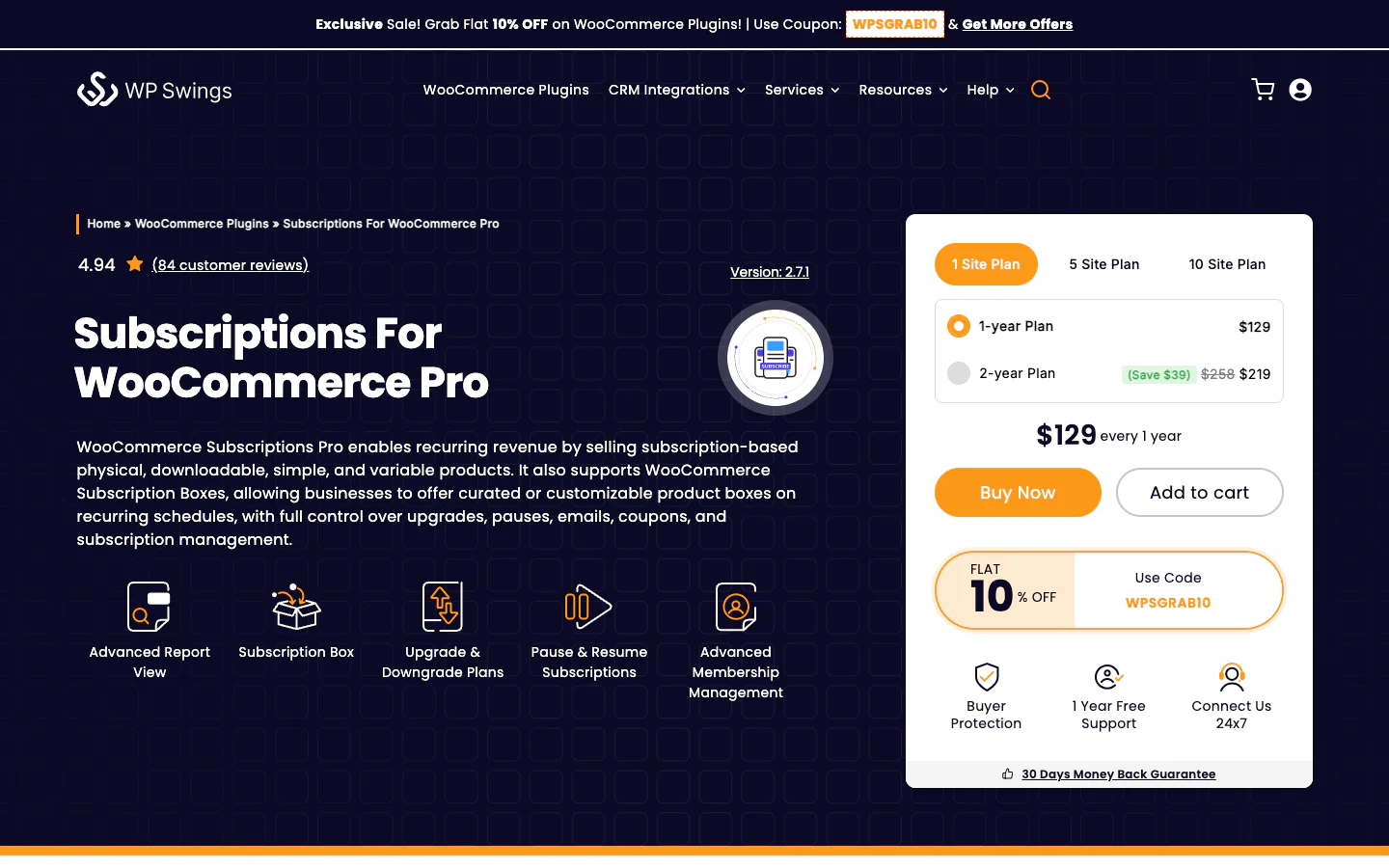
Subscriptions for WooCommerce Pro on the current WP Swings product website.
Subscriptions for WooCommerce Pro is a broad Free-plus-Pro system for recurring physical, virtual, downloadable, simple and variable products. Its strongest current differentiators are customer-selected boxes, variable-plan switching, retry settings, membership controls, reporting and a relatively long named gateway list.
It suits buyers with a detailed feature checklist who prefer one vendor package below the official Woo extension's price. That breadth also creates more combinations to test and its current sales page occasionally disagrees with older documentation.
Current facts and feature count
- Price: $129/year as displayed for one site, $269 for five and $529 for ten; the page also offers two-year terms, one year of support and a 30-day refund policy. Confirm currency and tax at checkout.
- Version and footprint: Pro 2.7.1, updated July 27, 2026; required free core 2.0.1 with 10,000+ active installs and a 4.5/5 directory rating from 176 ratings when checked.
- Verified feature count: 42 unique capabilities in the vendor's Free/Pro checklist after removing duplicate labels, plus newer box, membership, reporting, forecasting and bundle headlines outside that checklist.
- Automatic renewals: 12 named integrations on the current product page, plus manual BACS, cheque and cash-on-delivery paths.
Main features
- Simple and variable subscriptions for physical, virtual and downloadable products, with a one-time-purchase alternative, custom start date, finite or unlimited duration, trials, signup fees and customer-selected expiry.
- Multiple subscriptions or quantities in one cart, renewal coupons, renewal-order refunds, synchronization and three first-cycle charging treatments.
- Customer-selected Subscription Boxes with dynamic pricing and daily, weekly, or monthly schedules.
- Variable-plan upgrade and downgrade controls, same-interval restrictions, downgrade blocking and recurring-price or signup-fee proration.
- Customer cancel, pause, resume, reactivate, edit, expiry and Stripe card-update actions; administrative creation, reactivation, deletion, next-date changes and recurring-total changes.
- Configurable failed-payment retry days and attempt limits, renewal-failure emails, expiry notices, manual invoices and grace-related handling.
- Membership creation, access rules for content and products, Gutenberg block restriction, teaser templates, roles and membership analytics on the current page.
- Reports for sales, renewals, cancellations, monthly renewal revenue, ARR and churn, plus vendor-described AI forecasting.
- A limited REST surface for listing, retrieving, cancelling, pausing and reactivating subscriptions, plus integrations with LMS, bundles, funnels, rewards, wallets, gift cards, multilingual, multisite and HPOS tools.
Gateway and operational reality
The current page names Stripe cards and SEPA, Woo PayPal, Braintree cards, WPS PayPal, Amazon Pay, MultiSafepay, Eway, an Authorize.Net integration requiring legacy AIM, a vendor-labeled Woo payment method, Mollie cards, Payfast and PayHere. WPS PayPal is documented as US-only, customer card replacement is documented only for Stripe and Mollie is currently claimed for credit and debit cards rather than every Mollie method. Retry documentation also conflicts on the terminal result after attempts are exhausted, so merchants should treat the final status as version and configuration dependent.
Why and when to choose WP Swings Pro
Choose WP Swings when boxes, membership controls, variable-plan changes, retry configuration and reports all appear in your requirements, but the official Woo stack is too expensive or fragmented. Its 10,000+ free-plugin install base provides a stronger public maturity signal than newer entrants. The customer-selected box and variable-plan controls are meaningful strengths for product clubs, education, access plans and stores with multiple plan levels. Its ecosystem integrations can also be useful when the store already uses other WP Swings products.
Where WP Swings is weaker or needs validation
Pro requires the free core, so deployment and support involve two plugins. Bundle subscriptions rely on the separate WooCommerce Product Bundles extension, while the REST API is not a full CRUD and webhook platform. Automatic-gateway support is method- and country-specific and documentation conflicts on some retry outcomes. Test your exact gateway, active-card update, pause, retry, synchronization and switching-proration case before importing subscribers. Also treat its AI forecast as a vendor-described analysis feature; no public accuracy benchmark was found.
7. Subscriptions for WooCommerce by ThemeHigh: Best lower-cost conventional option
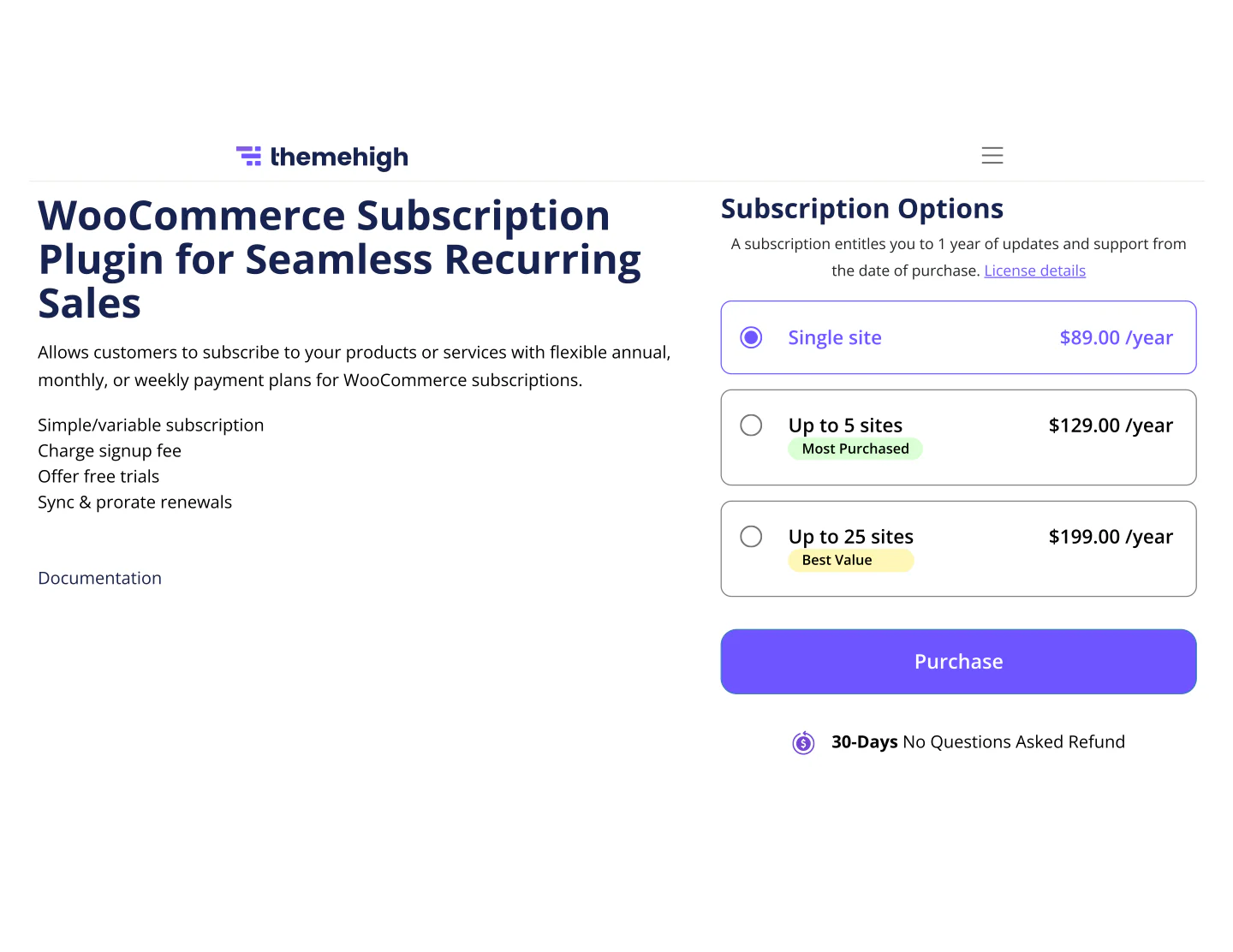
The current Subscriptions for WooCommerce product website under ThemeHigh ownership.
Subscriptions for WooCommerce are now sold and maintained by ThemeHigh, not WebToffee. WebToffee transferred this plugin and its related Stripe and PayPal Express products to ThemeHigh on September 22, 2025, so older articles and screenshots that still present it as a WebToffee product are outdated.
The plugin focuses on conventional, simple and variable subscriptions: intervals, expiry, trials, fees, renewal coupons, synchronization, first-cycle proration, emails and practical customer or administrator controls. Its current one-site price is the lowest among the established commercial products in this list.
Current facts and feature count
- Price: $89/year as displayed for one site, $129 for up to five and $199 for up to 25, including one year of updates and support and a 30-day refund policy. Confirm currency and tax at checkout.
- Version: 4.0.3. The page displays the update date as 04-07-2026 without clarifying its date format.
- Verified feature count: 25 independently named capabilities on the current ThemeHigh product page. Gateway brands, individual languages, minor labels and legacy-only claims are excluded.
- Automatic renewals: the most detailed former-vendor documentation names 10 integrations, but the current ThemeHigh page is less specific, so buyers should reconfirm the exact gateway build and method.
Main features
- Simple and variable subscriptions for physical, virtual and downloadable products.
- Daily, weekly, monthly and yearly custom intervals with finite expiry.
- Free trials, signup fees, scheduled sale prices and fixed or percentage renewal coupons.
- Mixed carts and renewed downloadable-file access.
- Fixed-date renewal synchronization and prorated first payments.
- Customer viewing, pause or suspension, cancellation and shipping-address editing in My Account.
- Administrative subscription creation, status and schedule editing, download permissions, notice resend, pending-renewal creation and recurring-payment processing.
- Lifecycle emails and multilingual compatibility.
Gateway and operational reality
The latest detailed WebToffee-era guide names PayPal Standard, PayPal Reference, Woo PayPal Checkout, Woo Stripe, the vendor's premium Stripe and PayPal Express gateways, two Angel Eye PayPal integrations, Mollie Credit Card and Mollie iDEAL. That list predates the ThemeHigh transfer, while the current product page does not reproduce an equally specific matrix. Recurring support is method-specific and token portability is not guaranteed. Ask ThemeHigh to confirm the exact gateway plugin version, country, saved-payment behavior, renewals, refunds and payment-method changes before purchase.
Why and when to choose ThemeHigh
Choose ThemeHigh when you need conventional recurring products, trials, fees, coupons, synchronized renewals, initial proration and customer self-service at a lower annual cost. The product is easier to evaluate when your store has a narrow, settled payment setup and does not need an access-control or retention platform. It can suit simple product replenishment, service retainers, or downloadable subscriptions where the merchant controls the offer. Its focused scope can be a strength for a small team that prefers fewer settings and fewer add-ons inside the subscription plugin itself.
Where ThemeHigh is weaker or needs validation
The latest explicit official comparison says it does not support plan switching, switching proration, or automatic failed-payment retry and the current ThemeHigh material does not announce replacements. Its “subscription box” tutorial describes a normal merchant-curated recurring product or an admin-assembled subscription, not a customer build-a-box composer. Native membership rules, dedicated MRR or churn analytics, advanced retention and a subscription REST API were not verified in the current materials. The ownership change also means older WebToffee documentation is useful but must not be assumed to describe every current ThemeHigh behavior. Read the transfer notice and the current ThemeHigh product page together.
8. Flexi Subscription for WooCommerce: Best lightweight low-cost starting point
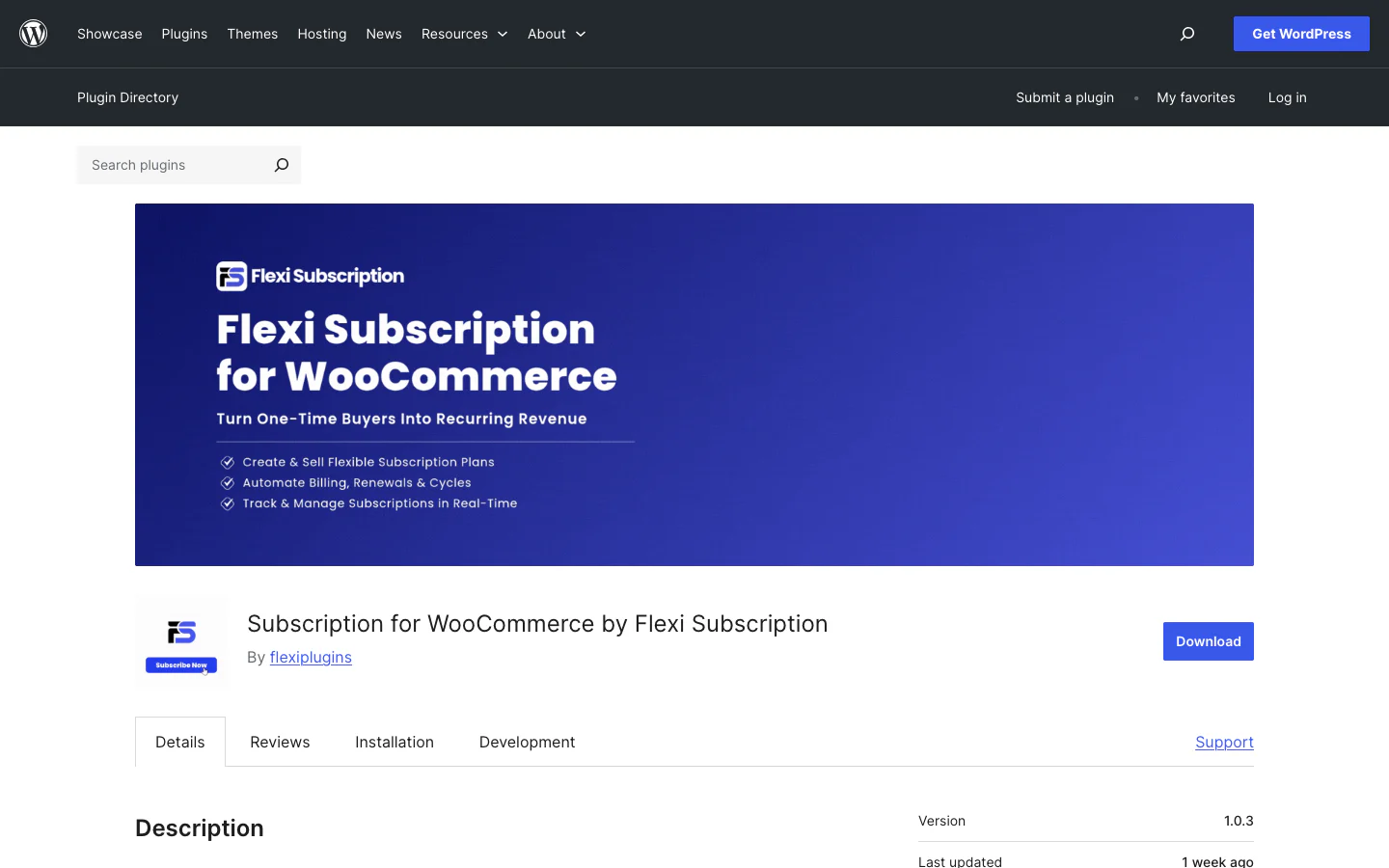
Flexi Subscription for WooCommerce on the official WordPress.org plugin directory.
Flexi Subscription for WooCommerce is the newest and smallest plugin in this comparison. Its free edition covers simple subscriptions, trials, renewal records, lifecycle emails, customer viewing and cancellation, while Pro adds variable plans, fees, fixed schedules, retries, delivery, analytics, webhooks and API visibility.
The low price makes it appealing for a new store validating a recurring offer. Its tiny install footprint, two explicitly verified automatic gateway paths and inconsistent marketing pages make it a higher-risk choice for a large migration.
Current facts and feature count
- Price: current pricing cards show $49/year for one site, $99 for five and $149 for 25, with all Pro features and annual support or updates. The same page conflicts over whether it offers a 7-day or 14-day guarantee, so confirm the terms before checkout.
- Version and footprint: version 1.0.3 with fewer than 10 active installs on WordPress.org.
- Verified feature count: 21 cards on the official Features page. 11 labeled Free and 10 labeled Pro. This is a card count, not a count of every setting.
- Automatic renewals: only the built-in PayPal gateway and separately installed official WooCommerce Stripe gateway are explicitly documented in the detailed current listing. Other gateways can be used for manual renewals.
Main features
- Simple subscription products, day, week, month, year and custom billing intervals, free trials and customer cancellation are free.
- Variable subscription plans, signup fees, different renewal prices, maximum billing cycles, billing anchors and fixed-length schedules in Pro.
- Free customer tools include subscription history, cancellation and renewal of canceled or expired subscriptions; Pro adds early renewal and eligible auto-renew toggles.
- Scheduled renewal orders, grace handling, expiry reminders, pre-renewal and retry reminder emails and configurable failed-renewal retry windows in Pro.
- Pro delivery records for paid cycles with interval, period and specific-day scheduling for replenishment products or fixed boxes.
- Pro analytics for active subscriptions, projected MRR, due renewals, renewal revenue, failures, trial conversion, churn, products and statuses, plus CSV export.
- Pro signed HTTPS lifecycle webhooks and a read-only API with API-key validation.
- WooCommerce products, orders, checkout, emails, My Account, Store API, Cart and Checkout Blocks and extension hooks.
Gateway and operational reality
Flexi's homepage broadly mentions Stripe, PayPal, Paddle, Mollie and more, but its detailed current WordPress.org listing verifies automatic behavior only for built-in PayPal and the official WooCommerce Stripe gateway. The safer claim is therefore two documented automatic paths, with manual renewals elsewhere. Stripe still depends on saved methods and the separate gateway plugin. Do not choose it for Paddle or Mollie automatic billing without written confirmation and an end-to-end test.
Why and when to choose Flexi
Choose Flexi for a new or low-volume store that needs simple subscriptions, trials, PayPal or Stripe renewals and a familiar WooCommerce account experience at the lowest paid price in this list. Pro can suit basic refill or delivery businesses that also need retry reminders, analytics, webhooks and read-only integration access. The focused feature set may be easier for a small team to learn than a large membership-and-retention platform. It can also be useful in a proof-of-concept environment where the store can absorb more product risk.
Where Flexi is weaker or needs validation
Flexi has fewer than 10 active installs, making its real-world footprint substantially smaller than every other directory plugin here. No current detailed source documents a customer build-a-box composer, a plan-switch proration formula, a broad automatic-gateway matrix, or a writable REST API. Variable products, signup fees, retry automation, delivery, analytics, webhooks and API access require Pro. Mixed regular-and-subscription carts and more than one subscription item per cart are blocked by default, although filters can change those rules. Its homepage still lists an old pre-order lifetime offer and launch date, while its pricing page conflicts with the guarantee and update terms. For an established subscriber base, wait for more operating history or perform unusually thorough staging, backup, scheduler, webhook and renewal testing.
Inside ArraySubs Pro
Now let’s see how the ArraySubs Pro interfaces used to build, operate, support and improve subscriptions.
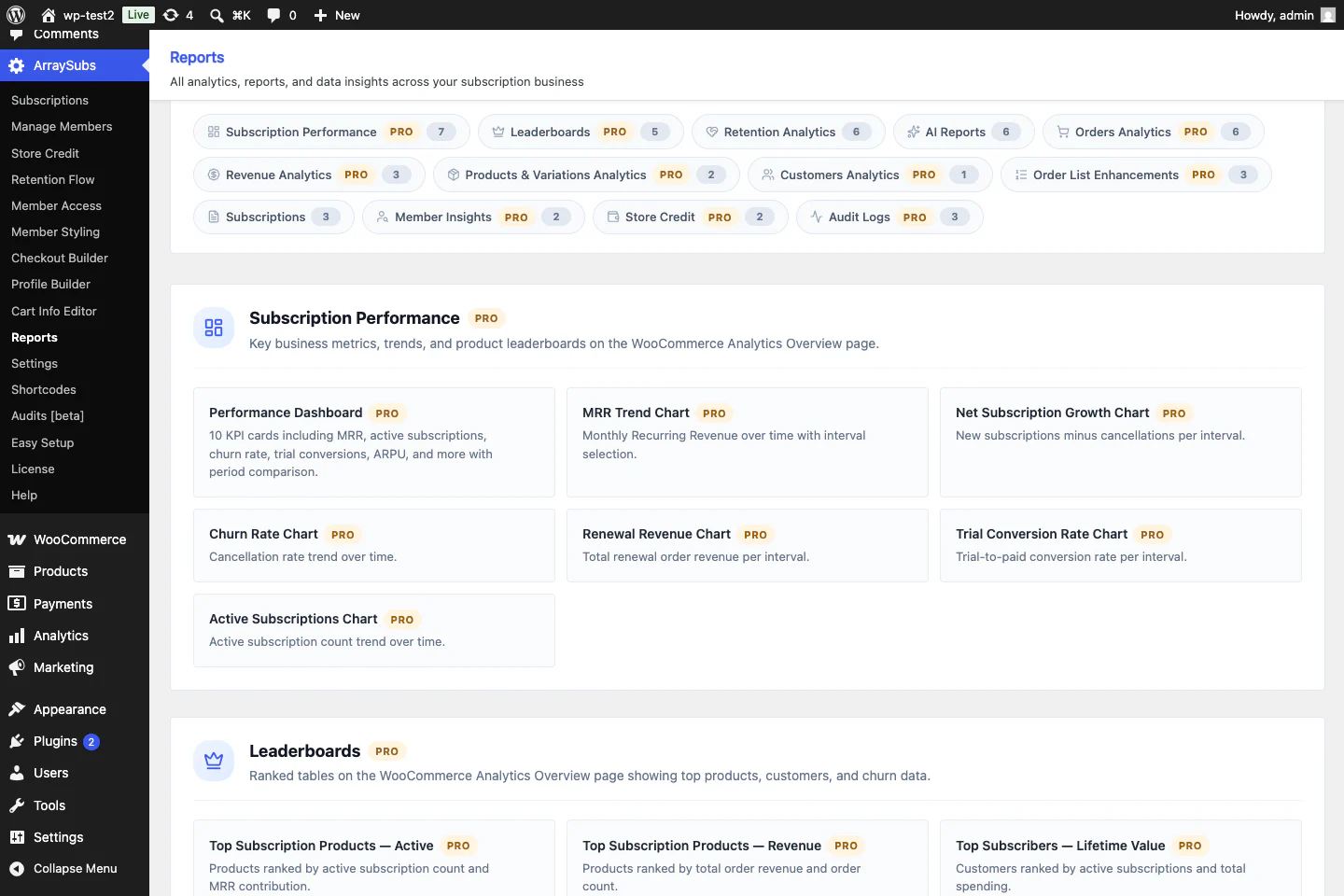
Subscription analytics and revenue forecasting
The reporting layer moves beyond renewal-order totals. Operators can inspect subscription growth, revenue, churn, retention reasons and offers, trials, products, customers, gateways, credit balances and scheduled operations. Forecast and AI screens are decision-support views rather than guarantees and their usefulness depends on data quality and provider configuration.
Profile Builder and My Account Builder
The Profile Builder collects the customer information for a membership, service, or community needs after purchase. The My Account editor controls how subscriptions, store credit, downloads, feature entitlements, support, profile data and custom pages appear without replacing WooCommerce's account system.
Checkout Builder
The builder organizes classic checkout into configurable steps and combines address, order and payment sections with extra fields and conditional visibility. It is useful when a service plan, configurable box, course, or membership needs structured onboarding information during purchase. Stores using WooCommerce Checkout Blocks should confirm whether a required custom flow belongs in the classic builder or the block checkout path.
Customizable Subscription Box Builder
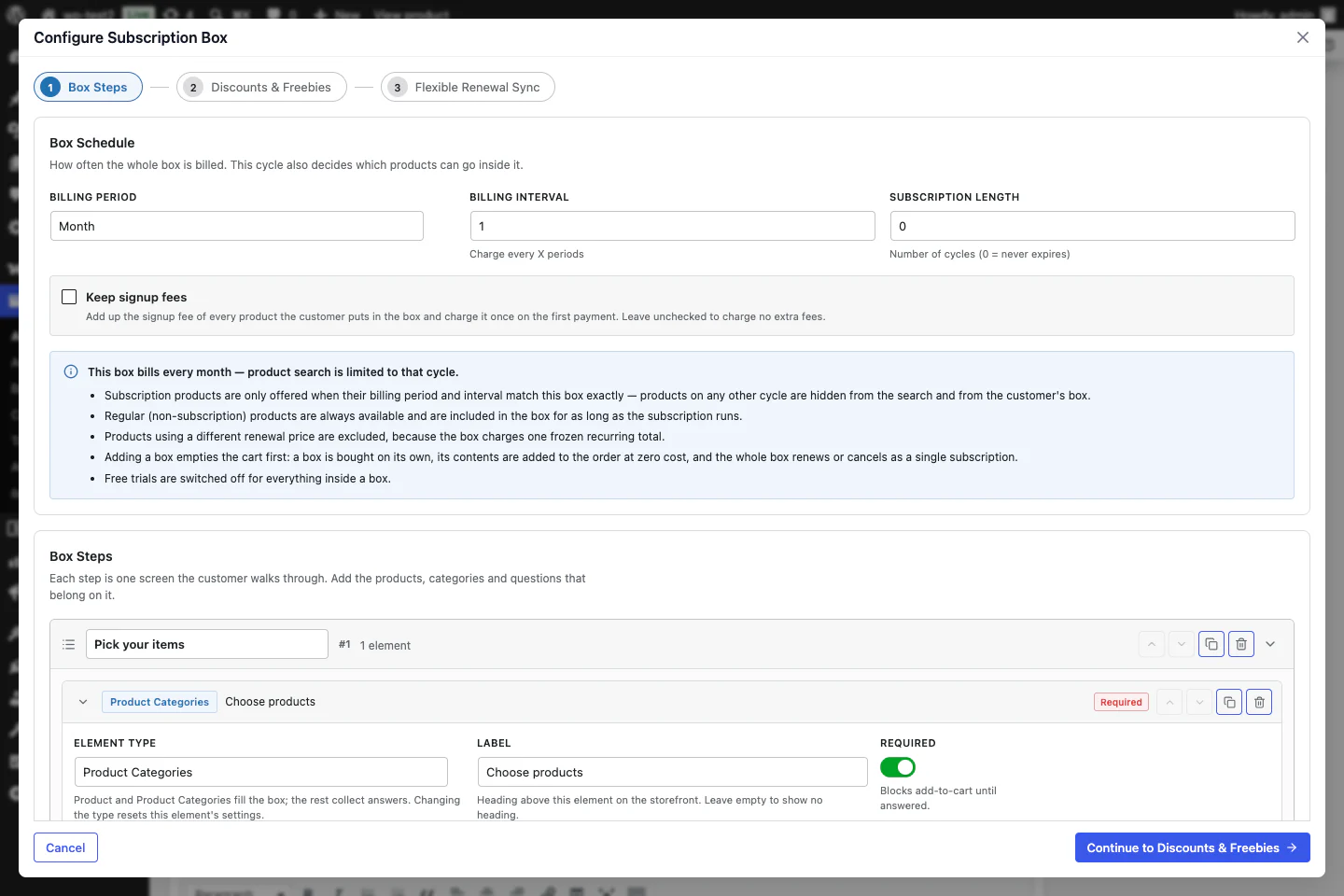
This is a shopper-configurable box rather than a fixed recurring product with “box” in its name. A merchant can create multiple steps, add product or category selectors and customer input fields, enforce required and min/max rules, configure tiered discounts and gifts and show live unlock hints. The completed selection becomes one subscription whose contents and frozen box pricing are reproduced at renewal. ArraySubs separately provides the merchant-configured Subscription Bundle when the customer should buy fixed contents with one click and one recurring total.
Conditional content restriction setup
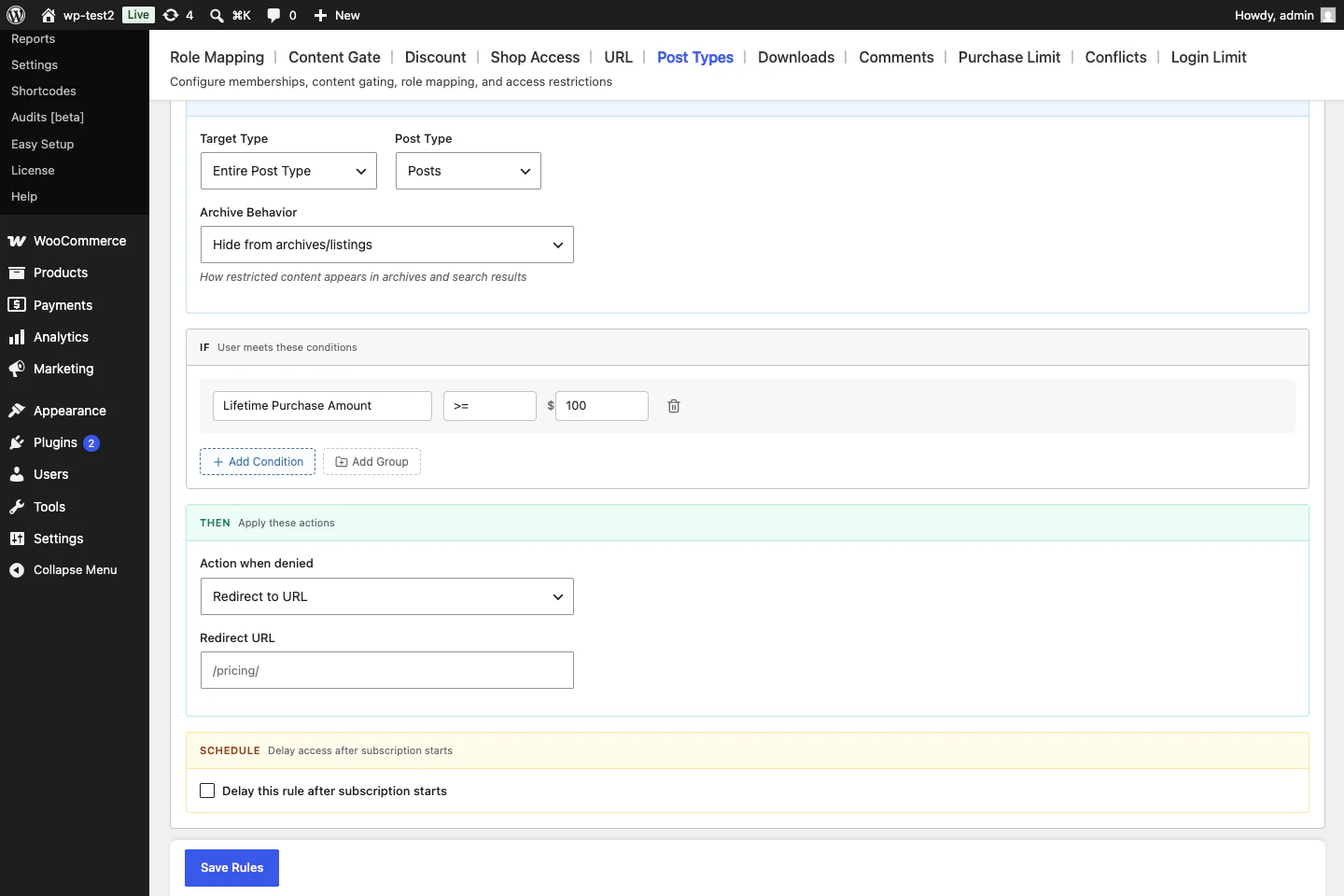
Member Access can gate posts, pages, custom post types, taxonomy terms, URL paths, page sections, downloads, shop browsing, comments, purchases, Elementor containers and Gutenberg blocks. Rules can combine subscription, role, product, purchase, spend, schedule and Pro feature-entitlement conditions with nested logic. This is native access behavior, not merely compatibility with a separate membership plugin.
Retention setup and My Account cancellation flow
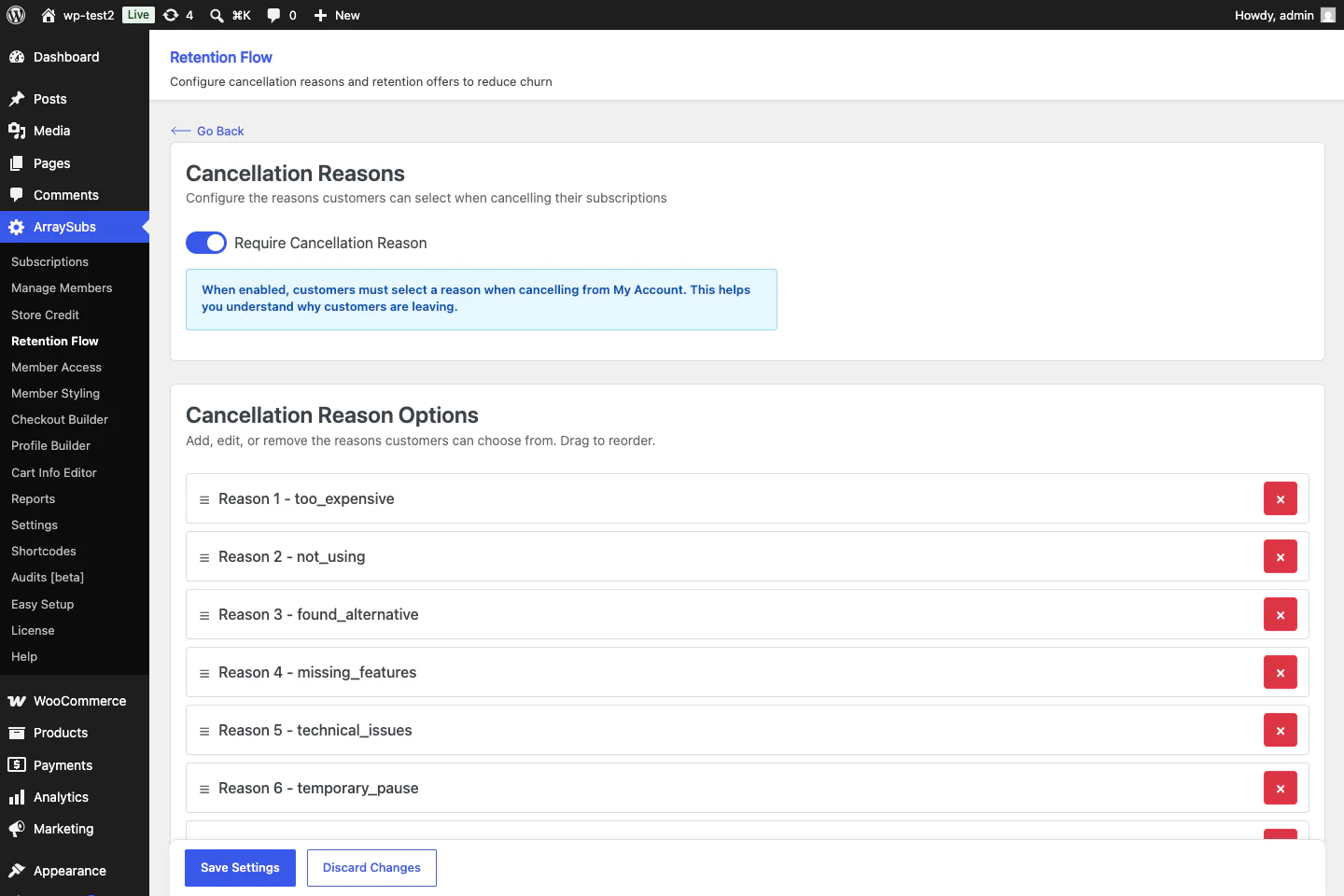
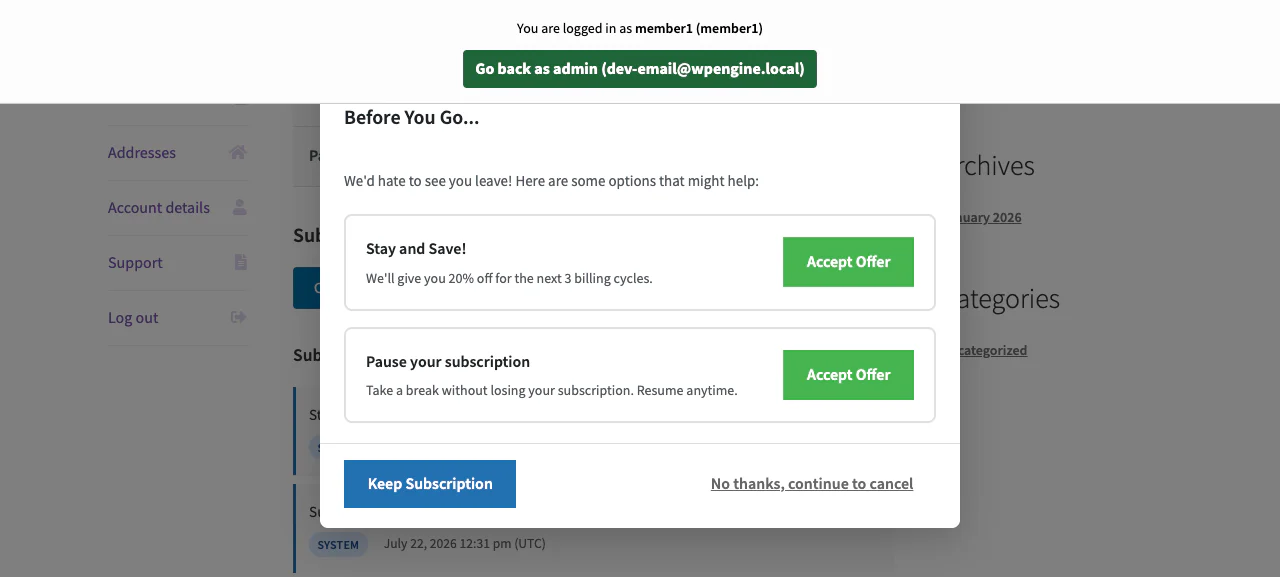
The administrative flow and customer popup share the same retention record. A store can save the reason first, conditionally present a discount, pause, downgrade, or support option and still leave a clear route to complete cancellation. Reports then connect accepted and rejected offers to retained customers and revenue instead of treating the popup as an isolated coupon tool.
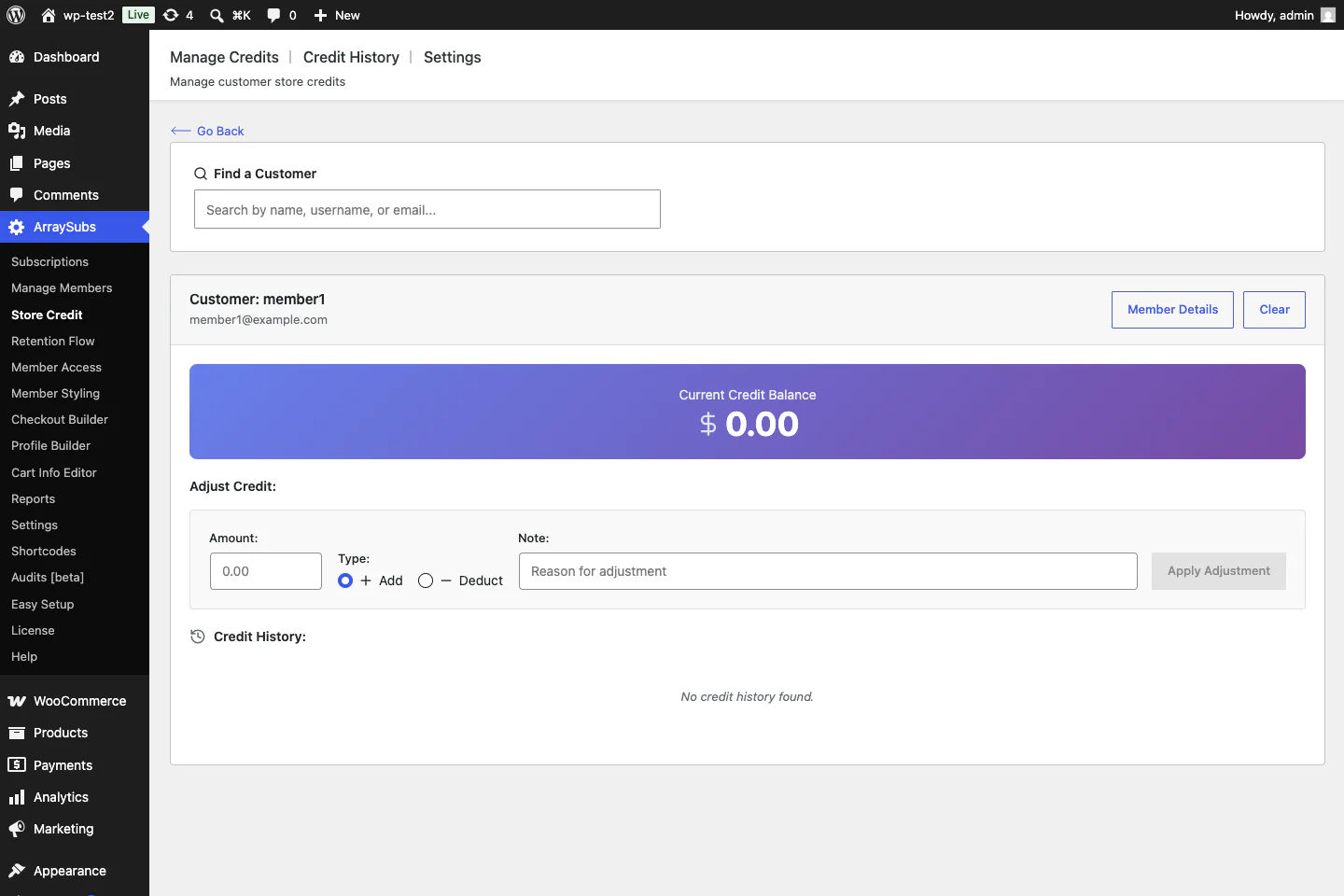
Manage Store Credit
Store staff can search for a customer, review the balance, add or deduct credit with a reason and audit every transaction. The broader module also supports refund-to-credit, prepaid credit products, bonus credit, expiry rules, dedicated emails and eligible use on later orders or renewals.
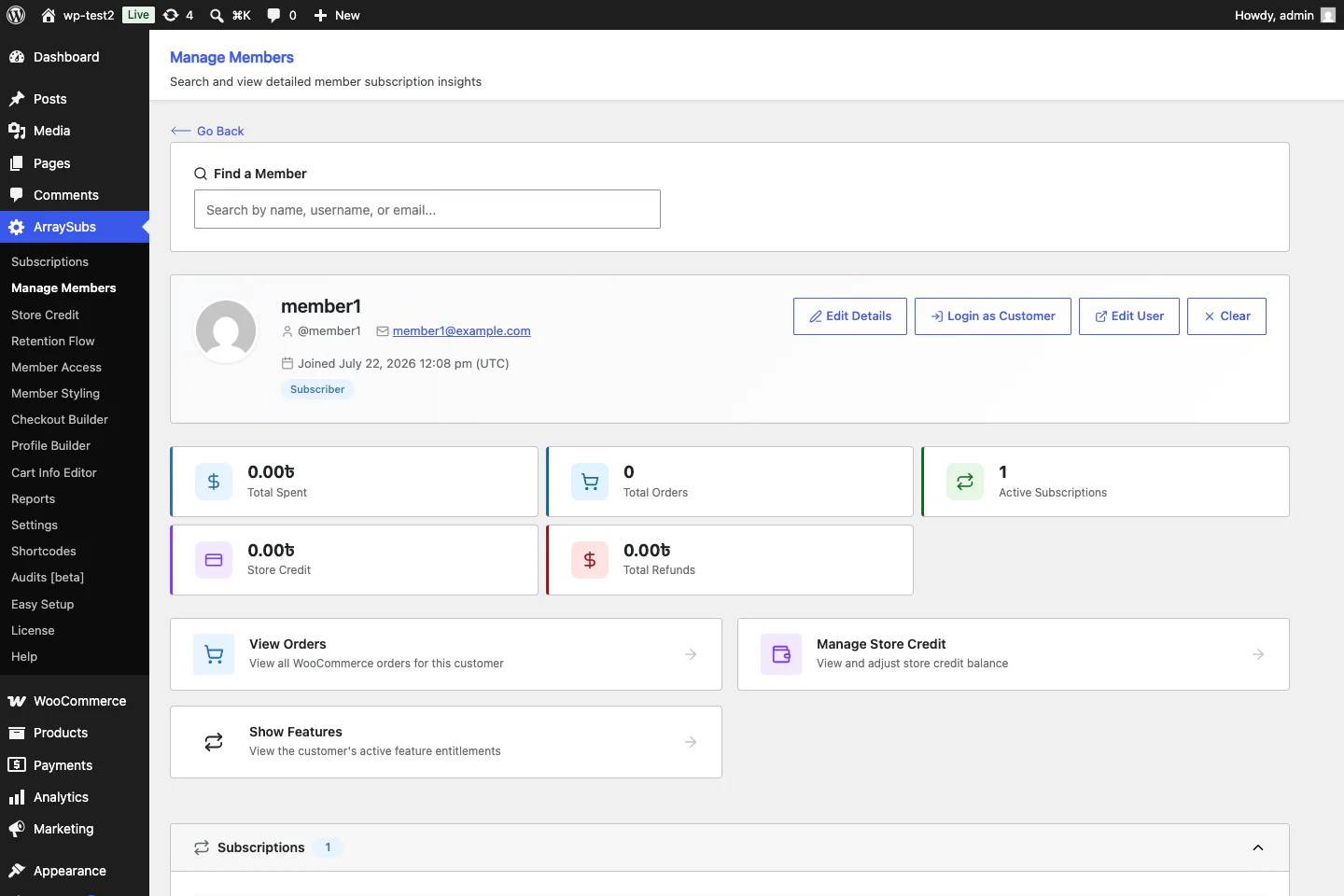
Manage Members
This workspace is designed for account operations and support. Staff can inspect the member's WooCommerce history, open related orders and subscriptions, manage credit, review feature entitlements, edit user details, or use Login as User to reproduce the account experience without having to assemble the story across unrelated screens.
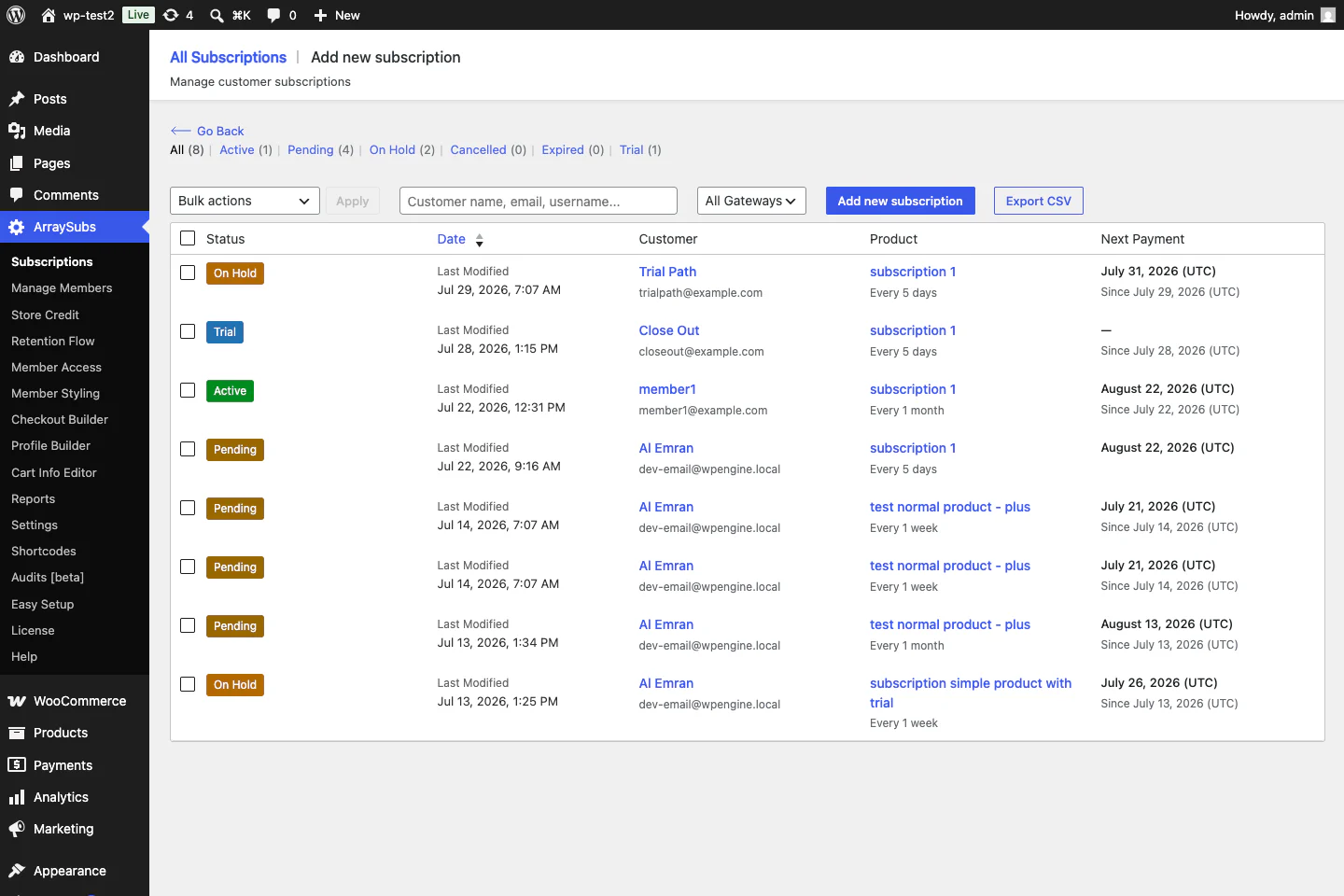
Manage Subscriptions
The central list covers active, pending, on-hold, canceled, expired, trial and other lifecycle records. Each row exposes the customer, plan, billing cadence, gateway, amount and next payment, while surrounding controls support daily administration, exports and navigation into the complete subscription timeline.
How to choose and migrate safely
- Write down the exact gateway and payment method. “Mollie” is not one method and “Stripe support” does not prove SEPA, saved cards, SCA, payment-method changes, or retries work identically. Use a country-and-business-model gateway checklist rather than comparing logos.
- Map the whole lifecycle. Include trial conversion, renewals, failures, retry timing, grace periods, pauses, skipped cycles, cancellations, scheduled cancellations, reactivation, plan changes, expiry, refunds and chargebacks.
- Separate the product model from billing. A fixed recurring box, shopper build-a-box, merchant bundle, installment plan, membership, course and service retainer need different data and customer interfaces.
- Define access and fulfillment. Decide whether subscription status controls content, roles, downloads, products, comments, member pricing, shipments, delivery dates, or merely the next invoice.
- Calculate the complete stack cost. Add gateway extensions, membership plugins, box builders, delivery modules, analytics, recovery tools, support and annual renewals, not only the base subscription license.
- Audit saved-payment portability. A CSV can move dates and statuses but cannot automatically move every token, billing agreement, or mandate between plugins and merchant accounts. The risks are covered in this guide to migrating subscription gateways without breaking renewals.
- Rehearse on staging. Copy representative subscriptions, rebuild scheduled actions, inspect the next date and complete checkout, automatic renewal, manual renewal, failed charge, retry, webhook, payment update, cancellation and reactivation tests.
- Plan rollback and communication. Back up the database, document what happens to future renewals during the migration window and prepare customer support messaging before changing live records.
Frequently asked questions
What is the best WooCommerce subscription alternative?
ArraySubs Pro is the strongest all-in-one option in this list when you need automatic Stripe, PayPal, Paddle, or Mollie billing together with customer-configurable boxes, fixed bundles, membership access, protected content, retention flows, store credit, customer-experience builders and analytics. WooCommerce Subscriptions is the safer choice when official ecosystem maturity and the broadest documented gateway matrix matter more than consolidation. YITH is a compelling alternative for configurable physical boxes and delivery schedules.
What is the best free alternative to WooCommerce Subscriptions?
The answer depends on whether manual renewals are acceptable. ArraySubs Free provides subscription products, manual renewal invoices, customer portal, member access, content restriction and retention-related capabilities without automatic off-session charging. WP Swings, YITH, Flexi and WPSubscription also have free editions, but their product types, gateway behavior, dashboards and Pro boundaries differ. Test the free edition against your exact required workflow, rather than comparing only the number of checked boxes.
Which WooCommerce subscription plugins support automatic renewals with Mollie?
ArraySubs Pro, WooCommerce Subscriptions, WP Swings Pro, WPSubscription and ThemeHigh's legacy-documented gateway matrix all have some form of documented Mollie recurring support. The scope is different: ArraySubs charges stored Mollie mandates and tracks delayed SEPA settlement; Woo's matrix varies by lifecycle action; WP Swings' current page limits its Mollie claim to cards; WPSubscription lists Mollie among its automatic gateways but may need a separate Mollie plugin; and ThemeHigh's detailed list comes from pre-transfer WebToffee documentation. Verify the exact country, method, mandate, webhook, renewal, refund and payment-update flow before purchase.
Which plugin is best for a WooCommerce subscription box?
Choose between a customer-built box and a fixed recurring box. ArraySubs Pro and YITH provide purpose-built multi-step customer box composers and WP Swings documents a customer-selected box with dynamic pricing. WooCommerce Subscriptions can power boxes through separate product-builder extensions. ThemeHigh, Flexi and WPSubscription can sell or schedule fixed recurring products but do not document an equivalent customer composer.
Can I migrate existing WooCommerce subscriptions to another plugin?
Possibly, but moving subscription posts is the easy part. A safe migration must map customer ownership, product and variation IDs, status, trial or expiry state, next payment, renewal orders, coupons, access entitlements, scheduled jobs and the gateway token, billing agreement, or mandate. Some tokens cannot move between gateway plugins or merchant accounts. Use a staging copy, follow a WooCommerce subscription launch-readiness checklist and prove at least one full automatic renewal for every gateway and subscription pattern before switching to production.
Do feature counts tell me which plugin is best?
No. This article includes counts because buyers ask for them, but the counting units differ by vendor. A 59-row comparison table can be narrower than a 20-block product page if many rows describe small settings. Use the counts to find what deserves inspection, then decide from gateway fit, product model, lifecycle behavior, operational tooling, documentation quality and migration risk.
Final verdict
If the store is still at the planning stage, this practical guide to adding subscriptions to WooCommerce explains the product, billing, payment and account decisions that should be settled before choosing a plugin.
There is no universal winner for every recurring WooCommerce store. WooCommerce Subscriptions is the strongest official ecosystem baseline. YITH is unusually capable for configurable boxes and delivery schedules. WP Swings Pro offers broad functionality and a larger free-plugin footprint. ThemeHigh is a focused, lower-cost choice for conventional subscriptions. WPSubscription suits regional-gateway and installment-led stores that also want cancellation surveys and win-back flows. ARMember fits membership-led businesses that need recurring plans with content restriction, content dripping and a wide choice of payment gateways. Flexi is inexpensive and lightweight but still carries the most maturity risk.
For a store that wants recurring billing plus Mollie, configurable Subscription Boxes, fixed Subscription Bundles, native member access, conditional content restriction, customer self-service, retention offers, store credit, Profile and My Account builders, Checkout Builder, member operations, subscription management and analytics, ArraySubs Pro offers the widest integrated operating stack in this list. Its trade-offs are a smaller public footprint and a narrower set of automatic gateways than the official Woo extension. Review the ArraySubs feature catalog, confirm which capabilities are Free or Pro and validate the exact renewal flow on staging before launch.
Editorial disclosure: ArraySubs is an ArrayHash product and appears first as the featured all-in-one solution in this guest-post comparison. Its section includes hands-on observations from a working local WooCommerce store, while competitor findings come from current first-party product pages, documentation, changelogs and WordPress.org listings. Limitations and validation requirements are included for every plugin.

Senior Content Strategist & Editor, BdThemes