
All-in-one media operations

WordPress Media Library Plugin That Replaces 5 Plugins

All-in-one WordPress media operations for sites that need more than folders: organize files, bulk AI metadata, unused-media cleanup, cloud offload, image optimization, and secure document libraries — one plugin instead of a fragmented stack.

No credit card required

Folders
AI
Cleanup
Cloud

Works with Elementor, Gutenberg, Divi, and Bricks

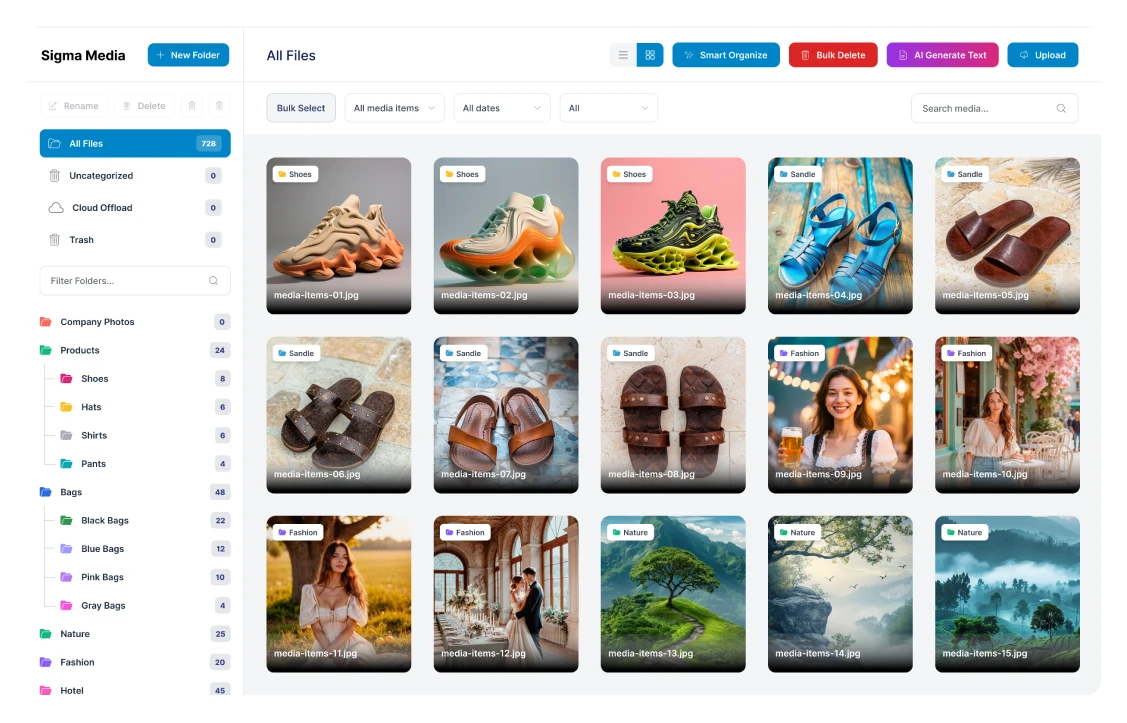
Sigma Media Manager — main library dashboard with folders and media grid

Pain points

Why the default WordPress media library breaks at scale

Small sites survive fine. Once upload volume, team size, or catalog depth grows, the same pain points show up again and again — usually patched with extra plugins and fragile workflows.

5→1Plugins replaced
6Core features
60-dayMoney-back
1000sActive sites
The fix

Sigma Media Manager replaces the entire stack

One plugin, one licence, one update cycle — covering every gap the default library leaves open.

  • Folders & organisation
  • Bulk AI metadata
  • Cleanup & unused detection
  • Cloud offload to S3 / R2
  • Image optimisation
  • Secure document libraries

Prefer the full story? Compare Sigma Media Manager vs alternatives.

Where it hurts

Six gaps teams patch with extra plugins

Each card is a real workflow break — folders, metadata, cleanup, offload, secure delivery, and the decision fatigue of stacking one more tool. Sigma Media Manager is built to close all six in one place.
01

No folders, no structure

Everything lives in one flat grid. Locating a file among thousands means scrolling, guessing, and wasted admin time every single day. Editors lose context, deadlines slip, and nobody agrees on naming — so the library quietly becomes a dumping ground.
02

Metadata gaps hurt SEO & accessibility

Most uploads ship without alt text, captions, or descriptions. Rankings slip, screen readers fail, and fixing it manually is hours of work. Bulk retrofits rarely finish, so accessibility and image search stay permanently behind where your content deserves to be.

03

Orphaned media piles up invisibly

Unused images consume disk, inflate backups, and clutter searches — and WordPress has no safe way to detect them. Teams fear deleting the wrong file, so cruft accumulates until migrations, restores, and audits all take longer than they should.

04

No native cloud offload

Growing libraries drive storage costs up fast. Moving assets to S3 or R2 means another plugin, another config screen, and another failure point to babysit. CDN URL rules, bulk migration, and rollback rarely arrive as one coherent workflow — so offload projects stall halfway.

05

No protected file delivery

WordPress ships with zero access control for documents. Protecting downloads usually means bolting on yet another plugin — or custom code — while direct URLs still leak. Sensitive PDFs and client deliverables end up exposed without rate limits, captcha, or clear audit trails.

06

Free trial · No card · 60-day guarantee

Not sure Sigma Media Manager fits your stack?

Try the live playground or a free trial — folders, AI metadata, and offload in one workflow.

Features

Six features that replace your entire media plugin stack

Sigma Media Manager bundles folders, AI metadata, cleanup, cloud offload, optimization, and secure documents in one workflow. Deep-dive on the features overview, or use the Features menu for file manager, image optimizer, document library, media offload, security, and comparison.
Feature 1 of 6

WordPress media library folders

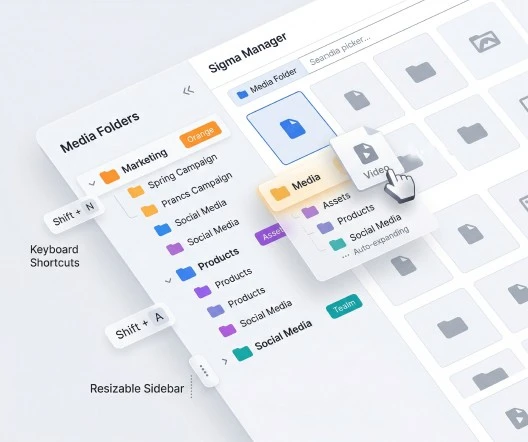
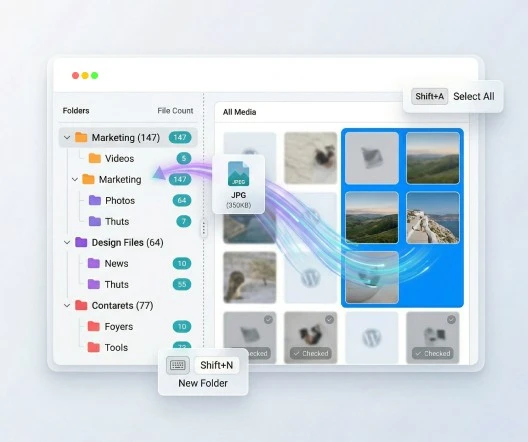
Create unlimited folders and nested subfolders to bring real structure to your media library. Drag files between folders, assign folder colors for quick visual identification, and see file counts at a glance.

Sigma Media Manager transforms the flat WordPress media grid into a file system that works the way you think — with keyboard shortcuts (Shift+A to select all, Shift+N for new folder, Shift+U to upload, Shift+Del to delete), auto-expand navigation, a resizable sidebar, and toggle between grid and list views.

What it solves

No more scrolling through thousands of files in one endless list. Agencies can separate client assets by project. Stores can organize product images by category. Teams can maintain a shared folder structure everyone understands.

Folder sidebar with color-coded folders, drag-and-drop, and file counts
Feature 2 of 6

Bulk AI metadata generation

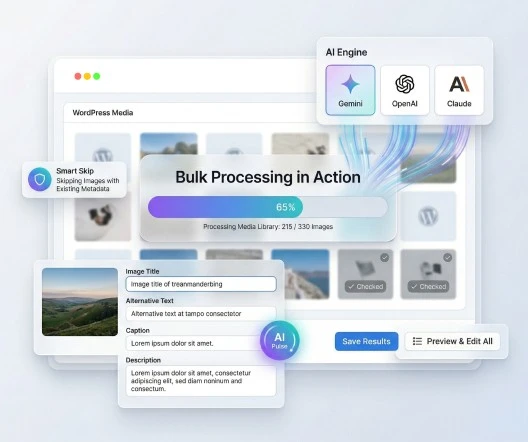
Sigma Media Manager is the only WordPress media library plugin with built-in AI metadata generation. It automatically creates image titles, captions, alt text, and descriptions using AI providers like Free Credits, Gemini, OpenAI, and Claude.

Process your entire media library in bulk or target specific folders. Sigma Media Manager can skip images that already have metadata, so existing work is never overwritten. Preview and edit every generated result before saving.

What it solves

Hundreds of images with missing alt text and SEO metadata. Instead of spending hours writing descriptions manually, Sigma Media Manager fills the gaps with AI — improving search visibility, Google Image rankings, and accessibility compliance at the same time.

AI metadata generation interface showing bulk processing results
Feature 3 of 6

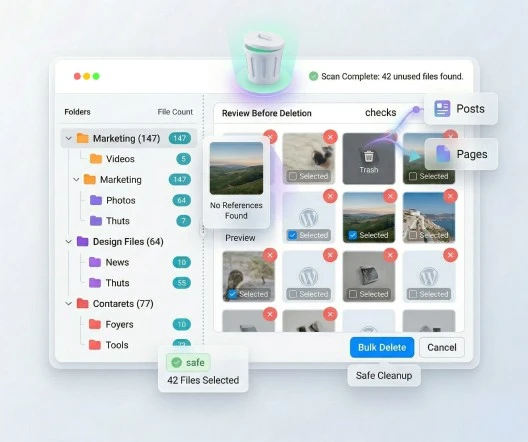
Unused media cleanup

Sigma Media Manager scans the entire WordPress media library and identifies files that are no longer referenced in any post, page, or product. You get a full preview of every unused file before deciding what to delete — no blind cleanup, no accidental removals.

Select specific files or bulk delete everything that is no longer needed.

What it solves

Orphaned uploads consuming server storage, bloating backups, and cluttering the media library. Regular cleanup keeps the site lean and the library navigable.

Unused media scan results with preview thumbnails and delete options
Feature 4 of 6

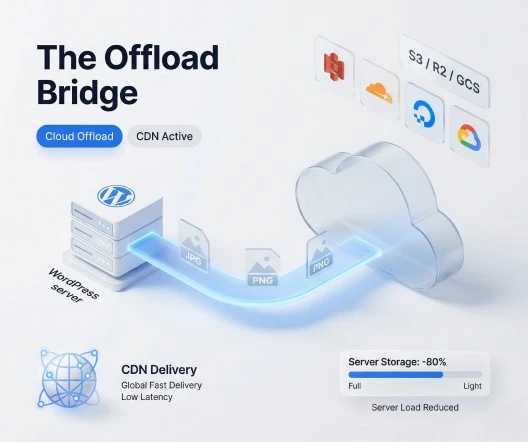
Cloud storage offload

Move media files off your WordPress server and onto scalable cloud storage. Sigma Media Manager automatically offloads new uploads and can bulk-migrate existing media libraries to the cloud. All URLs are rewritten seamlessly — your site works exactly the same, but files are served from the cloud or through a CDN.

Supported providers: Amazon S3, Cloudflare R2 (zero egress cost), DigitalOcean Spaces, Google Cloud Storage, and any S3-compatible storage provider via custom endpoints.

What it solves

Server storage filling up, hosting costs increasing, and page load times degrading under heavy media loads. Cloud offload gives you scalable infrastructure without changing hosting plans.

Cloud storage settings showing connected provider and migration progress
Feature 5 of 6

Built-in image optimization

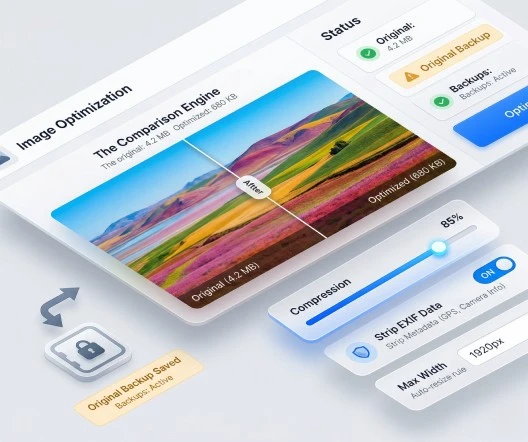
Sigma Media Manager includes JPEG and PNG compression with a quality slider so you control the balance between file size and visual clarity. Images can be automatically resized on upload to prevent oversized files from entering the library. EXIF metadata — camera info, GPS location data, shooting settings — can be stripped for smaller, safer files.

Keep original files as backups so compression is always reversible.

What it solves

Large images slowing down page load times, hurting Core Web Vitals scores, and consuming excessive storage. One plugin handles both optimization and organization — no need for a separate image compression tool.

Optimization settings showing compression slider, auto-resize toggle, and EXIF removal
Feature 6 of 6

Secure document libraries

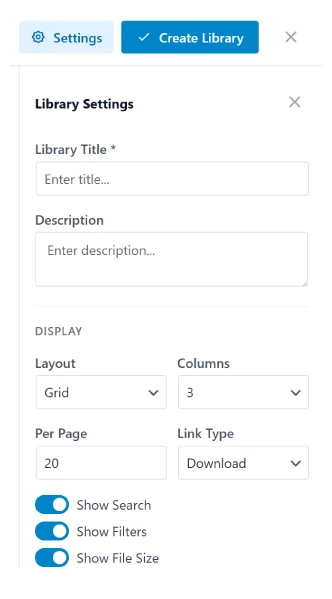
Create multiple independent document libraries for PDFs, DOCX, XLSX, PPTX, MP4, ZIP files, and more. Organize documents into folders within each library, and display them anywhere on your site with a simple shortcode.

Visitors can browse documents in grid or list layouts with built-in search and filtering. Security features include library-level, folder-level, and file-level password protection, captcha verification (reCAPTCHA, Turnstile, or hCaptcha), download rate limiting, and file type whitelisting.

What it solves

No native way to share protected documents in WordPress. Agencies can build secure client portals. Educators can distribute course materials with access restrictions. Businesses can share internal files without exposing them to bots or unauthorized users.

Front-end document library with grid layout, search bar, and password prompt

Proof

Built for teams who ship at scale

One plugin replaces a patchwork of media tools — fewer updates, one support channel, and a workflow that stays inside WordPress.

Active installs

10k+

Sites organizing media with Sigma Media Manager across agencies, stores, and publishers.

Trusted by WordPress teams

4.8

Avg. rating across BdThemes ecosystem

Media operations

6-in-1

Folders, AI metadata, cleanup, offload, optimization, documents.

Use cases

Real use cases for real WordPress teams

From agencies and stores to publishers and internal docs — Sigma Media Manager fits how your team actually ships content in WordPress.
01

Agencies and freelancers

Keep each client's assets in separate, color-coded folders. Offload large media libraries to the cloud so client sites stay fast without expensive hosting upgrades. Deliver project files through password-protected document libraries.

02

WooCommerce stores

Organize product images by category, collection, or season. Compress product photos automatically on upload so pages load faster. Use AI to generate alt text for hundreds of product images in bulk.

03

Publishers and marketing teams

Generate alt text and captions at scale so every blog post and landing page meets SEO and accessibility standards. Clean up unused featured images and draft assets regularly.

04

Educators and course creators

Create secure document libraries for course materials, lesson plans, worksheets, and downloadable resources. Protect premium content with passwords and captcha verification.

05

Internal documentation

Share company handbooks, policy documents, onboarding materials, and SOPs through private document libraries. Restrict access with passwords and download limits.

06

Membership and community sites

Separate member-only downloads from public media, keep drip content assets tidy, and scale image delivery when communities grow. Use folders and bulk metadata so moderators are not stuck in an endless grid.

One plugin

What this WordPress media library plugin replaces

If you are comparing plugin stacks, this is the real buying decision — fewer renewals, fewer settings screens, and one place to manage media operations.
Job to get donePatchwork setupSigma Media Manager
Folder organizationOne folder pluginIncluded
AI metadata generationSeparate AI or SEO workflowIncluded
Unused media cleanupSeparate cleanup plugin or manual reviewIncluded
Cloud storage offloadSeparate offload pluginIncluded
Image optimizationSeparate optimization pluginIncluded
Secure document deliverySeparate document library / security pluginIncluded
Ongoing updates & maintenanceMultiple renewals, settings, and support pathsOne plugin, one workflow

Sigma Media Manager is built for teams that want to replace 3-5 plugins with one cleaner system.

No credit card required

Comparison

The only WordPress media plugin with all six capabilities

Most WordPress media plugins stop at organization. Sigma Media Manager adds AI metadata, cleanup, offload, optimization, and secure document delivery in one product.
Feature / Capability
Sigma Media Manager
FileBird
HappyFiles
Folders (Premio)
Media library folders
Bulk AI metadata generation
Unused media cleanup
Pro only
Cloud storage offload
Built-in image optimization
Secure document libraries
Addon
Supported
Not supported
Partial / conditional
Not applicable / unknown

No competitor combines all six features in one plugin. This is what makes Sigma Media Manager a media operations platform — not another folder tool.

Workflow

How Sigma Media Manager fits into your existing workflow

Sigma Media Manager enhances the native WordPress media library instead of replacing it. Your upload flow stays familiar while folders, automation, and cloud tools work behind the scenes.

Page builder compatibility

Use Sigma Media Manager folders and assets directly inside the media pickers your team already relies on.

  • Elementor

    Full media picker integration

  • Gutenberg

    Native block editor support

  • Divi

    Compatible with Divi's media workflow

  • Bricks

    Works with Bricks Builder

Automatic workflows

Set rules once; Sigma Media Manager applies them on every new upload so consistency does not depend on manual steps.

  • 1

    Auto-compress images on upload

  • 2

    Auto-resize oversized images to maximum dimensions

  • 3

    Auto-offload new uploads to cloud storage

  • 4

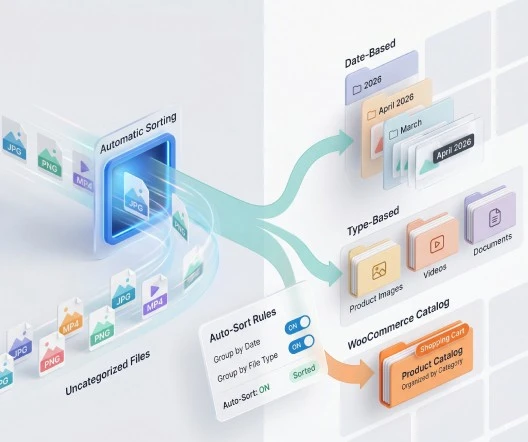
    Auto-group files by upload date or file type

In-context preview

Sigma Media Manager folders visible inside Elementor or Gutenberg media picker modal

Mockup: your builders keep the same picker — with Sigma Media Manager organization inside.

Media library foldersBulk AI metadataCloud offloadImage optimizationSecure document librariesMedia library foldersBulk AI metadataCloud offloadImage optimizationSecure document librariesMedia library foldersBulk AI metadataCloud offloadImage optimizationSecure document librariesMedia library foldersBulk AI metadataCloud offloadImage optimizationSecure document librariesMedia library foldersBulk AI metadataCloud offloadImage optimizationSecure document librariesMedia library foldersBulk AI metadataCloud offloadImage optimizationSecure document librariesMedia library foldersBulk AI metadataCloud offloadImage optimizationSecure document librariesMedia library foldersBulk AI metadataCloud offloadImage optimizationSecure document librariesMedia library foldersBulk AI metadataCloud offloadImage optimizationSecure document librariesMedia library foldersBulk AI metadataCloud offloadImage optimizationSecure document libraries
WordPress-nativeAgencies & WooCommerceRuns inside wp-adminOne integrated stackWordPress-nativeAgencies & WooCommerceRuns inside wp-adminOne integrated stackWordPress-nativeAgencies & WooCommerceRuns inside wp-adminOne integrated stackWordPress-nativeAgencies & WooCommerceRuns inside wp-adminOne integrated stackWordPress-nativeAgencies & WooCommerceRuns inside wp-adminOne integrated stackWordPress-nativeAgencies & WooCommerceRuns inside wp-adminOne integrated stackWordPress-nativeAgencies & WooCommerceRuns inside wp-adminOne integrated stackWordPress-nativeAgencies & WooCommerceRuns inside wp-adminOne integrated stackWordPress-nativeAgencies & WooCommerceRuns inside wp-adminOne integrated stackWordPress-nativeAgencies & WooCommerceRuns inside wp-adminOne integrated stack

Why Sigma Media Manager

Why teams switch to Sigma Media Manager

Less plugin sprawl, unique AI metadata, a long guarantee, and a product that lives inside wp-admin.
“We replaced three media plugins with Sigma Media Manager — folders, cleanup, and offload finally live in one place. The AI alt text alone paid for the licence in week one.”

Jordan Lee

Lead Developer, Studio Meridian

WordPress media library organized with folders in Sigma Media Manager

One plugin instead of a stack

Instead of paying for and maintaining separate tools for folders, offload, cleanup, optimization, AI metadata, and document protection, Sigma Media Manager consolidates those jobs.

AI metadata that no competitor offers

Sigma Media Manager is the only WordPress media library plugin that generates image titles, captions, alt text, and descriptions using AI.

A lower-risk decision

Sigma Media Manager includes a 60-day money-back guarantee — longer than most competing plugins.

Built for the way WordPress works

Sigma Media Manager works inside the standard WordPress admin and supports the page builders your team already uses.

FAQ

Frequently asked questions

Everything you need to know about Sigma Media Manager — features, builders, cloud providers, and how one plugin can replace a whole media stack.

Sigma Media Manager is a WordPress media library plugin that organizes files with folders, generates AI metadata in bulk, removes unused media, offloads files to cloud storage, optimizes images, and creates secure document libraries. It is designed as an all-in-one media operations platform that replaces 3–5 separate plugins.

Yes. Sigma Media Manager supports unlimited folders with full nesting, so you can build any hierarchy that fits your team’s workflow — organized by project, client, product category, date, or any other structure.

Sigma Media Manager uses AI providers (Free Credits, Gemini, OpenAI, and Claude) to analyze your images and generate titles, captions, alt text, and descriptions automatically. You can process the full media library or specific folders, skip images that already have metadata, and preview every result before saving.

Yes. Sigma Media Manager scans the entire media library for files not referenced in any post, page, or product. You preview every unused file before deciding to delete — no blind cleanup.

Sigma Media Manager supports Amazon S3, Cloudflare R2, DigitalOcean Spaces, Google Cloud Storage, and any S3-compatible provider via custom endpoints.

Yes. Sigma Media Manager includes JPEG and PNG compression with adjustable quality, automatic image resizing on upload, and EXIF metadata removal. Original files can be kept as backups.

Create multiple independent document libraries, organize files into folders, and embed them on any page with a shortcode. Protect access with passwords at the library, folder, or individual file level. Add captcha verification (reCAPTCHA, Turnstile, or hCaptcha) and download rate limiting to prevent bot abuse.

Sigma Media Manager works with Elementor, Gutenberg, Divi, Bricks, and the native WordPress media picker. It enhances the existing media workflow instead of replacing it.

In most cases, no. Sigma Media Manager is built to replace separate tools for folders, AI metadata, cleanup, cloud offload, image optimization, and secure document delivery — all in one plugin.

Yes. Sigma Media Manager includes a 60-day money-back guarantee, giving you time to evaluate the full feature set risk-free.

All-in-one WordPress media plugin

Replace five plugins with one workflow

Sigma Media Manager replaces separate tools for folders, AI metadata, unused-file cleanup, cloud offload, image optimization, and document security — all from one lightweight WordPress plugin.

  • Media Folders
  • AI Metadata
  • Unused Media Cleanup
  • Cloud Offload
  • Image Optimization
  • Document Security
Setup in 5 minutes
60-day money-back guarantee
No credit card required